A Monday morning security inbox can turn a manageable maintenance queue into a guessing game. One client site has a vulnerable form plugin, another has an abandoned page builder, and a WooCommerce store has several updates waiting. Your agency may manage a handful of websites or a portfolio of dozens, but the question is the same: which alert deserves attention first?
A plugin security scanner can answer the detection part of that question. It can identify installed extensions, compare their versions with vulnerability records, and highlight potentially dangerous software. It can't decide every business consequence for you, and it can't replace backups, updates, access controls, or incident response.
The useful mindset is to treat scanner output as decision support. You need to understand what the scanner checks, how it produces findings, where it can be wrong, and how to turn a long list of alerts into a ranked fix sequence. The sections ahead build that understanding from the inventory stage through detection methods, limitations, portfolio workflow, and practical agency triage.
Table of Contents
- Introduction Why Plugin Alerts Feel Overwhelming
- What a Plugin Security Scanner Actually Does
- How Plugin Security Scanners Detect Vulnerabilities
- Limitations False Positives and Blind Spots to Expect
- From Scan Results to Triage Workflow Integration
- How Agencies and Freelancers Should Prioritize Scanner Output
- Putting Plugin Scanning Into Practice With Confidence
Introduction Why Plugin Alerts Feel Overwhelming
An alert rarely arrives in isolation. A scanner may report a known issue in a plugin on an informational brochure site, a different issue in a checkout extension, and a third finding on a staging installation that isn't publicly used. The labels might all sound urgent, even though the operational decisions are very different.
That creates two predictable mistakes. Some teams treat every alert as an emergency, interrupting planned work and creating alert fatigue. Others postpone everything because the list is too large to interpret, leaving a dangerous extension in place while less important updates receive attention.
The WordPress ecosystem makes this problem structural, not occasional. In 2025, researchers recorded 11,334 new WordPress ecosystem vulnerabilities, a 42% increase from 2024, and 91% were found in plugins rather than themes or core, according to Patchstack's State of WordPress Security in 2026. That concentration means agencies spend much of their security time evaluating third-party extensions.
The practical shift: A scanner tells you what may be wrong. Triage determines what you should do next.
A good process starts by separating four questions:
- What is installed? Include active, inactive, renamed, and unexpectedly present plugins.
- Is the version exposed? Match the exact installed version against a current vulnerability record.
- Can an attacker use the issue? Consider exploit status, severity, public disclosure, and the site's exposure.
- What would a fix affect? Weigh site purpose, revenue, client commitments, compatibility, and patch availability.
The rest of this guide shows how those questions fit together. You'll begin with the scanner's actual job, then examine its detection logic and blind spots. From there, the focus moves to workflow integration and portfolio prioritization, so alerts become a repeatable queue rather than a stream of disconnected warnings.
What a Plugin Security Scanner Actually Does
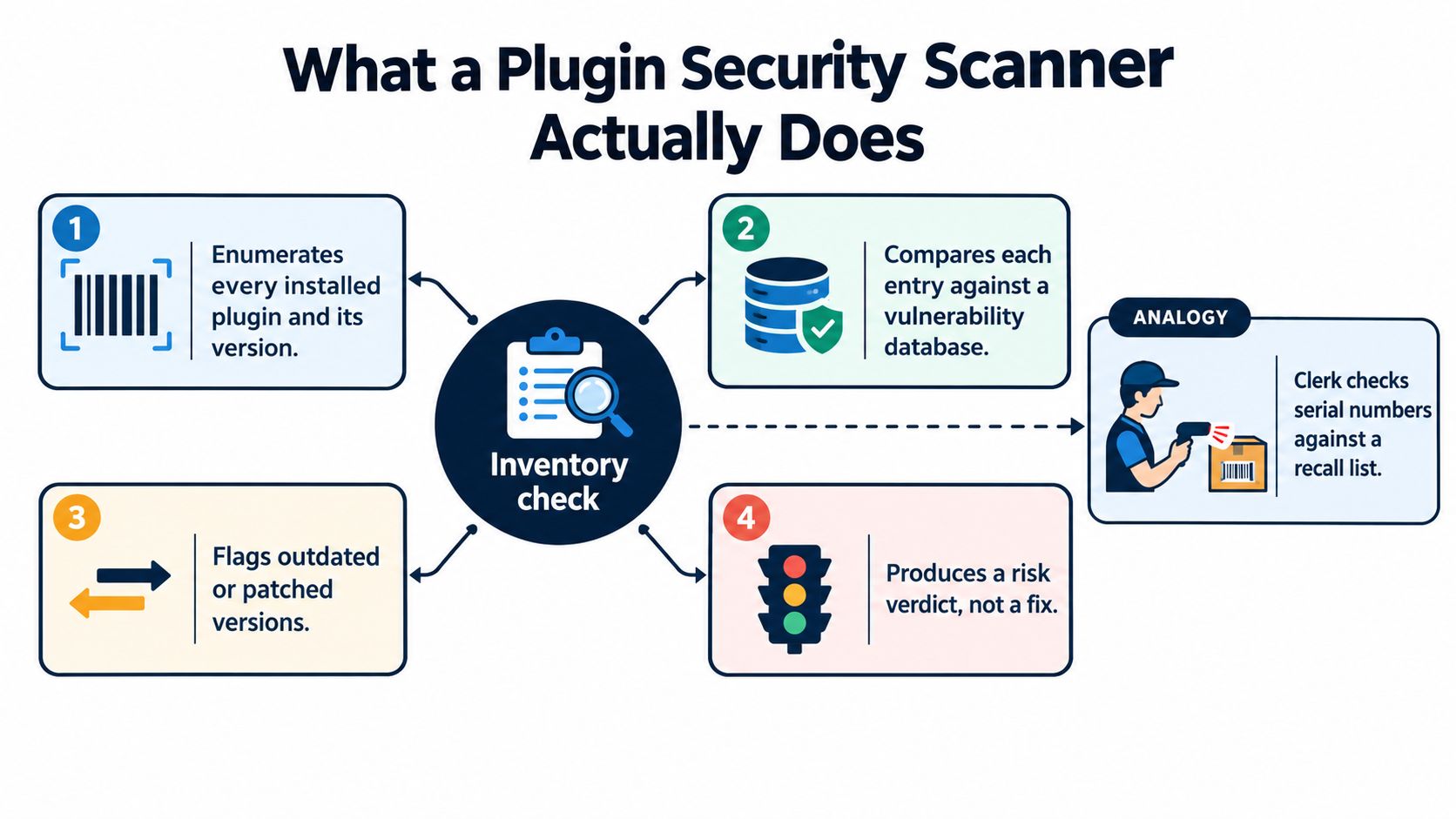
Think of a scanner as an inventory clerk with a recall database. The clerk first identifies each product on a shelf and reads its serial number. Only then can the clerk determine whether that product appears on a recall list.
A WordPress plugin security scanner follows the same pattern:
- Enumerate installed plugins. It identifies plugin folders, slugs, names, and versions.
- Extract version information. It reads metadata or other signals from the installation.
- Compare the inventory. It matches each plugin and version against vulnerability records.
- Return findings. It reports affected versions, severity information, exploit context, and suggested remediation where available.
The matching step matters because a plugin name alone isn't enough. A vulnerability may affect an older version range but not a current release. If the scanner misidentifies the slug or misses a plugin entirely, its conclusion can be incomplete even when the vulnerability database is accurate.
What the scanner doesn't do
A scanner's finding isn't the same as an attack block. Most plugin scanners aren't firewalls, malware cleaners, backup systems, or patch deployment tools. They can identify known exposure, but they won't automatically make a vulnerable plugin safe unless a separate workflow applies an update or mitigation.
That boundary is easy to miss when a dashboard uses reassuring labels such as “protected” or “clean.” For a broader view of finding vulnerabilities with automated tests, look at how automated testing fits into a wider security process rather than treating one scan as proof of protection.
Three terms appear frequently in scanner results:
- CVE: A public identifier for a disclosed vulnerability.
- CVSS: A scoring system that describes technical severity. It helps compare findings, but it doesn't know your client's business context.
- Exploit status: Information about whether attackers have demonstrated or are actively using a weakness. This often changes the remediation order.
WordPress's risk profile explains why this category exists. A 2021 academic assessment found that 92% of vulnerabilities detected in WordPress-powered websites were attributable to third-party plugins, based on an evaluation of 11 security scanner plugins against 51 insecure plugins. The findings are discussed in the WordPress vulnerability scanner research.
A plugin security scanner is an inventory and correlation tool. It gives you evidence for a decision, not automatic immunity from compromise.
How Plugin Security Scanners Detect Vulnerabilities
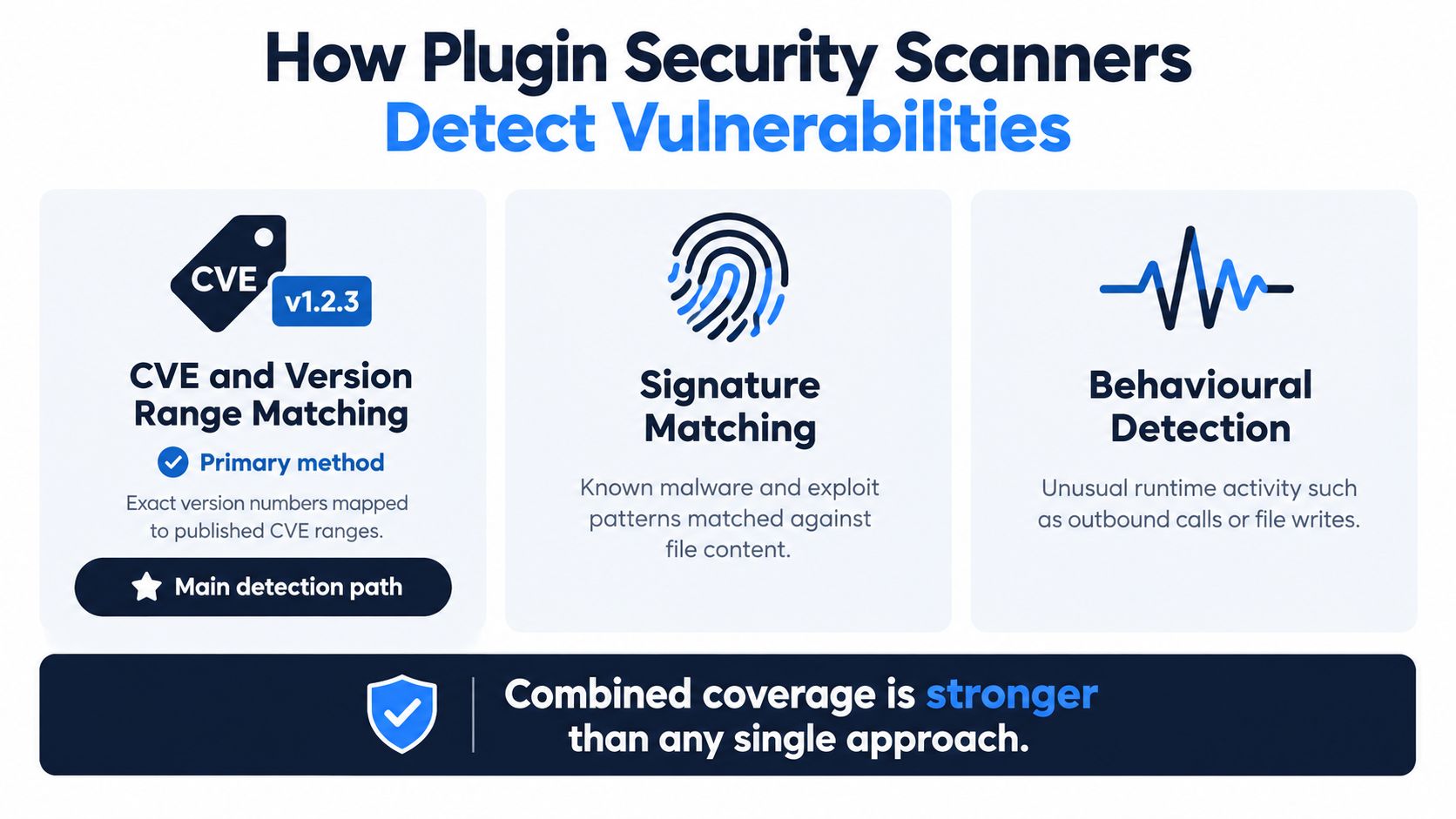
Most useful scanners combine several detection methods, but they don't all carry equal weight. For WordPress plugin exposure, component identification followed by version matching is usually the central path. Signature and behavioral checks add coverage for situations that a database match can't capture.
The scanner first needs a trustworthy inventory. That means identifying the plugin slug, extracting the installed version, and checking both active and inactive extensions. An inactive plugin can still matter if an attacker can reach its files or reactivate it through another compromise, so excluding it without a documented reason can understate portfolio risk.
The three main detection paths
CVE and version-range matching compares a detected plugin and version with records describing affected releases. This is why accurate enumeration matters more than a generic “old software” warning. The scanner needs to know which component it found and whether that exact release falls inside the vulnerable range.
Signature matching looks for known code or malware patterns in files. It can identify suspicious content even when the installed version isn't cleanly mapped to a database record. The trade-off is that signatures may miss modified or novel code, and broad patterns can produce findings that need human validation.
Behavioral detection observes suspicious activity, such as unexpected file writes or outbound requests. This approach can provide useful runtime context, but it often requires deeper monitoring than a simple inventory scan and may generate ambiguous signals in complex WordPress environments.
The ecosystem's scale makes feed freshness important. WPScan's public database lists 80,070 WordPress core, plugin, and theme vulnerabilities, and its 2025 mid-year reporting recorded 6,700 new vulnerabilities in six months, associated with 56,058,527 affected active installs. Those figures are documented on WPScan's vulnerability database. A scanner that checks its feed only occasionally may learn about a serious issue too late.
| Detection Method | What It Checks | Strengths | Limitations |
|---|---|---|---|
| CVE and version matching | Plugin identity and affected version ranges | Fast, explainable, effective for known issues | Depends on complete inventory and accurate version extraction |
| Signature matching | Known malware or exploit code patterns | Can find suspicious content outside simple version matches | May miss new patterns and produce false positives |
| Behavioral detection | Runtime actions such as file writes or outbound activity | Adds context about what software is doing | Requires monitoring and can be difficult to interpret |
Severity metadata adds another layer. A record can tell you that a weakness is technically serious, but exploit status and patch availability help determine whether the issue belongs at the top of today's queue. The 2026 security reporting cited earlier identified 4,124 vulnerabilities, or 36% of the total, as serious enough to require rapid mitigation rules, while 1,966, or 17%, had high severity scores. The WordPress security report also highlights the operational problem of disclosures arriving before fixes.
For a visual explanation of how these methods fit together, review the embedded walkthrough below.
The strongest scanners combine these approaches, but combination doesn't remove the need for judgment. A version match may be highly reliable while offering little guidance about whether to update immediately, isolate the site, or wait for a compatible patch.
Limitations False Positives and Blind Spots to Expect
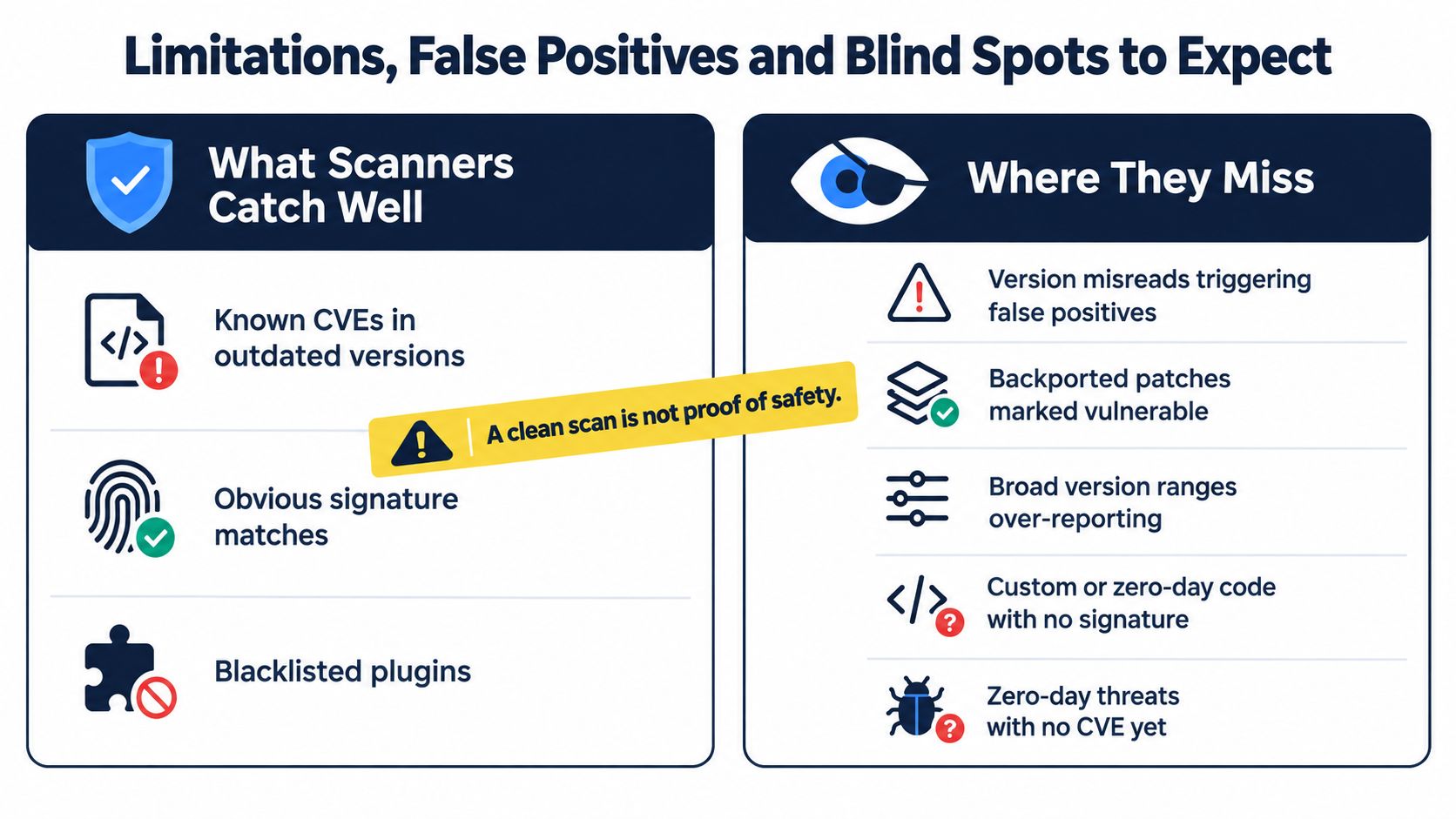
A clean scan doesn't prove that a site is safe. It usually means the scanner didn't find a known condition within the coverage and visibility available at scan time.
False positives often begin with imperfect identification. A scanner may read the wrong version, fail to recognize a vendor-customized build, or flag a release that contains a security fix backported by the vendor. Broad vulnerable-version ranges can also over-report when the specific installation includes a mitigation that the database doesn't understand.
False negatives have a different cause. The scanner may miss a renamed plugin, an inactive extension, custom code, or a newly created vulnerability that has no public record yet. A plugin can also be abandoned without having a well-maintained advisory trail, leaving the operator with a real maintenance concern but no neat CVE match.
Why findings need validation
Use the finding as a prompt to inspect the site, not as an instruction to click “update” blindly. Check the plugin's exact version, whether the vulnerable feature is used, whether a fixed version exists, and whether the site has a tested rollback path.
A useful review checklist includes:
- Version accuracy: Confirm the installed version from the site's detail page or administration tools.
- Patch context: Check whether the advisory names a fixed release or recommends a temporary mitigation.
- Runtime exposure: Determine whether the vulnerable feature is reachable by visitors, authenticated users, or administrators.
- Site importance: Treat a revenue-generating store differently from a low-change brochure site.
- Inventory completeness: Look for inactive, duplicated, renamed, or manually installed plugins.
- Compensating controls: Record access restrictions, web application rules, or disabled features that reduce exposure.
High severity also doesn't automatically mean active exploitation on every site. It signals technical seriousness, while exploit status, exposure, and business impact determine urgency. Conversely, a lower-severity issue can deserve prompt attention when it affects a public login, checkout flow, or widely used client workflow.
Disclosures can outpace patches. The 2026 reporting referenced above states that nearly half of newly disclosed vulnerabilities lacked a patch when disclosed. In that situation, the operator may need to disable a feature, restrict access, remove an abandoned extension, or apply a vendor-recommended workaround instead of performing a routine update.
For a current-style reference point on tracking known issues, agencies can use a maintained WordPress plugin vulnerability list. The list is an input to investigation, not a substitute for confirming the actual installation.
Security vendors also differ in how they document their controls, retention, and handling of customer information. Reviewing a provider's published trust and security information can help you evaluate the service itself, especially when a scanner connects to client sites.
From Scan Results to Triage Workflow Integration
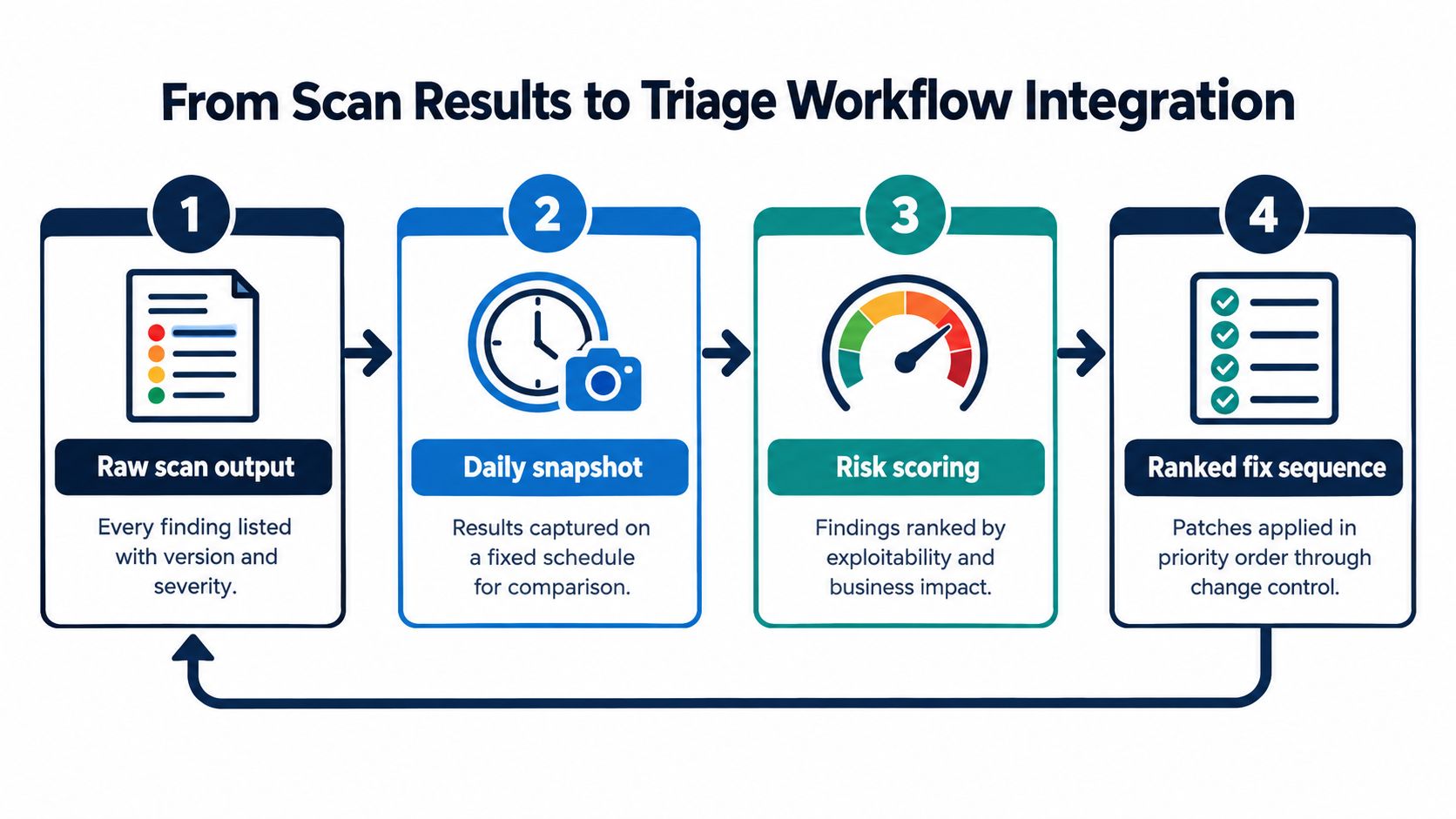
A scanner becomes operationally valuable when its output enters a repeatable system. Without that system, every finding becomes a separate email, ticket, or dashboard badge. With it, the same data can support daily comparison, risk scoring, and a ranked sequence of fixes.
Start by capturing a consistent snapshot of each connected site. Record the plugin inventory, versions, vulnerability matches, severity, exploit status, and patch availability. Comparing today's state with the previous snapshot helps distinguish a newly introduced risk from a longstanding item that still needs a decision.
A practical decision pipeline
- Collect raw output. Preserve the plugin name, slug, installed version, affected range, severity, exploit status, and evidence.
- Compare snapshots. Identify new findings, resolved findings, score changes, and inventory changes.
- Score the risk. Weight exploitability, software age, severity, patch availability, and the site's business importance.
- Create the fix sequence. Put the highest-impact action first, then route execution through the update or change-control tools already in use.
The score shouldn't hide its reasoning. If a site moves into a higher-risk band, the operator should be able to see whether an exploitable plugin, an old runtime, a newly disclosed issue, or a missing inventory record caused the change.
Portfolio triage needs aggregation. If the same plugin appears on several client sites, group the finding so the team can assess the affected versions and choose a coordinated response. Then separate sites by business impact, because a shared vulnerability doesn't create identical operational risk everywhere.
Notification design matters as much as scoring. Send targeted alerts for critical vulnerabilities, confirmed exploit activity, or sudden score drops. Reserve weekly summaries for routine planning, unresolved medium-priority findings, and changes that don't justify an immediate interruption.
WP Triage is one example of this decision-engine approach. It collects daily snapshots of WordPress core, plugins, themes, and PHP versions, matches installed components with known vulnerabilities, and produces a 0–100 risk score with a ranked top-three fix sequence per site. Execution remains in the team's existing tools, which keeps the scanner focused on prioritization rather than pretending to be a complete firewall, malware scanner, or management platform.
A useful workflow doesn't ask your team to read every alert immediately. It identifies which alert changes the next action.
How Agencies and Freelancers Should Prioritize Scanner Output
Two identical scanner findings can deserve different responses. A vulnerable payment-related plugin on a WooCommerce store has a different business context from a medium-severity issue in an infrequently changed brochure site, even when the technical advisory uses similar language.
Use four decision dimensions:
- Exploitability: Is exploitation reported, practical, or merely theoretical?
- Patch status: Is a tested fixed version available, or does the vendor offer only mitigation guidance?
- Site criticality: Does the site handle sales, bookings, member access, sensitive submissions, or client operations?
- Exposure: Is the vulnerable functionality public, authenticated, administrator-only, or unused?
How the order changes by context
A publicly reachable plugin issue with known exploit activity and a compatible patch belongs at the front of the queue. Test the update, confirm a backup or rollback path, and apply it through the normal deployment process. If the plugin supports checkout or another revenue-critical workflow, include functional testing rather than treating the update as a simple maintenance click.
A medium-severity finding without a patch may need a documented holding action. Disable the affected feature if the site can operate without it, limit access where practical, contact the vendor, and set a review date. Don't mark the issue resolved merely because the scanner can't identify a patch.
Abandoned plugins deserve special scrutiny. Even without a matching CVE, an extension that no longer receives maintenance can create compatibility, update, and future disclosure risk. Remove it when the site doesn't need it, or plan a replacement when the plugin supports a necessary function.
PHP version signals belong in the same conversation because an outdated runtime can complicate plugin remediation. Record whether the site can move to a supported PHP release, what compatibility testing is required, and which client approval is blocking the change.
Validate every high-priority result on the site's detail page. Confirm the version, affected component, evidence, and recommended action before contacting the client. Then document the decision, including why the team patched, mitigated, accepted temporarily, or scheduled replacement.
For a more formal method of vulnerability remediation prioritization, use a consistent scoring model across client sites. Consistency makes handoffs easier and gives clients a clear explanation that goes beyond “the scanner said so.”
Putting Plugin Scanning Into Practice With Confidence
A reliable plugin security program starts with visibility. Make sure the scanner can identify every relevant extension, keep vulnerability feeds synchronized, and review both active and inactive inventory. Then separate detection from action by recording exploitability, patch status, site importance, and exposure before assigning priority.
The operating checklist is straightforward:
- Maintain inventory: Verify plugin slugs and versions across every connected site.
- Review findings: Confirm high-impact alerts against the site and advisory details.
- Rank fixes: Address exploitable, exposed, business-critical issues before lower-impact noise.
- Track exceptions: Document mitigations, accepted risks, abandoned plugins, and pending replacements.
- Repeat the rhythm: Use daily snapshots for change detection and a weekly review for planned remediation.
The goal isn't to chase every alert at the same speed. It's to make the most consequential decision first, explain why it comes first, and preserve a record of what happens next. Once agencies adopt that triage mindset, a plugin security scanner becomes more than an alert generator. It becomes a dependable input to maintenance planning.
If your team manages multiple WordPress sites, visit WP Triage to see how daily inventory snapshots, portfolio risk scoring, and ranked fix sequences can turn scanner findings into a clear action queue. Connect your sites, review the highest-impact issues, and standardize how your team decides what to fix first.