WordPress plugin security has moved beyond routine update management. In 2025, researchers identified 11,334 new vulnerabilities across the WordPress ecosystem, up from 7,966 in 2024, and 91% were found in plugins. Only six affected WordPress core. That concentration changes the operating question for an agency managing 10, 20, or 50 sites. The problem isn't whether the team can apply updates. It's whether the team can identify which plugin exposure deserves attention first.
A weekly “update everything” session still has a place, but it isn't a complete security strategy. A portfolio needs continuous inventory, vulnerability matching, and a defensible way to rank exploitability, business exposure, and remediation urgency. Without that layer, teams either miss a dangerous plugin because it looks like one item in a long queue or waste scarce development time investigating issues that pose little immediate threat.
Table of Contents
- The Escalating Reality of Plugin Vulnerabilities
- How Coding Errors Escalate to Full Site Takeovers
- The Hidden Blast Radius of Trusted Utility Plugins
- Building a Transparent Vulnerability Scoring Model
- Executing a Prioritized Triage Workflow Across Portfolios
- Defining the Boundaries of Triage Engines and Scanners
- Shifting from Reactive Patching to Proactive Risk Management
The Escalating Reality of Plugin Vulnerabilities
The volume alone should change how technical directors think about maintenance. The State of WordPress Security in 2026 records 11,334 new vulnerabilities in 2025, compared with 7,966 in 2024, a 42% year-over-year increase. Plugins accounted for 91%, themes for 9%, and WordPress core for only six vulnerabilities.
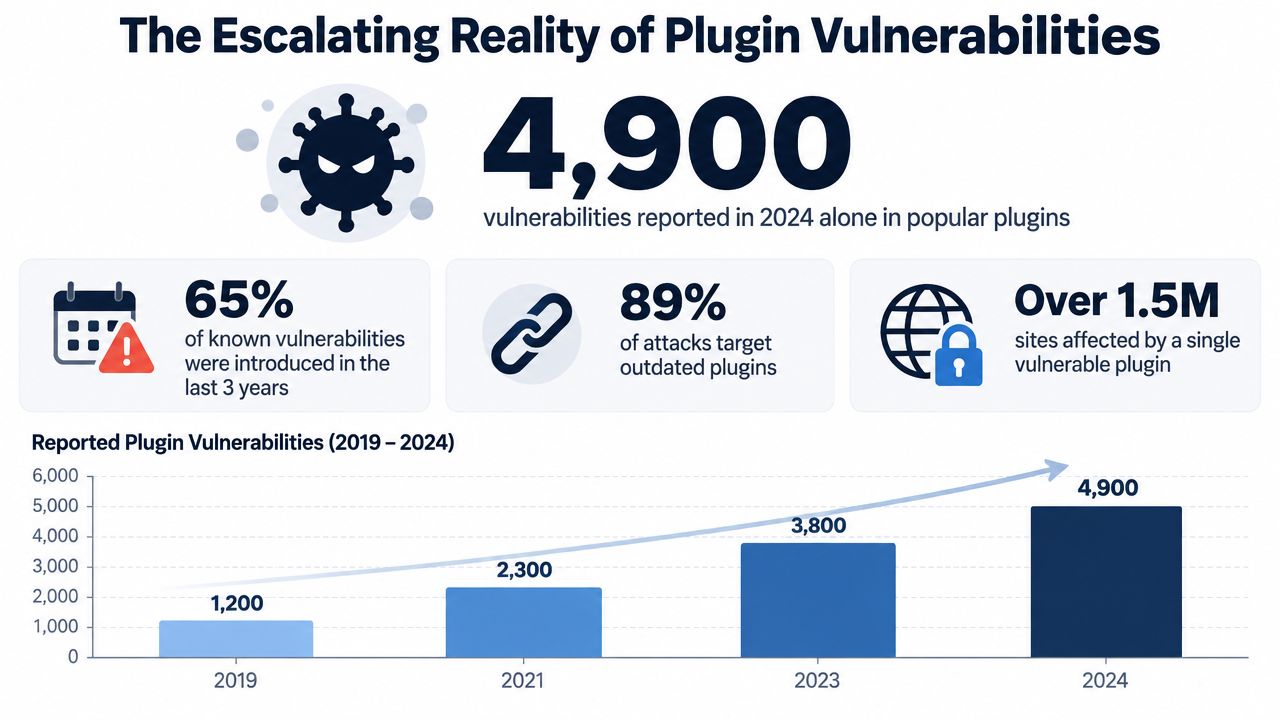
The historical pattern matters more than any single annual total. In 2024, the ecosystem recorded about 22 new vulnerabilities per day, while WordPress core had seven vulnerabilities, none significant enough to create a widespread threat, according to Patchstack's 2025 security report. In 2022, researchers documented 4,528 confirmed WordPress security bugs, compared with 1,382 in 2021, and 93% were in plugins. Plugin security isn't a temporary distraction from core maintenance. It has been the dominant risk center for years.
Why portfolio scale changes the problem
On one site, a developer may recognize a vulnerable plugin during a normal update. Across a portfolio, the same plugin can appear in different versions, with different configurations, permissions, staging practices, and business consequences. A single advisory can therefore create a coordinated exposure-management task rather than a simple maintenance ticket.
The useful inventory isn't just a list of plugin names. It must connect each installation to its plugin version, known vulnerabilities, patch status, exploitability, and role in the site. A form plugin on a brochure site and the same form plugin on a revenue-critical store shouldn't automatically receive identical treatment.
The operational shift is straightforward: stop treating plugin updates as a calendar event and start treating them as a ranked risk queue. Teams that need help designing that wider process can also review security consulting for enterprises as part of a broader governance approach.
For day-to-day WordPress work, a maintained WordPress plugin vulnerability list can help analysts validate advisories, but a list alone won't decide which site should be fixed first. The decision requires context from the portfolio.
How Coding Errors Escalate to Full Site Takeovers
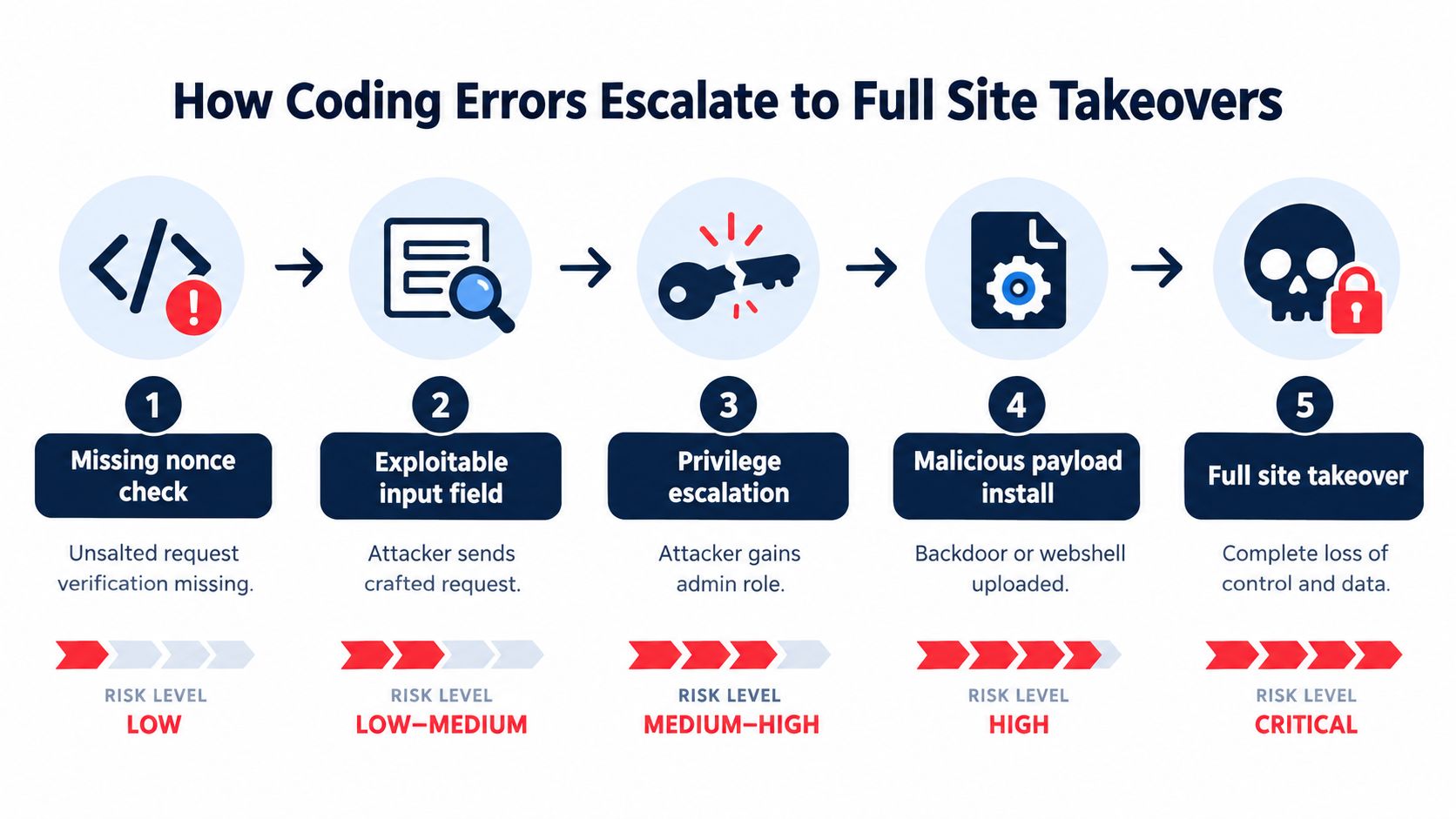
A plugin vulnerability becomes operationally dangerous when an attacker can reach it, satisfy its prerequisites, and turn its output into control. The code defect may look narrow in a changelog, but the access path can be broad.
Common escalation paths include:
- Missing capability checks: A plugin exposes an administrative action without verifying whether the current user has permission to perform it.
- Weak nonce handling: A request isn't adequately protected against cross-site request forgery, allowing an attacker to induce a privileged browser session to submit it.
- Unsanitized parameters: User-controlled data reaches a database query, file operation, API request, or rendered page without suitable validation and escaping.
- Unsafe file handling: A plugin accepts uploads or writes files without tightly restricting paths, types, or contents.
- Authentication bypass: The application accepts a request as trusted even though the attacker hasn't completed the expected identity check.
The sequence often looks like this: an unauthenticated request reaches a vulnerable endpoint, the endpoint changes an account or permission, the attacker gains an administrative session, and that access enables a malicious plugin setting, file upload, or code path. In other cases, a file-write or command-execution flaw skips the administrator step and reaches the server directly.
Read severity as a starting point
Recent plugin disclosures include authentication bypass, arbitrary file write, privilege escalation, and information disclosure flaws. Several issues were scored at CVSS 9.8, while one command-execution flaw received 10.0, as reported by The Hacker News. Those scores communicate potential impact, but they don't replace exposure analysis.
A high-severity issue that requires an authenticated administrator and a rare configuration may be less urgent than a lower-scored unauthenticated endpoint exposed on every public site in a portfolio. The first question should be, “Can an external attacker reach this path without help?” The next should be, “What does success provide?”
Practical rule: Rank an exposed authentication bypass or file-write primitive ahead of a severe issue that requires several difficult preconditions, unless your environment provides evidence that changes the ordering.
Turn advisories into action
For each plugin advisory, capture the vulnerable versions, fixed version, authentication requirement, affected functionality, exploit status, and whether the plugin is exposed on production sites. Then map that result to business impact. A vulnerability in a backup or page-builder plugin may affect privileged workflows, while the same technical severity in an unused extension may be removable rather than patched.
The team should also distinguish between mitigation and remediation. A firewall rule, temporary access restriction, or disabled feature can reduce exposure, but it doesn't remove the vulnerable code. The durable fix is usually a vendor patch, a safe replacement, or removal of the extension when the business no longer needs it.
The Hidden Blast Radius of Trusted Utility Plugins
Popularity doesn't make a plugin safe. It can make a vulnerability more consequential because a trusted utility plugin often has broad permissions, handles sensitive data, or sits inside workflows that administrators use every day.
Recent disclosures illustrate the pattern. WPMU DEV Dashboard had an authentication bypass that could lead to administrator access. TranslatePress exposed raw password-reset URLs. Pods allowed privilege escalation to Administrator. GiveWP enabled arbitrary command execution under certain conditions. The details differ, but each category matters because the plugin operates close to identity, content, payments, files, or administrative control.
Categories that deserve immediate review
A practical review begins with function, not reputation:
- Backup plugins may create archives, read site data, write files, or connect to remote storage.
- Page builders often process rich content, administrative requests, templates, and dynamic assets.
- Forms and donation tools handle user input and may connect to payment or notification systems.
- Multilingual plugins can process URL routing, translated content, and account-related workflows.
- SSO and security utilities influence authentication, sessions, and access rules.
- Content-type frameworks can expose custom fields, metadata, and privilege-sensitive operations.
March 2026 fixes affected Elementor, Yoast SEO, WPForms, and Really Simple Security, including products with millions of installs, according to The Hacker News' reporting on recent WordPress plugin flaws. The point isn't that these vendors or categories are uniquely careless. Large, integrated plugins have a larger blast radius when a flaw reaches a privileged function.
Reputation changes the response, not the risk
A reputable vendor may publish a fix quickly, communicate clearly, and provide a reliable upgrade path. Those are valuable remediation advantages. They don't justify leaving the vulnerable version active while the team waits for its normal maintenance window.
For a portfolio operator, the decision tree is simple. If the plugin is exposed and the flaw permits unauthenticated access, file manipulation, account takeover, or command execution, escalate it immediately. If the plugin is unused, remove it after confirming that no templates, content, scheduled jobs, or integrations depend on it. If a replacement is required, assess migration risk before disabling the existing extension, but don't confuse operational inconvenience with acceptable exposure.
Building a Transparent Vulnerability Scoring Model
A risk score should explain a decision, not hide one. The useful model is transparent enough that a developer can understand why a site moved into a critical queue and challenge an input when the inventory is wrong.
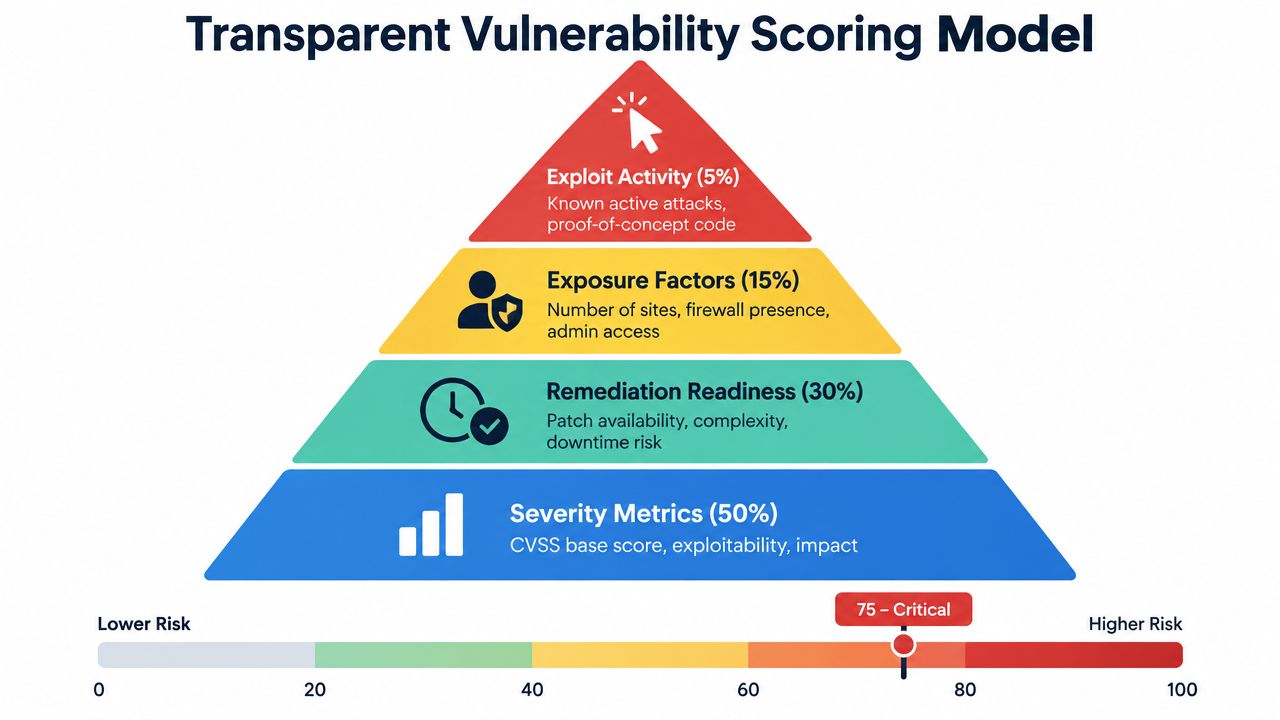
A practical score combines four kinds of evidence:
- Severity and impact. Record the advisory's severity, affected capability, and likely consequence. Remote code execution, authentication bypass, arbitrary file write, and administrator privilege escalation deserve strong weight because successful exploitation can change the site's control boundary.
- Remediation readiness. A fixed version makes action possible. A patch that requires a major compatibility change, database migration, or staging validation still needs careful sequencing, but it should remain visible as an actionable item.
- Exposure context. Count where the affected plugin is installed, whether the site is public, whether the feature is enabled, and whether the vulnerable function is available to unauthenticated users.
- Exploit activity. Give additional urgency to known exploitation or credible proof-of-concept material. Treat this as a signal that can move an issue ahead of another advisory with similar technical severity.
The exact weighting must match the operating environment. A public WooCommerce store, an internal editorial site, and a staging installation shouldn't inherit the same business-impact assumptions. What matters is that the team documents its choices and applies them consistently.
Use bands to create queue discipline
A 0–100 score can provide a common language across sites, provided it remains tied to underlying signals. WP Triage uses a 0–100 risk score and groups sites into Safe, At Risk, and Critical bands, with a ranked sequence of the top three issues per site. You can read a practical explanation of what a WordPress risk score means before defining internal thresholds.
The score shouldn't become a new source of alert noise. A sudden increase caused by an exposed critical plugin should trigger a targeted notification. A small change from ordinary version drift may belong in the next scheduled maintenance batch.
A transparent score doesn't replace judgment. It makes judgment repeatable, reviewable, and faster across a portfolio.
Avoid a model that gives an old plugin an automatic critical label without checking exploitability. Age is useful evidence because abandoned extensions may lack a patch path, but age alone isn't proof of active compromise. Pair it with known CVEs, exposure, permissions, and available remediation.
Executing a Prioritized Triage Workflow Across Portfolios
A reliable workflow starts with one inventory rather than separate browser tabs, inbox alerts, and spreadsheets. Every connected site should produce a current snapshot of WordPress core, plugins, themes, and PHP version. The snapshot becomes useful when the system can compare it against known vulnerability records and preserve the change over time.
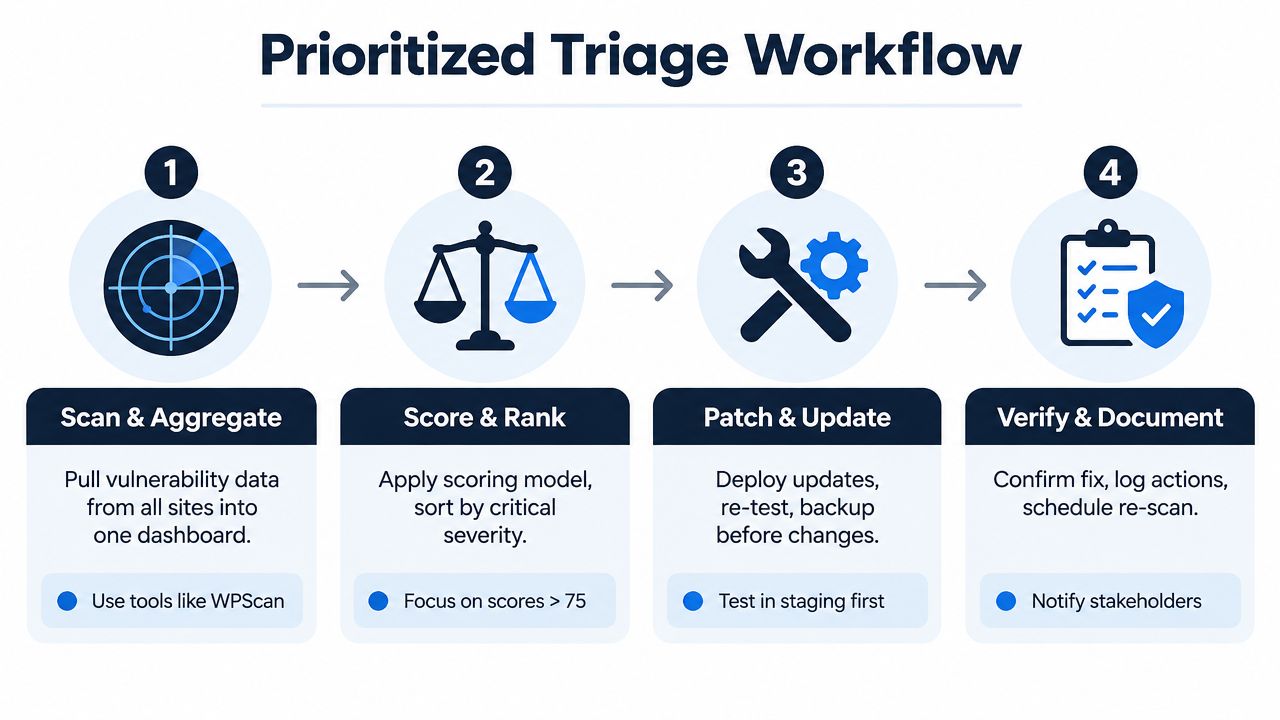
Four steps that keep the queue manageable
Scan and aggregate. Pull inventory from every site into one portfolio view. Tools such as WPScan can contribute vulnerability data, while an agent connector or management platform can provide version snapshots. Reconcile plugin names carefully because vendor naming differences can produce false matches.
Score and rank. Apply the agreed model, then sort by exploitability, impact, exposure, and patch readiness. Start with the highest-risk issues, not the sites that happen to be easiest to update.
Patch and update. Confirm a backup and test the change in staging when the plugin affects checkout, forms, authentication, page rendering, or stored content. Use the deployment process the team already trusts, and record whether the fixed version resolved the finding.
Verify and document. Re-scan after deployment, inspect the affected function, and log the site, plugin, old version, fixed version, result, and follow-up. Notify the client or internal owner when the change affects availability, data handling, or user access.
Make “top three” an operating habit
A ranked top three gives each site a clear starting point. It prevents a developer from spending the first hour cleaning low-impact version drift while a public authentication bypass waits below it. The list can change after inventory updates, so the team should treat it as a current action order rather than a permanent project plan.
Daily snapshots are useful for catching score changes and newly disclosed matches. A weekly summary is useful for management because it shows which sites moved, which findings remain open, and where remediation is blocked. Notifications should focus on critical disclosures and material score drops, otherwise the team will learn to ignore the channel.
Defining the Boundaries of Triage Engines and Scanners
Security tools answer different questions. Confusing those questions produces duplicated alerts without improving the fix sequence.
| Tool Category | Primary Focus | Portfolio Triage Value |
|---|---|---|
| Triage decision engine | Scores exposure and orders fixes | Compares sites and identifies the next most impactful action |
| Vulnerability scanner | Detects versions, signatures, and known issues | Supplies findings that can feed prioritization |
| Web application firewall | Blocks or challenges suspicious requests | Provides compensating protection while remediation is prepared |
| Malware scanner | Looks for malicious files, code, or indicators | Helps investigate compromise and validate site state |
| Backup solution | Preserves recoverable site data | Supports rollback and recovery after failed changes or incidents |
| Deployment and management tools | Applies updates and configuration changes | Executes the remediation sequence selected by the team |
A WordPress vulnerability scanner can identify a vulnerable version, but detection doesn't automatically tell an agency which client should be patched first. A firewall may block a known request pattern, but it doesn't update the plugin or establish that every site has the same exposure. A malware scanner can find evidence of compromise, while a backup system can help restore service. None of those functions, by themselves, creates a portfolio-wide decision queue.
Keep execution where it already works
A triage engine should sit above existing operational tools rather than attempt to replace all of them. The development team can continue using staging, deployment pipelines, managed hosting controls, backups, and security plugins. The decision layer should provide inventory, matching, scoring, ranked findings, and verification prompts.
WP Triage is one option in that layer. It monitors core, plugin, theme, and PHP versions, matches installed plugins against known vulnerabilities, and produces a 0–100 risk score with a ranked fix sequence for each site. Its scope is prioritization, not firewall enforcement, malware cleanup, backup creation, or full deployment management.
That boundary reduces tool sprawl. The team knows which system detects, which system decides, and which system executes. When an incident occurs, those records also make it easier to distinguish an unpatched finding from an active compromise.
Shifting from Reactive Patching to Proactive Risk Management
Reactive patching treats every advisory as an interruption. Proactive risk management treats the portfolio as a changing operational system, where new disclosures, plugin changes, configuration changes, and PHP version drift can alter priority before a maintenance meeting.
The foundational controls are practical:
- Maintain inventory: Know which plugins, themes, core versions, and PHP versions exist on every site.
- Match vulnerabilities continuously: Connect installed versions to known CVEs and capture severity and exploit status.
- Rank by consequence: Put externally reachable authentication, file-handling, privilege, and command-execution flaws ahead of routine drift.
- Track remediation: Record the patch, validation result, remaining exceptions, and owner.
- Review the portfolio: Use a concise weekly summary to identify persistent exposure and stalled fixes.
This approach also changes conversations with clients. Instead of sending a long list of updates, the agency can explain that a specific plugin requires immediate attention because it affects a public privileged workflow, while other maintenance items can safely wait for a planned release window. That distinction protects developer capacity and gives stakeholders a reasoned basis for approval.
The larger lesson from WordPress plugin security is that inventory and version tracking aren't housekeeping metrics. They are exposure signals. Plugin count, maintenance quality, known CVEs, exploitability, and business role determine where the team should spend its next hour.
A risk-based process won't eliminate vulnerabilities. It will make the response predictable, auditable, and less dependent on whoever happens to notice an alert first. For agencies and WooCommerce operators, that is the difference between a maintenance calendar and a security operation.
WP Triage gives agencies and multi-site teams daily inventory snapshots, known-vulnerability matching, risk bands, targeted alerts, and a ranked top-three fix sequence for each site. Visit WP Triage to replace scattered plugin alerts with a clear, risk-based order of work across your WordPress portfolio.