Your agency's maintenance dashboard looks familiar: several client sites share one WordPress Multisite network, a plugin update is waiting, and nobody can say with confidence which sites depend on it. One subsite has a contributor account that no longer needs access. Another uses a theme that hasn't been reviewed in months. The network-activated plugin appears harmless because it's widely used, so the update gets postponed.
That's how multisite security turns into a portfolio incident. A shared extension, account, or core release can affect connected sites at the same time. The practical answer isn't another static checklist. It's a ranked workflow that identifies correlated exposure, assigns an order of work, and verifies the result.
Table of Contents
- Why WordPress Multisite Security Fails Differently
- Locking Down Network Architecture and User Roles
- Taming Plugins and Themes Across the Entire Network
- A Reliable Update and Patch Workflow That Prevents Outages
- Monitoring CVEs and Turning Risk Into a Ranked Fix List
- Your Next Moves for a Safer Multisite Network
Why WordPress Multisite Security Fails Differently
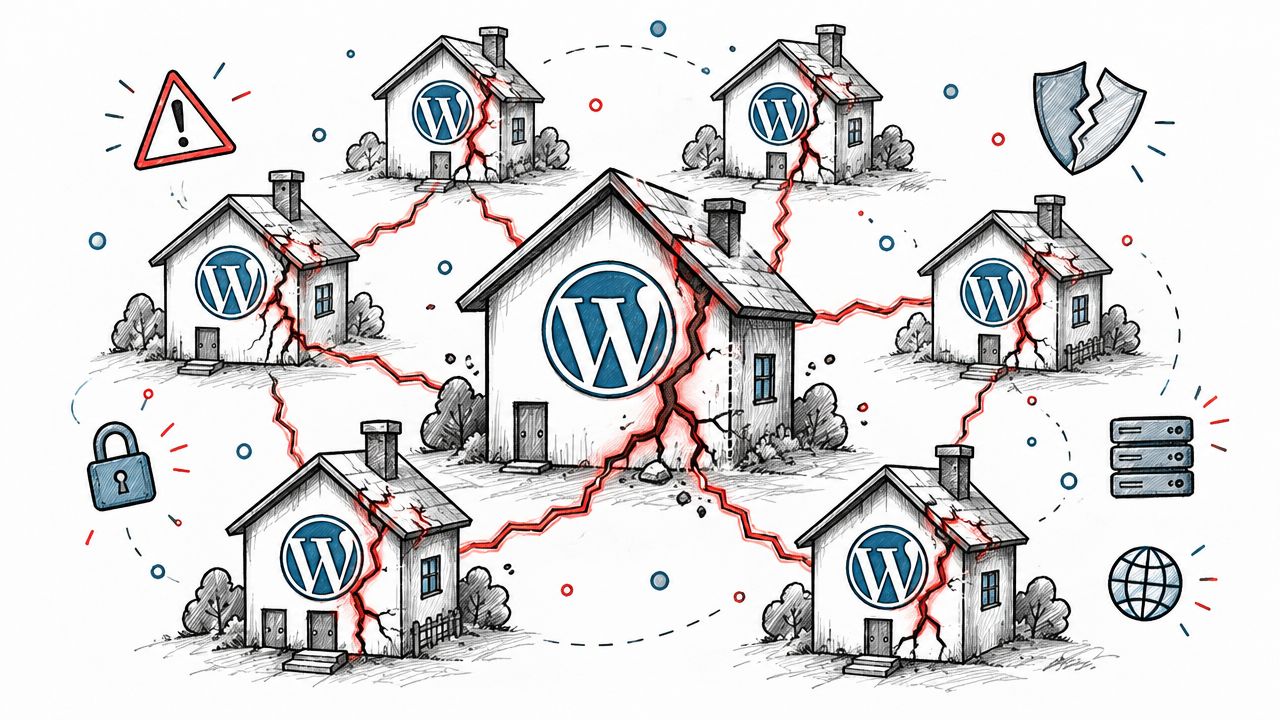
A forms plugin update can turn into a portfolio incident before anyone notices. One client site needs the release, but the plugin is network active, so every subsite runs the new code. If that release contains a vulnerability or breaks a dependency, the operator must assess shared exposure across different owners, templates, payment flows, and editorial processes.
A multisite network concentrates risk in common core files, database structures, user relationships, plugins, themes, and hosting controls. Super Administrators and network-activated extensions also define a trust boundary. A weakness in either can affect sites that appear unrelated operationally.
The shared-code problem
The main exposure often sits outside WordPress core. Patchstack's 2026 State of WordPress Security report records 11,334 new WordPress ecosystem vulnerabilities in 2025, a 42% increase over 2024, and identifies plugin and theme layers as the main security challenge for multisite operators. A separate scanner study cited in the original report summary found that 92% of vulnerabilities in WordPress-powered websites were attributable to third-party plugins.
Those findings change the first question in an incident review. Ask which shared component could expose the most sites, then identify the installed version and rank the fix by reach, exploitability, and business impact. A static hardening checklist cannot show that order.
A compromised contributor account creates another path. Although the account may belong to one subsite, shared user records, editorial workflows, or broader capabilities can help an attacker test boundaries beyond the intended site. WordPress Core vulnerability records document a multisite-specific issue published on 2026-08-08, where an authenticated subscriber-level user could create arbitrary sites on affected multisite installations, rated CVSS 4.3 Medium in the WordPress core vulnerability records.
Practical rule: Treat every network-activated component and privileged identity as a multiplier. Rank it by the number of sites it touches, the access it grants, and the consequence of failure.
The workflow also needs ownership and governance. Teams reviewing CIO cybersecurity strategy guidance can apply the same principle here: assign responsibility, make shared risk visible, and turn findings into repeatable decisions. Document whether multisite still fits the portfolio's isolation and operational needs in a multisite WordPress hosting review.
Locking Down Network Architecture and User Roles
Start with the network boundary, not the plugin screen. A multisite installation should have a small, well-defined group of people who can manage network settings, install extensions, alter domains, and change access across sites. Everyone else should work within the narrowest site-level role that supports their job.
Separate network authority from site administration
Super Admin review: List every Super Admin, confirm the business reason for each account, and remove dormant access. Don't use shared credentials. Require strong authentication through the identity controls available to your hosting and security stack, and record role changes so another operator can reconstruct what happened.
Subsite boundaries: A site Administrator should administer the assigned site, not the entire network. Check whether the account can install or activate plugins, change themes, manage users outside its site, or alter network-wide settings. If a capability isn't essential, remove it or move the task to a controlled operator.
Role separation: A person who publishes content doesn't automatically need user-management privileges. Agencies should map roles to activities, then review those mappings whenever a client changes staff, vendors, or responsibilities. If your organization needs a broader access-control design, you can find access control solutions that support formal role separation beyond WordPress's native model.
Staging isolation: Keep staging credentials, domains, and data separate from production wherever practical. A staging copy should never become an unmonitored duplicate of production with the same active integrations and unrestricted public access.
Harden the network configuration
Review wp-config.php, database table prefixes, file ownership, writable directories, and server-level permissions with your hosting engineer. The exact configuration depends on the stack, but the principle is consistent: WordPress should write only where it needs to write, and operators should know which process can modify shared files.
Domain mapping deserves a deliberate review. Confirm that each mapped domain uses enforced HTTPS, points to the intended site, and has an owner responsible for renewal and change approval. A forgotten mapped domain can become a neglected route into a site that still shares the network's application layer.
Use this audit sequence during a maintenance review:
- Export the user and role inventory. Include Super Admins, site Administrators, editors, authors, contributors, and service accounts.
- Verify business ownership. Every privileged account needs a current owner and a reason for access.
- Test boundaries. Use a controlled account to confirm that site-level administrators can't reach network-only actions.
- Review configuration access. Check hosting panels, deployment tools, database access, and source-control credentials separately from WordPress roles.
- Log and approve changes. Record who changed a role, what changed, and why.
The useful mental model is not “make admins safer.” It's “make authority traceable and limited.” For a broader treatment of permission failures, keep an internal reference to broken access control in WordPress, then apply the findings to your network's actual role map.
Taming Plugins and Themes Across the Entire Network
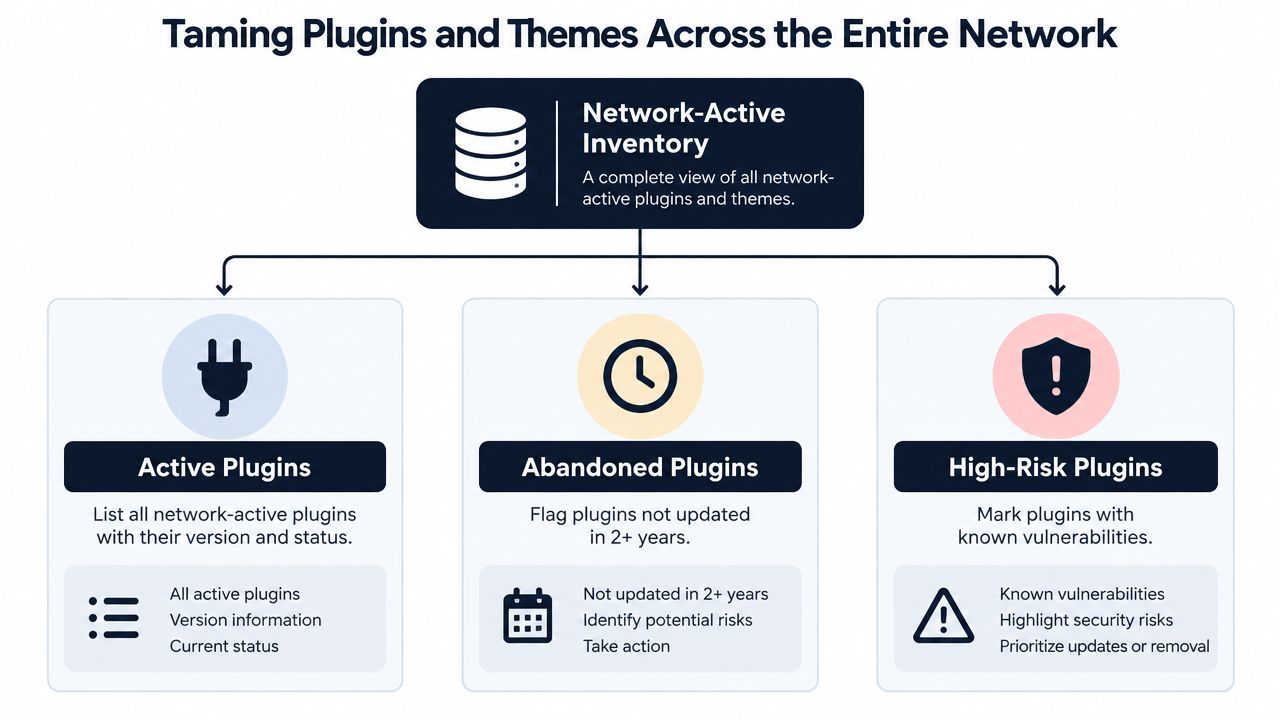
Plugin inventory is the highest-value control in multisite security because extensions often determine how many sites share the same exposure. Start with the network-active list, then map site-specific plugins and themes. Don't rely on a WordPress admin screen alone. Reconcile the result with deployment files, hosting records, staging environments, and any managed update service.
A directory analysis covering 44,705 plugins found more than 8,800 plugins with at least one vulnerability and 67,486 total vulnerabilities in the reported analysis. Among the larger plugins in that analysis, 4,559, or 43% of that subset, had at least one medium-severity issue. The dominant classes were XSS, above 68%, and SQL injection, just over 20%. These figures don't mean every large plugin is unsafe. They do mean popularity and install count aren't a sufficient security test.
Build an inventory that supports decisions
Record each extension with fields that answer an operational question:
- Component and version: What exactly is installed?
- Activation scope: Is it network active, active on selected sites, or inactive?
- Business dependency: Which workflows fail if it's removed?
- Update history: Does the maintainer release and support it consistently?
- Vulnerability status: Are there known issues, exploit details, or remediation notes?
- Replacement path: Can the feature move to a smaller, better-supported component?
- Test owner: Who validates the extension after an update?
A plugin with broad functionality, network activation, and a critical business dependency deserves careful testing, but it shouldn't receive an automatic pass. A smaller extension with no current owner should be removed or replaced if nobody can explain why it remains installed.
Use a keep, replace, or remove decision
Keep an extension when it has a clear owner, a supported release path, a necessary function, and a tested configuration. Network activation should be intentional, not a historical default.
Replace it when the feature is important but the plugin has unresolved risk, poor maintenance, unnecessary complexity, or an incompatible architecture. Replacement can create migration risk, so stage the change and preserve a rollback path.
Remove it when the extension is inactive, duplicated, abandoned, or no longer tied to a real requirement. Deactivation alone isn't enough if files, settings, scheduled tasks, or access rules remain. Verify cleanup in staging before making production changes.
Research into plugin vulnerabilities identified 397 XSS occurrences, 166 SQL injection occurrences, and 120 cross-site request forgery occurrences in its exploratory dataset as summarized in the plugin vulnerability study. The same source describes a long-term dataset in which every compromised site had at least two infected plugins, with 94% of those malicious plugins still active. The practical lesson is to avoid allowing several weak extensions to coexist around a shared administrative surface.
I'd freeze the allowlist before approving more additions. Require a business owner, compatibility test, support review, and network-impact assessment for every new plugin or theme. That process feels slower than installing freely, but it prevents the more expensive pattern where one convenience plugin becomes shared technical debt.
A Reliable Update and Patch Workflow That Prevents Outages
A network-activated plugin can turn one urgent vulnerability into a portfolio-wide incident. The update process must rank shared exposure first, then move from awareness to a tested rollout without losing a usable recovery point.
Start by assigning an update owner and acceptable maintenance window for each subsite. A commerce site, editorial site, and brochure site may share code but have different outage tolerances. WooCommerce stores require checks for checkout, payment, email, stock, and orders. Client networks need a communication path before a network-wide deployment.
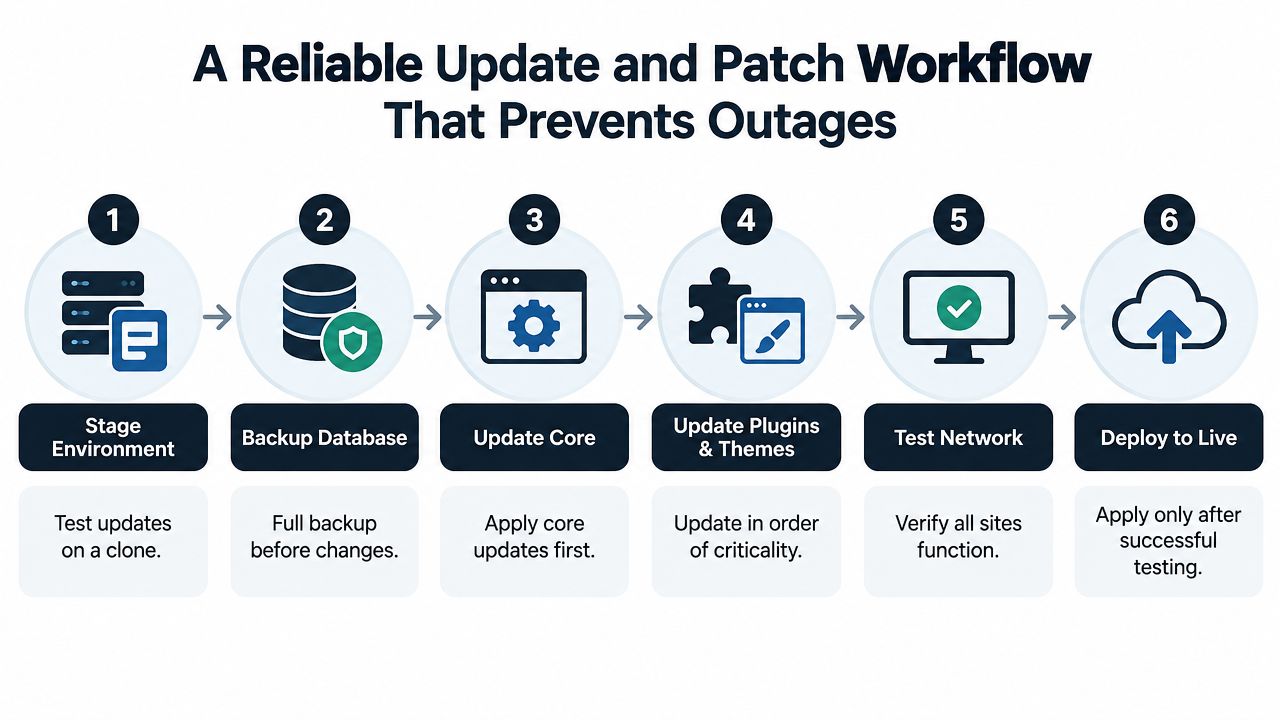
Use the same sequence every time
- Stage the environment. Clone the network or create representative staging. Include active plugins, themes, custom code, integrations, and meaningful subsite configurations. Test the components with the widest activation scope first.
- Capture a full backup. Back up the database and files before changing anything. Confirm access to the backup and assign responsibility for recovery.
- Update WordPress core. Review release notes, compatibility concerns, and security urgency. Core advisories demonstrate how quickly severe issues can appear. A CVSS 8.8 High remote code execution issue and a CVSS 7.5 High SQL injection issue both require a response based on exposure, exploitability, and the availability of a tested fix.
- Update plugins and themes. Prioritize urgent, network-active components, then check dependencies instead of updating every package together.
- Test the network. Check login, user creation, media uploads, forms, search, scheduled tasks, domain mapping, permalinks, REST integrations, and revenue-critical workflows.
- Deploy to production. Release during the agreed window, watch logs and synthetic checks, and retain the rollback point until validation is complete.
Test more than the polished flagship site. Failures often appear in unusual combinations, such as a legacy theme with a newer editor component, a language-specific setting, a membership workflow, or a client-only integration. Keep a short validation script for each important site, and have its owner confirm the business functions before closing the change.
For teams standardizing maintenance, use this guide to WordPress plugin updates as an operational reference. A dashboard can report available updates, but it cannot replace compatibility testing, backup verification, or a decision about rollback.
Routine maintenance can follow a weekly cadence, while actively exploited or high-severity issues need faster handling. Patch the shared layer first when it creates correlated risk, but avoid indefinite delays in pursuit of perfect testing. A prepared staging path, verified snapshots, clear ownership, and an emergency route provide the practical balance between speed and control.
Monitoring CVEs and Turning Risk Into a Ranked Fix List
Security monitoring becomes useful when it changes what the team does next. A feed full of plugin notices isn't a triage system. For each installed component, match the exact product and version against trusted vulnerability records, then add context about activation scope, exploitability, business importance, and whether a tested fix exists.
The portfolio view should answer three questions quickly:
- Which network or site has the most consequential exposure?
- Which issue affects the largest number of connected sites?
- What are the next three fixes the team should complete?
A simple internal score can use a 0 to 100 scale if the team documents the method and applies it consistently. Weight known exploitation, severity, network reach, software age, business criticality, and remediation availability. Don't pretend the score is an objective measurement of security. It's a decision aid that makes competing maintenance tasks easier to compare.
Portfolio Risk Triage Matrix for Multisite Networks
| Signal | What to Check | Triage Action |
|---|---|---|
| Network activation | Does the component run across the network? | Put shared exposure ahead of isolated site issues when severity and exploitability are comparable. |
| Known vulnerability | Does the installed version match a documented vulnerable range? | Confirm the fixed version, stage it, and schedule the update or replacement. |
| Exploit status | Is there evidence that attackers can use the issue in real-world attacks? | Escalate immediately, consider temporary mitigation, and reduce exposure while testing the fix. |
| Severity | Is the issue rated low, medium, or high? | Use severity to guide urgency, but don't let it override network reach or exploitability. |
| Privilege requirement | Does exploitation require Author, Contributor, Subscriber, or higher access? | Review affected roles and remove unnecessary accounts while patching. |
| Business dependency | Does removal threaten checkout, publishing, authentication, or integrations? | Assign a test owner and prepare rollback before changing production. |
| Maintenance condition | Is the plugin or theme abandoned, duplicated, or poorly supported? | Replace or remove it instead of creating a recurring exception. |
The need for ranked triage is reinforced by ecosystem reporting. A mid-2025 report identified 6,700 new WordPress ecosystem vulnerabilities in six months, with 41% exploitable in real-world attacks in Patchstack's mid-year report. Another report cited in the same verified data said 17% of disclosed vulnerabilities were high severity and likely to be used in automated mass-scale attacks. Those figures don't tell you which item to fix in your environment. Your inventory and activation map do.
Low-privilege pathways deserve their own review. WordPress advisories from September 2025 included Stored XSS affecting versions up to 6.8.2 that required Author-or-higher privileges, along with a separate issue exposing sensitive data to Contributor-level users as documented in the OSV vulnerability record. That's why your triage report should include role exposure, not only administrator accounts.
Set notifications for material events, such as a critical vulnerability match, a sudden risk-score drop, or a newly network-active plugin. Send a concise weekly portfolio summary for everything else. Alert fatigue is a security control failure because operators stop distinguishing urgent signals from maintenance noise.
Your Next Moves for a Safer Multisite Network
A safer network isn't created by collecting more security settings. It comes from making the right decision visible early enough for someone to act. Agencies should know which extensions are shared, which accounts can cross boundaries, which sites depend on fragile integrations, and which vulnerability deserves attention before the rest.
Use this sequence to establish the operating habit:
- Audit privileged identities. Confirm every Super Admin, site Administrator, service account, and external collaborator has a current owner and an appropriate scope.
- Freeze the plugin and theme allowlist. Require a reason, owner, support review, and staging test before approving new shared code.
- Map activation scope. Mark network-active extensions separately from site-specific components. Shared code gets a portfolio impact rating.
- Verify daily recovery points. Make sure snapshots cover the database and files, and test the recovery process rather than assuming backups work.
- Match inventory against vulnerability records. Record the installed version, affected range, severity, exploitability, and available remediation.
- Create a ranked fix sequence. Give each site a short list of the most consequential issues, then assign an owner and deadline.
- Review the portfolio every week. Look for new components, unexpected role changes, score movement, abandoned software, and failed updates.
A decision engine such as WP Triage can support this process by collecting daily snapshots of WordPress core, plugins, themes, and PHP versions across connected sites, matching installed components against known vulnerabilities, and producing a per-site 0 to 100 risk score with a ranked top-three fix sequence. It's designed for prioritization, not as a firewall, malware scanner, backup system, or replacement for the tools that execute updates.
The trade-off is straightforward. Centralized management saves operator time, but it also concentrates risk. Separate networks may provide stronger isolation for unrelated clients, while a well-governed multisite can remain practical when sites share functionality, ownership, and release processes. If those conditions don't exist, convenience can hide a dependency structure your team can't safely maintain.
The strongest agencies standardize the workflow across people and clients. They don't wait for a breach to discover who owns a plugin, whether a backup restores, or which contributor still has access. They keep the inventory current, rank the exposure, patch deliberately, and document the result.
WP Triage gives WordPress operators a portfolio dashboard, daily inventory snapshots, vulnerability matching, risk bands, targeted notifications, and a ranked fix sequence for each site. Use WP Triage to turn multisite security work from a noisy checklist into an actionable order of operations.