Most advice about a WordPress site maintenance plugin starts with ratings, feature counts, and screenshots. That's the wrong buying decision. A plugin can schedule updates, create backups, and surface vulnerabilities, yet still leave an agency unable to answer the question that matters at 9 a.m. on Monday: which site needs attention first, and why?
Maintenance is an operating process, not an installation event. The right stack captures changes, protects recovery, monitors exposure, and turns noisy signals into an ordered queue. A traditional plugin still has an important role, but portfolio operators need to separate execution from judgment before they add another dashboard.
Table of Contents
- Why One Maintenance Plugin Is No Longer Enough
- What a WordPress Maintenance Plugin Must Actually Do
- Comparing the Four Main Plugin Archetypes
- A Week in the Life of a WordPress Maintenance Workflow
- The Prioritization Gap Most Plugins Leave Open
- Agency and Freelancer Scenarios That Change the Calculus
- Stacking a Triage Engine With Your Maintenance Plugin
- Choosing the Right Maintenance Stack for Your Portfolio
Why One Maintenance Plugin Is No Longer Enough
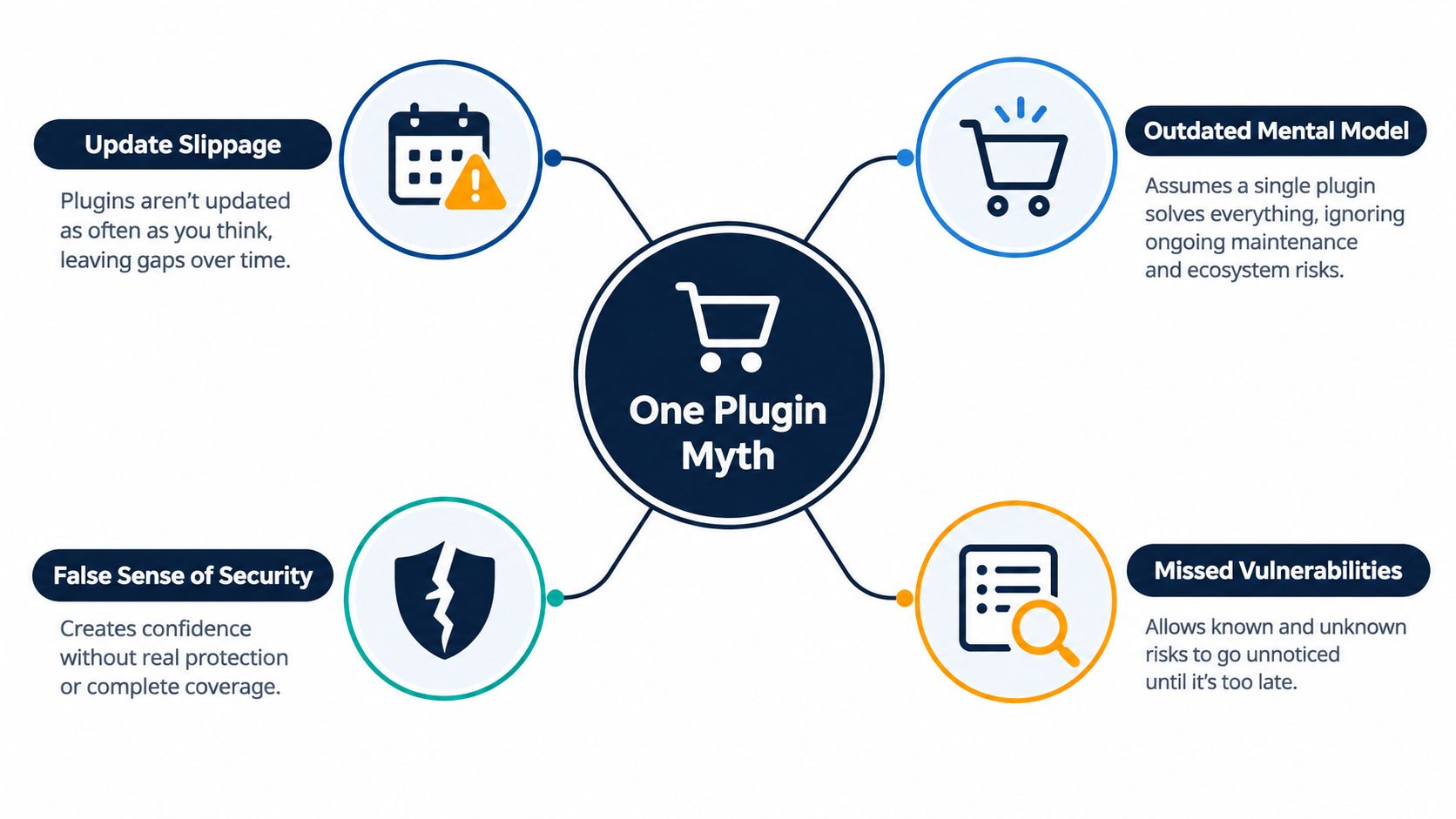
The “install one highly rated plugin and forget about maintenance” model fails because it treats every alert as equivalent. A plugin update on a low-risk brochure site doesn't carry the same operational consequence as a vulnerable extension on a store handling payments, even if both alerts appear in the same dashboard.
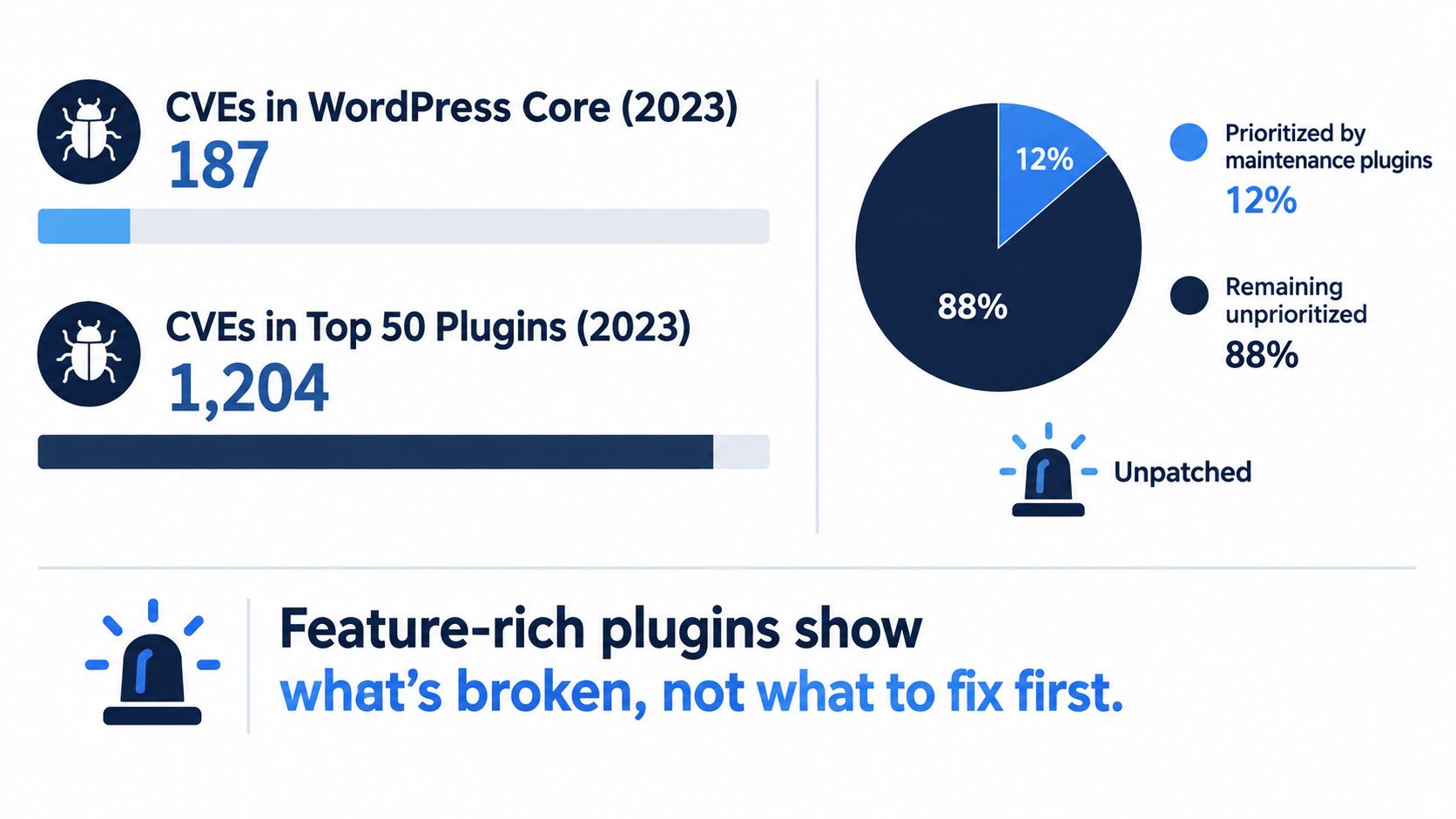
WordPress's security exposure also sits largely outside core. In 2024, 7,966 new WordPress ecosystem vulnerabilities were discovered, a 34% increase over the prior year, and 96% were in plugins rather than WordPress core, according to Cyber Unit's analysis of WordPress plugin security risk. The same reporting stream recorded 4,462 additional vulnerabilities in the first half of 2025, reinforcing the need for ongoing monitoring rather than occasional manual reviews.
Maintenance creates competing decisions
A maintenance suite may know that a plugin is outdated. It usually won't know whether the update should happen immediately, after staging validation, or during the next client-approved window. It may also show a backup as completed without proving that the backup can restore the site cleanly.
That gap creates familiar problems:
- Update slippage: Teams postpone alerts because the queue contains too many equally urgent-looking tasks.
- False confidence: A green status badge can hide a failed restore, an abandoned extension, or an unresolved vulnerability.
- Missed context: Generic severity doesn't account for checkout flows, membership access, lead forms, or client SLAs.
- Unowned backlog: Operators see work but lack a defensible order for completing it.
Agency rule: A maintenance plugin should report and execute. A separate decision layer should determine what earns the next engineering hour.
The rest of the stack should follow that distinction. Choose maintenance tooling for reliable change capture, recovery, and deployment. Then add prioritization only where the portfolio creates more competing work than a human can comfortably rank by hand.
What a WordPress Maintenance Plugin Must Actually Do
A credible maintenance plugin has four core responsibilities. If one is weak, the operator inherits the missing work manually.
Capture changes accurately
The plugin should track changes to WordPress core, plugins, themes, and relevant runtime components. Version numbers are useful, but they aren't enough on their own. Operators need to know what changed, when it changed, and whether the site's critical functions still work afterward.
An update queue that only says “available” encourages bulk clicking. A useful workflow connects the update to staging, rollback, compatibility checks, and post-deployment validation. That distinction matters most for WooCommerce, page builders, custom post type extensions, and plugins that share dependencies.
Keep recovery practical
Backups are valuable only when they're off-site, restorable, and verified. A scheduled backup that fails, excludes uploads, or cannot restore the database leaves the operator with a reassuring record and no dependable recovery path.
Recovery readiness also requires a clear restore owner. Teams should know where the backup lives, how to retrieve it, which restore method applies, and how they'll confirm that the restored site is complete. Treat restoration as an operational test, not as a checkbox inside a settings screen.
Monitor exposure
Security monitoring should cover known vulnerabilities, outdated software, abandoned extensions, and configuration conditions that increase risk. WordPress maintenance has become more security-sensitive because plugin exposure changes continuously, as the vulnerability reporting cited above demonstrates.
A scanner that identifies a CVE but offers no installed-component context still leaves the operator with research work. The useful output connects the finding to the affected site, installed version, patch status, and practical exposure.
Maintain signal hygiene
Alert volume is an operational problem. Emailing every update, warning, and advisory to every team member doesn't create accountability. It creates a queue people learn to ignore.
A maintenance system should distinguish routine work from material events, group related findings, and make the next action obvious. It should also preserve enough detail for an operator to explain the decision to a client or contractor.
| Core Job | What It Must Deliver | Failure Mode When Skipped |
|---|---|---|
| Change capture | Version tracking, update visibility, and validation context | Updates remain unnoticed or get applied without testing |
| Recovery readiness | Off-site backups with verified restore procedures | A failed update becomes a prolonged outage |
| Exposure monitoring | Vulnerability, age, abandonment, and environment signals | Known risk stays hidden inside a crowded portfolio |
| Signal hygiene | Actionable alerts grouped by urgency and ownership | Alert fatigue delays the work that matters |
The best maintenance plugin isn't the one with the longest feature list. It's the one that performs its assigned job consistently and hands clear information to the next layer.
Comparing the Four Main Plugin Archetypes
The WordPress maintenance market has four practical categories. They overlap, but each category optimizes for a different operating problem.
| Archetype | Core Strength | Main Weakness | Best-Fit Operator |
|---|---|---|---|
| All-in-one maintenance suite | Broad coverage from one interface | Usually shallow prioritization and limited workflow nuance | Freelancers with smaller portfolios |
| Security-first plugin | Vulnerability detection, hardening, and security controls | Often light on restore testing and deployment orchestration | Agencies focused on exposure management |
| Backup-and-restore specialist | Recovery depth and backup control | Doesn't necessarily explain vulnerability urgency | Operators with strict recovery requirements |
| Staging-and-deployment tool | Controlled change capture and release workflow | Usually doesn't provide broad vulnerability monitoring | WooCommerce and complex build teams |
All-in-one suites
An all-in-one suite reduces tool sprawl. That makes it attractive for a freelancer who maintains a manageable group of sites and wants one place for updates, backups, and basic security checks.
The tradeoff is depth. Broad coverage often produces a wide stream of findings without enough portfolio context to rank them. It's a sensible consolidation choice when the operator can still review the queue manually.
Security-first tools
Security-first plugins excel at exposure visibility, firewall controls, malware detection, and vulnerability signals. They're a strong choice when the primary concern is identifying attack surface and responding to active threats.
They shouldn't automatically become the backup or deployment system. Teams often get better results by pairing security monitoring with a backup specialist and a controlled release process. For a focused look at this category, review WordPress security plugin options.
Backup specialists
Backup-and-restore tools earn their place when recovery is the central risk. They often provide better control over storage, database handling, file selection, and restoration than broad maintenance suites.
They don't replace vulnerability intelligence. A clean backup can faithfully preserve a vulnerable plugin, so recovery and exposure monitoring must remain separate responsibilities.
Staging and deployment tools
Staging tools are designed for safer changes. They help operators test updates, compare environments, and push approved changes into production with less improvisation.
They usually won't tell you which vulnerability deserves immediate attention across an entire portfolio. That's why complex WooCommerce operations often combine deployment control with security and backup tooling.
My verdict: Smaller portfolios can consolidate. Larger or revenue-critical portfolios should accept a layered stack instead of forcing one plugin to perform every job.
A Week in the Life of a WordPress Maintenance Workflow
A 30-site agency doesn't experience maintenance as a single “update all” action. It runs a recurring sequence of collection, validation, recovery checks, communication, and escalation. The work is closer to managing workflows effectively than to pressing an update button.
Monday starts with reconciliation
The operator reviews dashboard messages, hosting-provider queues, vulnerability notices, uptime results, and client restrictions. The first task is reconciliation. A site may appear current in one system while another reports a failed update or a different plugin inventory.
The questions are operational:
- Should the team patch now or wait for staging?
- Does the affected plugin exist on production, staging, or both?
- Is the site inside a client-defined change window?
- Does the finding affect a payment flow, login, form, or editorial workflow?
A generic maintenance plugin provides raw status. It doesn't resolve those competing priorities.
Tuesday belongs to validation
Staging environments rarely behave uniformly across a portfolio. Some hosts provide reliable clones, some require manual preparation, and some make full-network validation difficult. The operator runs updates where staging is trustworthy, checks the site's important paths, and records exceptions where testing isn't possible.
The update process needs an explicit WordPress plugin update workflow, particularly when different sites use different hosting and deployment methods. “Tested” should mean more than “the dashboard loaded.”
Wednesday tests the safety net
Backup verification is the uncomfortable part of maintenance because many systems assume it happens automatically. The operator checks that recent backups exist, that the expected files and database are included, and that a restore path remains available.
A completed backup job isn't proof of recovery. The team needs enough evidence to trust the restore before it applies a risky update to production.
Thursday and Friday expose the human layer
Client reporting brings the exceptions to the surface. An update may conflict with WooCommerce, Elementor, a custom post type plugin, or a client's launch schedule. The operator then chooses between escalation, deferral, rollback, or a controlled production fix.
| Day | Primary Task | Decision Point | Plugin Coverage |
|---|---|---|---|
| Monday | Reconcile inventory and alerts | Which sites enter the active queue? | Collects status, rarely ranks business impact |
| Tuesday | Stage and validate updates | Patch now, test longer, or defer? | Supports updates when integrations are available |
| Wednesday | Verify backups and restores | Can the team recover if deployment fails? | May report backup completion, not restore confidence |
| Thursday | Prepare client reporting | What needs explanation or approval? | Provides records, not client judgment |
| Friday | Close exceptions and plan work | Escalate, absorb, roll back, or schedule? | Tracks tasks, while humans resolve conflicts |
A maintenance plugin stops where prioritization begins. The operator still has to compare risk, business importance, patch confidence, and available time.
The Prioritization Gap Most Plugins Leave Open
More detection doesn't automatically produce better maintenance. It can produce a larger queue.
The WordPress ecosystem illustrates why. A 2026 industry analysis reported that 52.8% of WordPress sites had at least one plugin with a known CVE at scan time, while Patchstack-based reporting cited 11,334 new WordPress vulnerabilities disclosed in 2025, with 91% in plugins. Those figures are documented in GuardingWP's state of WordPress security analysis. The practical issue for an operator isn't discovering another advisory. It's deciding which installed exposure deserves action before the others.
Detection and ordering are different products
Wordfence, Patchstack, and Solid Security can surface valuable signals. They can identify vulnerabilities, suspicious activity, hardening gaps, or affected components. The operator still has to rank those signals against site purpose, exploitability, patch availability, and client commitments.
The backlog changes quickly. On January 21, 2026, one report listed 180 publicly disclosed vulnerabilities, with 62 plugin and theme patches available and 118 still unpatched. By February 11, 2026, the disclosed total had reached 467, with 386 patches available. Later snapshots also showed changing patch coverage, including 225 disclosed vulnerabilities with 91 unpatched on April 1, 2026, and 68 disclosed with 4 unpatched on April 8, 2026, as documented in Vortex Media's vulnerability roundup.
That volatility makes “fix everything” a poor operating policy. Teams need an ordering model that separates:
- Exploitability: Is the vulnerability actively useful to an attacker?
- Exposure: Is the affected component installed and reachable on production?
- Impact: Would failure affect checkout, authentication, revenue, or reputation?
- Patch confidence: Is a tested fix available, or does remediation require replacement or mitigation?
Workload principle: A better dashboard doesn't solve an unranked queue. The queue needs a decision rule.
Resources such as MakeAutomation's guidance on managing workload reinforce the broader operational point. Prioritization is a discipline, not a cosmetic feature added to an alert list. A triage layer exists to order work, while the maintenance plugin remains responsible for carrying out approved actions.
Agency and Freelancer Scenarios That Change the Calculus
A freelancer maintaining a small group of brochure sites should not buy the same stack as a commerce agency. The software may be similar, but the cost of a wrong decision is different.
The 10-site freelancer
Consider a freelancer managing 10 low-traffic sites on shared hosting. Maintenance time is mostly unbillable, and a broken Elementor update can consume the margin from an entire client engagement. This operator needs reliable scheduled backups, basic security monitoring, clear update visibility, and a triage layer that filters findings against installed components.
The freelancer shouldn't build a sprawling operations center. A lean stack is easier to understand, easier to hand off, and less likely to create overlapping alerts. The maintenance plugin handles routine execution. The decision layer identifies which exception deserves attention before the next maintenance window.
The 40-site WooCommerce agency
A 40-site WooCommerce agency has a different risk profile. Checkout uptime, payment integrations, inventory synchronization, and promotional campaigns create business-critical dependencies. The same plugin vulnerability that can wait on a brochure site may need immediate staging, rollback preparation, and client communication on a store.
This agency needs stronger staging and deployment controls, verified recovery, and a ranking model that accounts for revenue exposure. Generic severity still matters, but it can't be the only signal. A critical issue on an isolated development clone shouldn't automatically outrank a high-impact issue on a production store.
| Dimension | 10-Site Freelancer | 40-Site Woo Agency |
|---|---|---|
| Primary constraint | Unbillable maintenance time | Revenue and uptime exposure |
| Preferred stack | Lean maintenance suite with reliable backups | Security, backup, staging, and centralized portfolio tooling |
| Update approach | Scheduled updates with selective staging | Staged releases, validation, rollback readiness |
| Triage context | Installed components and client importance | Exploitability, checkout impact, campaign timing, and SLA |
| What to avoid | Overlapping dashboards and redundant scanners | One-plugin dependency and untested bulk deployment |
The maintenance plugin choice follows portfolio shape. Starting with a favorite plugin and forcing every site into its workflow reverses the decision order.
Stacking a Triage Engine With Your Maintenance Plugin
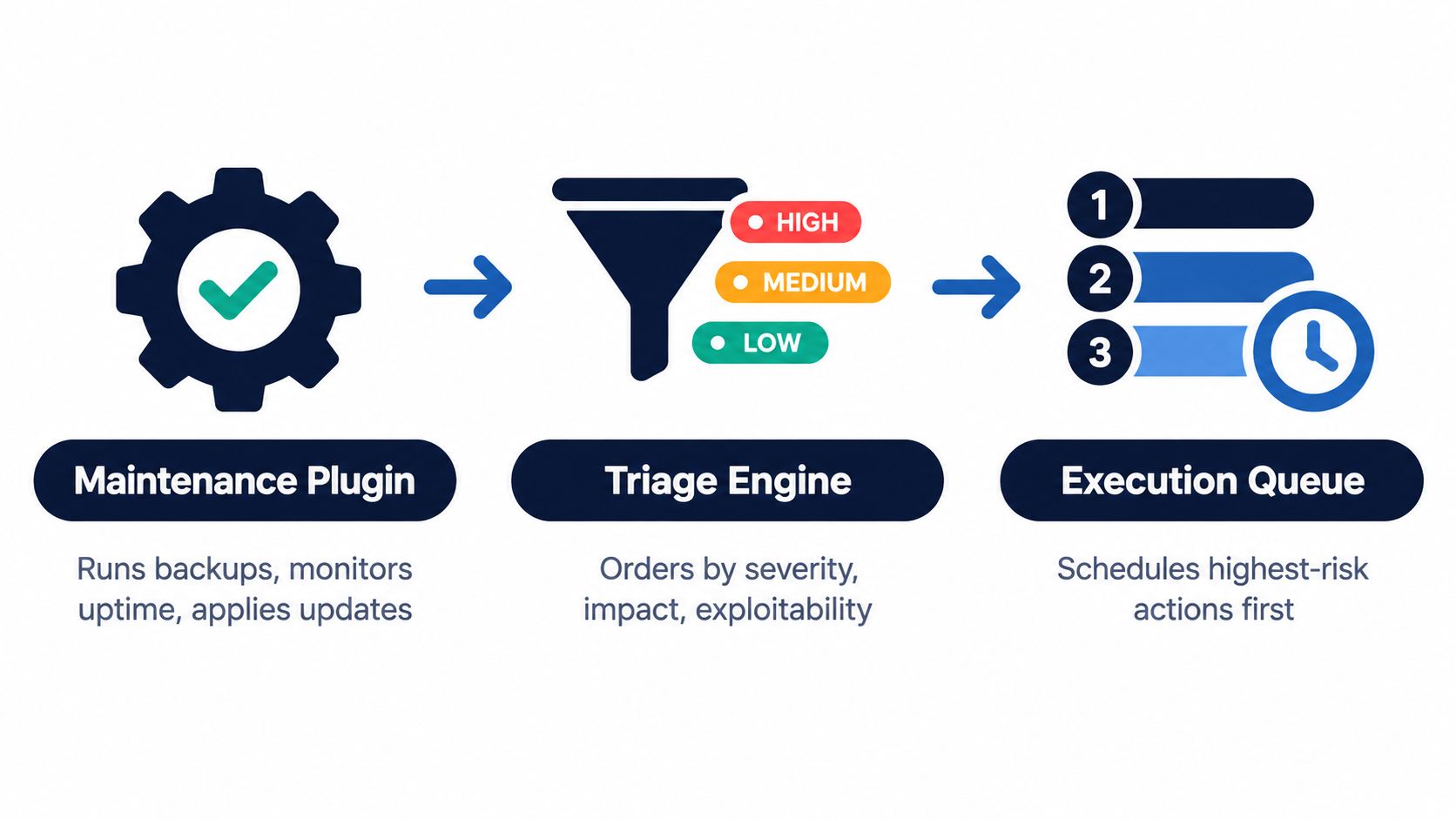
The clean architecture is simple: the maintenance plugin executes, the triage engine orders, and the operator approves exceptions. Don't duplicate backups, uptime monitoring, or update controls merely because a new tool offers them in a feature list.
A maintenance plugin or management platform emits raw signals. Those signals may include an outdated plugin, a failed uptime check, a suspicious file change, an unsuccessful backup, or a newly detected vulnerability. The triage layer adds portfolio context, then turns the findings into a ranked queue.
Keep the handoff explicit
A practical handoff has three stages:
- Collection: MainWP, ManageWP, a security plugin, or a site-level maintenance plugin reports versions, backups, uptime, and security findings.
- Classification: The decision layer evaluates severity, exploitability, software age, patch status, site role, and business criticality.
- Execution: The operator applies updates, restores a backup, stages a change, opens a ticket, or escalates to the client.
WP Triage fits the second stage. It takes inventory snapshots covering WordPress core, plugins, themes, and PHP, matches installed components against known vulnerabilities, and produces a 0–100 risk score with a ranked fix sequence. Its portfolio view uses risk bands and highlights the top issues per site, while execution remains in the tools the team already trusts.
The boundary matters during contractor changes and offboarding. If the triage layer owns backups or deployment credentials, removing it can disrupt the whole maintenance process. Keep credentials, execution ownership, and documented restore procedures inside the operational tools that perform those jobs.
For teams deciding whether a separate scanner is necessary, compare the role of a WordPress vulnerability scanner with the role of a prioritization layer. Detection tells you what exists. Triage tells you what should move to the front of the queue.
Use severity overrides deliberately
Portfolio context should be able to override a generic ranking. A payment-processing site, membership platform, or high-value client may deserve a higher operational priority than a static brochure site with the same component finding.
That override should be documented, not improvised. Record why the site moved up, who approved the exception, and what execution step follows. This keeps the queue defensible when another operator, contractor, or client asks why a different issue waited.
Choosing the Right Maintenance Stack for Your Portfolio
Start with the portfolio, not the plugin directory. Count the sites you actively support, identify which ones process transactions or member data, map available staging environments, and document who owns restoration when an update fails.
| Operator Profile | Maintenance Plugin | Centralization Layer | Triage Layer | What to Skip |
|---|---|---|---|---|
| Freelancer under 10 sites | Lean suite covering backups and security | Hosting uptime checks or a simple dashboard | Portfolio risk ranking | Redundant scanners and overlapping backup tools |
| Agency with 20 or more sites | Site-level execution tools matched to each host | MainWP or ManageWP | Cross-site severity and fix order | Replacing reliable execution tools just for a larger feature list |
| WooCommerce or membership portfolio | Backup and deployment tooling with staging support | Centralized management dashboard | Business-critical and payment-flow tagging | Blind bulk updates and generic severity-only queues |
| Internal multi-site team | Standardized maintenance tooling | Shared reporting and ownership workflow | Consistent portfolio scoring | Unowned alerts and undocumented exceptions |
Use this checklist before switching:
- Define the decision: Do you need better backups, safer deployment, vulnerability detection, or work ordering?
- Test recovery: Verify that the backup process can support an actual restore.
- Map critical paths: Identify checkout, login, forms, subscriptions, and custom integrations.
- Separate execution: Keep updates and restores in tools designed to perform them.
- Reduce overlap: Don't pay for duplicate scanners or dashboards unless they serve distinct operational roles.
- Set ownership: Every alert category needs a person, deadline, and escalation path.
The common waste is feature overlap. A plugin that looks essential during procurement often becomes another ignored dashboard once the team has to reconcile it with existing tools. Buy the layer that solves your actual bottleneck, then keep the handoff clear.
WP Triage adds a portfolio-level decision layer that turns WordPress, plugin, theme, PHP, and vulnerability signals into risk scores and ranked fixes. Visit WP Triage to see how it can help your team decide which maintenance action should happen first without replacing the execution tools you already use.