It's Tuesday afternoon. A mid-size WordPress agency has dozens of client sites, a scanner has filled the dashboard with hundreds of findings, and only a few developers are available before the workday ends. The team can patch some issues, but not everything. The difficult decision isn't whether to remediate vulnerabilities. It's which fixes deserve attention before the queue grows again.
That's the operational reality behind vulnerability remediation prioritization. A fast team can still reduce security if it spends its limited patching capacity on the wrong findings. Severity matters, but exploit activity, exposure, asset value, ownership, and remediation effort determine whether a vulnerability is urgent on a particular WordPress site.
Table of Contents
- Why Prioritization Matters More Than Patching Speed
- How Risk Scoring Actually Works
- The Signals That Move a Fix to the Top
- Comparing Prioritization Frameworks
- Building Your Remediation Playbook
- When the Queue Itself Becomes the Risk
- Your Monthly Triage Rhythm
Why Prioritization Matters More Than Patching Speed
A WordPress portfolio can show a critical plugin flaw on a parked brochure site, a medium-severity form-plugin issue affecting revenue-generating sites, and a high-severity weakness on an internal staging installation. A scanner places all three in the same workflow. The risk does not match.
With only a few developers available, selecting tickets by CVSS alone can produce an impressive closure count while an internet-facing checkout weakness remains open. The dashboard looks cleaner, but the business exposure may be unchanged. Ownership and patch latency matter too. A finding assigned to an unresponsive client contact can remain risky longer than a technically worse issue with a ready maintainer.
The 2020 study summarized by Picus Security's analysis of CVSS limitations found that remediating every vulnerability with a CVSS score of 7 or higher would cover slightly over 74% of exploited cases, but with only 9% efficiency and 57% accuracy. In WordPress operations, that trade-off creates busywork around findings that are not driving the immediate threat.
A severity score is useful for sorting. It cannot decide which client should receive a call, which owner can deploy safely, or how long an exposed site can wait.
The backlog changes the decision
Patching everything sounds responsible until new findings arrive faster than the team can close them. The same study found that only about 5.5% of organizations remediate more vulnerabilities than they discover during a given period, according to the underlying vulnerability prioritization discussion. A portfolio therefore needs an explicit queue, service-level expectations, and a review date for deferred work.
That decision affects more than ticket counts:
- Engineering capacity: Assign developers where a fix can reduce meaningful exposure.
- Alert fatigue: Keep low-context findings from competing with urgent work.
- Exposure windows: Move reachable or actively exploited weaknesses ahead of theoretical issues.
- Client communication: Give account owners a clear reason one site moved ahead of another.
- Ownership latency: Escalate tickets that are technically understood but waiting on approval, testing, or access.
Practical rule: Measure the risk removed by completed fixes, not only the number of tickets closed.
Prioritization does not excuse ignoring the long tail. It sets what waits, why it waits, who owns the next action, and when the decision is reviewed. On a busy Tuesday, that discipline helps the team fix the vulnerability that matters instead of the one that was easiest to understand.
How Risk Scoring Actually Works
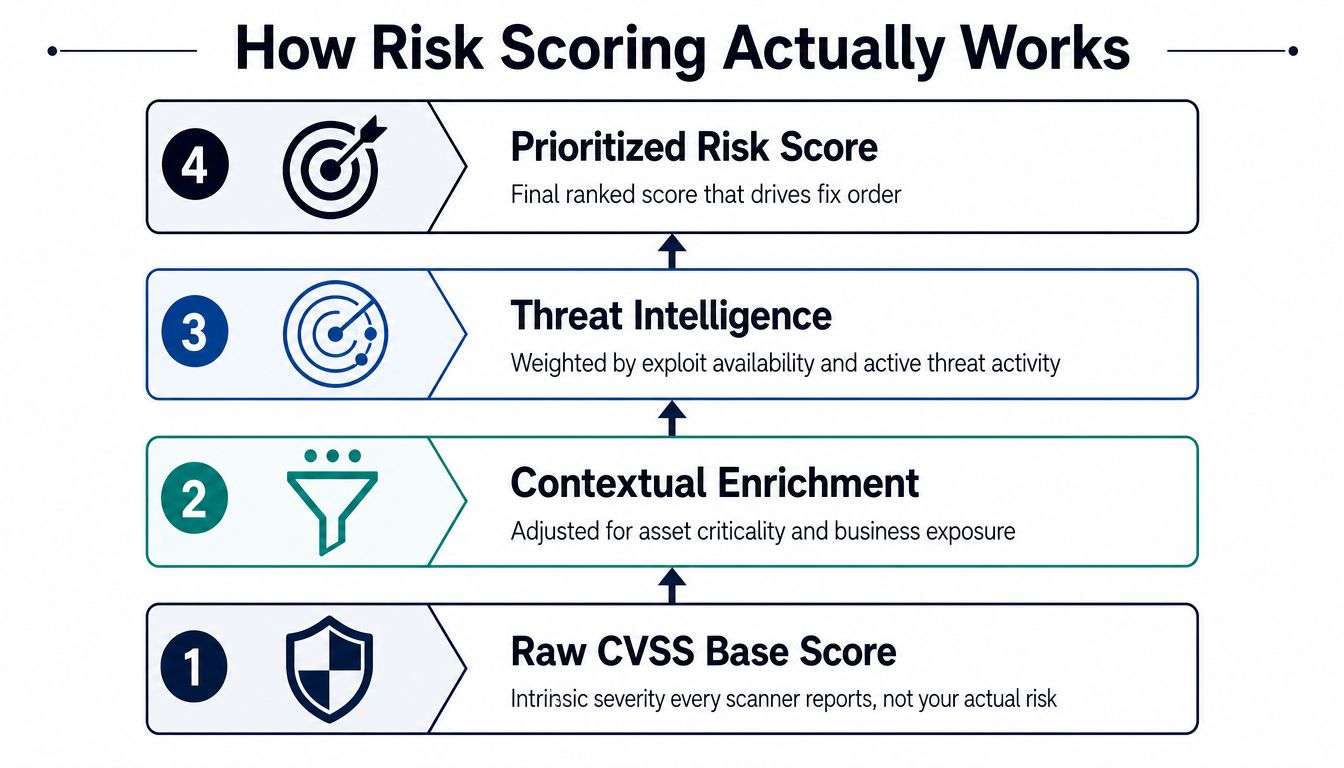
Risk scoring works best as a layered model rather than a single number copied from a scanner. Start with technical severity, add environmental context, bring in threat intelligence, and then turn the combined view into a ranked queue.
Start with CVSS, but stop there
CVSS describes the intrinsic technical severity of a vulnerability. It helps answer, “How damaging could this flaw be if successfully exploited?” It doesn't know whether the affected WordPress site is public, whether the vulnerable component is active, whether a WAF blocks the request, or whether the asset processes customer orders.
That's why two vulnerabilities with similar CVSS scores can require completely different treatment. A high score on an unused widget installed on an isolated staging site may wait. A lower score in a public-facing membership or checkout flow may move ahead if attackers can reach it and the asset has meaningful business value.
The FIRST CVSS specification explicitly states that base scores shouldn't be used alone for prioritization. Treat CVSS as the severity layer, not the final decision.
Add likelihood and confirmed exploitation
EPSS, the Exploit Prediction Scoring System, adds an exploitation-likelihood signal. It estimates the probability that a vulnerability will be exploited in the wild within the next 30 days, according to the verified description in this brief. That gives the queue a time-sensitive dimension that CVSS doesn't provide.
CISA's Known Exploited Vulnerabilities catalog adds a stronger operational signal. A KEV entry requires a CVE identifier, reliable evidence of active exploitation in the wild, and a clear remediation action, such as a vendor update, as described by CISA's KEV program. A KEV-listed vulnerability affecting a publicly exposed WordPress plugin should normally outrank a similar non-KEV finding.
CISA also frames SSVC around exploitation status, technical impact, automatability, mission prevalence, and public well-being impact. That approach uses decision points instead of relying only on a composite score.
For a practical queue, read the signals together:
- CVSS: How severe could the outcome be?
- EPSS: How likely is exploitation soon?
- KEV: Is active exploitation already documented?
- Asset context: Can an attacker reach this site, and what would compromise affect?
A risk score is useful only when it produces an order of work that reflects those questions. The WP Triage explanation of risk scores offers additional context on how a WordPress-focused decision model can translate multiple signals into a practical sequence.
The Signals That Move a Fix to the Top
Raw severity is only one input. In a WordPress portfolio, four additional signals usually determine whether a finding moves to the front of the queue or becomes scheduled maintenance.
| Signal | What It Measures | Push to Top | Push Down |
|---|---|---|---|
| Exploitability | Evidence that attackers can or are trying to use the flaw | Public proof of concept, KEV listing, exploit-kit use, ransomware association, or active scanning in logs | No known exploitation, difficult attack path, or effective blocking control |
| Asset value | Business consequence if the site is compromised | Checkout, member accounts, customer data, lead capture, or critical publishing workflows | Parked, low-value, or disposable brochure site |
| Exposure | How reachable the vulnerable component is | Internet-facing production site, unauthenticated endpoint, or weak perimeter controls | Restricted staging site, authentication barrier, segmentation, or validated compensating control |
| Software age and reach | Lifecycle risk and portfolio-wide blast radius | Abandoned plugin, unsupported WordPress or PHP version, or one component installed across many important sites | Maintained software with a tested update path and limited portfolio presence |
Exploitability changes urgency
A vulnerability with public exploit code deserves more attention than one with no practical attack path. Active scanning in access logs is another strong escalation signal, especially when the requests target a publicly reachable plugin or endpoint.
A KEV match should trigger immediate review rather than wait for the next routine maintenance cycle. The question isn't whether every KEV issue causes an incident. It's whether the evidence of active exploitation makes delay difficult to justify.
Business value prevents bad rankings
Asset value is where WordPress triage becomes specific. A medium-severity flaw in a form or commerce plugin installed across 12 checkout sites may deserve priority over a critical widget flaw on a single static brochure site. The score on the finding hasn't changed. The consequences and reach have.
Look at what the site does:
- Commerce: Checkout, payment, order, and account functions increase the cost of compromise.
- Identity: Member login and administrator workflows create valuable attack paths.
- Lead generation: Public forms can expose customer data or provide an abuse route.
- Publishing: High-traffic or reputation-critical sites may warrant faster response than their technical classification suggests.
Age and reach amplify portfolio risk
An abandoned plugin creates more than a single vulnerability. It may indicate that updates are unavailable, compatibility testing is uncertain, and future findings will remain unresolved. A vulnerable component used across many client sites also deserves portfolio-level handling because one remediation decision may reduce exposure in several places.
The SigOS bug prioritization guide provides useful background on combining impact, urgency, and practical remediation considerations rather than treating every issue as an isolated score.
Signals compound. A public-facing checkout site running an old plugin with a KEV-listed flaw has exploitability, asset value, exposure, and lifecycle boosters at the same time. That combination should produce a same-day owner and a clearly documented response, not another item in a shared inbox.
Comparing Prioritization Frameworks
No framework eliminates judgment. Each one makes different trade-offs, and the right starting point depends on the maturity of the portfolio, the quality of asset data, and how much operational complexity the team can sustain.
| Framework | Primary Inputs | Strength | Main Blind Spot | Best Fit |
|---|---|---|---|---|
| CVSS-only | Base severity score | Simple, familiar, and available in most scanners | Ignores local exposure, exploit likelihood, and business value | Small teams needing a basic starting point |
| EPSS-augmented | CVSS plus exploitation probability | Adds time-sensitive threat likelihood | Global prediction doesn't prove exploitability on a specific site | Teams ready to move beyond severity |
| KEV-driven | CISA KEV status plus asset context | Responds to documented active exploitation | Misses vulnerabilities not yet cataloged | Internet-facing portfolios needing a hard escalation rule |
| SSVC | Exploitation, technical impact, automatability, mission prevalence, and public well-being impact | Produces defensible decisions through structured logic | Requires maintained decision trees and consistent inputs | Organizations with governance and defined risk owners |
| Risk-scored | Severity, likelihood, exposure, asset value, lifecycle, and fix feasibility | Reflects the actual operating environment | Depends on accurate inventory and ongoing enrichment | Agencies and teams managing multiple sites |
CVSS-only remains useful, but only as a baseline
CVSS-only triage is attractive because it requires almost no setup. The problem is that it tends to flood the queue with medium and high findings that look similar even when their attack paths differ. It works as a first pass, especially when asset context is missing, but it shouldn't remain the final authority.
EPSS and KEV add threat context
EPSS-augmented prioritization answers a question CVSS can't: which flaws are more likely to be exploited soon? KEV-driven triage is even more direct because it uses documented exploitation evidence. The trade-off is coverage. A newly disclosed zero-day may be dangerous before it appears in KEV, and an EPSS score can't tell you whether your specific WordPress configuration is reachable.
SSVC is rigorous but operationally demanding
SSVC can produce consistent decisions when teams maintain the underlying decision points. In smaller agencies, however, the process can become another form to complete rather than a decision engine. If ownership data is weak, a decision tree still ends with an unassigned ticket.
Mature teams blend methods
A practical WordPress model often combines CVSS for impact, EPSS and KEV for threat activity, and local context for exposure and asset value. The framework matters less than whether it produces a ranked queue, names an owner, and triggers verification after the fix.
Building Your Remediation Playbook
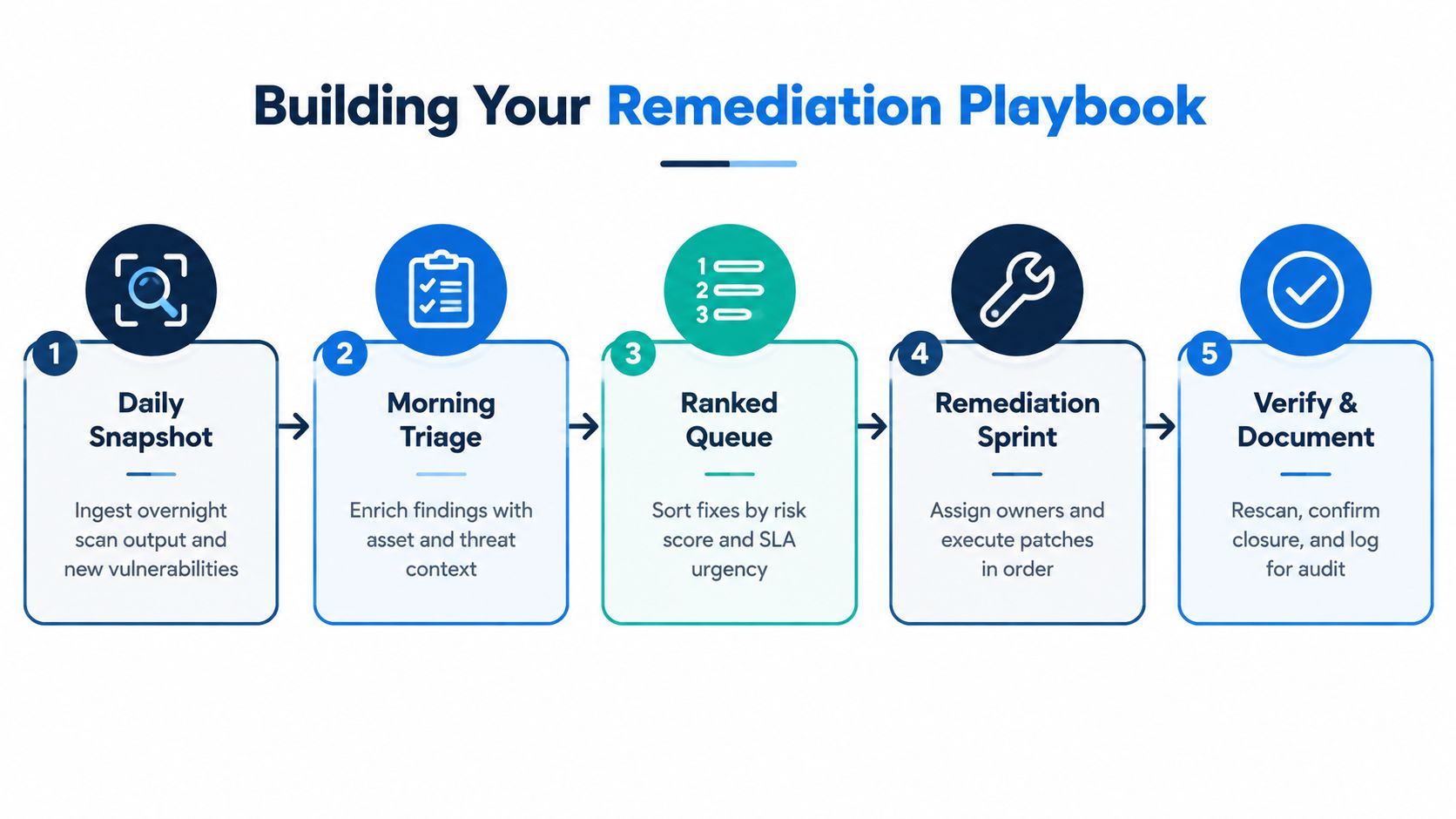
A score doesn't patch a plugin. The playbook connects a finding to a person, a deadline, a change process, and a verification result.
Start with a daily snapshot
The morning snapshot should capture new vulnerabilities, changed exploit signals, failed updates, outdated software, and changes in site exposure. For WordPress, that means reviewing core, plugins, themes, and PHP versions across the portfolio instead of waiting for a client to report a broken or suspicious site.
Enrich every finding with the details the scanner usually lacks:
- Production, staging, or development status
- Internet-facing or restricted exposure
- Commerce, membership, form, or brochure function
- Named technical owner and client contact
- Available update, mitigation, or replacement
- Required testing and rollback path
Rank, assign, and set the SLA
The ranked queue should make the next action obvious. A critical issue on a WooCommerce checkout endpoint may require a 24-hour patch window, while a brochure site may tolerate a 14-day window, and an internal staging environment may be deferred until the next planned maintenance cycle. Those are policy examples for asset classes, not universal standards. The important point is that the SLA reflects consequence and exposure rather than treating every site identically.
Assign one remediation owner. A team or shared mailbox can remain a notification target, but one person needs responsibility for testing, deployment, and closure evidence.
The Nutmeg Technologies vulnerability remediation process is a useful reference for connecting identification, remediation, and reporting into one operational workflow. For a WordPress-specific planning template, teams can also use the WP Triage remediation plan example.
Verify the change
A ticket isn't closed because someone clicked “update.” Rescan the site, confirm the vulnerable version is gone, test the affected workflow, and record the result. For a checkout site, test product selection, cart, payment handoff, order confirmation, and administrator access as appropriate to the change.
Use the playbook as the artifact that proves the decision was made deliberately:
- Daily Snapshot: Ingest new and changed findings.
- Morning Triage: Add exposure, asset, and threat context.
- Ranked Queue: Order work against risk and SLA urgency.
- Remediation Sprint: Assign and execute fixes.
- Verify and Document: Rescan, test, and record closure.
A short video walkthrough can help junior administrators understand how a structured workflow moves from discovery to remediation.
When the Queue Itself Becomes the Risk
An accurate score won't produce a fix if nobody owns the finding. This is the failure mode many vulnerability programs miss. Teams invest in better ranking, then route the resulting queue to a shared inbox, hold a review meeting, and assume remediation will follow.
It often doesn't. Findings age without escalation, developers receive alerts with little context, and the same issue appears repeatedly across scans. Eventually, people stop trusting the queue and begin dismissing alerts before they understand them.
Ownership must exist outside the scanner
Asset ownership changes faster than scanner configuration. A site may move from one account manager to another, a developer may lose deployment access, or a client may change hosting providers. Maintain a separate ownership matrix that maps each production site and major component to a named technical owner, backup owner, client contact, and escalation path.
Every finding should carry enough context to act without another meeting:
- Affected asset: The exact site, environment, plugin, theme, or core version.
- Reason for priority: Exploit status, exposure, asset value, or lifecycle concern.
- Required action: Update, replace, disable, isolate, or apply a documented mitigation.
- Deadline: The SLA and the date when escalation begins.
- Verification method: Rescan, functional test, or both.
A queue without ownership is not a plan. It's a list of future disagreements.
Latency needs active management
Weekly triage meetings often identify the same old problems without assigning anyone to resolve them. Replace passive review with explicit operating controls:
- Named owners: Assign one person to every priority finding.
- Aging alerts: Notify the owner when half of the SLA has passed, then escalate at the deadline.
- Daily fix windows: Reserve predictable time for the highest-ranked remediation work.
- Burn-down reviews: Discuss what remains open, why it remains open, and what decision changes next.
- Exception records: Document accepted risk, compensating controls, and a review date.
Manual workflows are a major bottleneck. The verified Axonius data in this brief reports that more than a third of teams run fully manual workflows, while 55% say they're ineffective at completing prioritized exposures on time. The same source reports that vulnerabilities account for 42.6% of critical exposure, but only 7.8% of vulnerability alerts are validated as exploitable and classified as Critical or High. These figures point to a practical issue: a large alert stream can still contain a much smaller action set.
Teams also face a speed mismatch. The verified Axonius summary cites a mean time to exploit of negative seven days, while another finding in the same brief notes that critical remediation can average five months and ten days in complex enterprise applications. A queue that takes longer to process than attackers take to exploit can become the risk-control failure.
The WP Triage guide to alarm fatigue is relevant here because reducing noise isn't cosmetic. It protects attention, and attention is part of remediation capacity.
Your Monthly Triage Rhythm
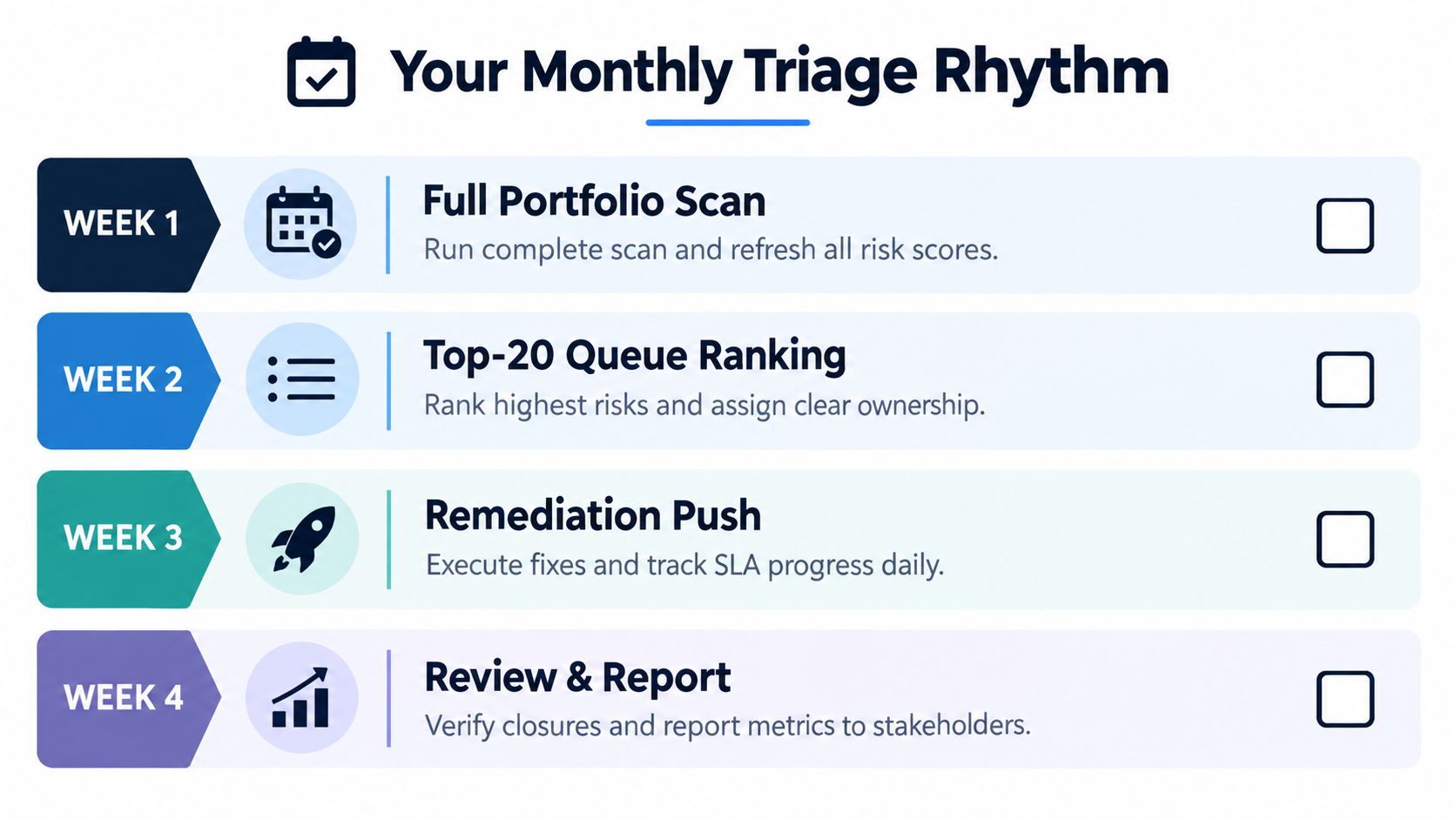
A repeatable rhythm keeps prioritization from turning into an emergency exercise. Use the first week to rescan the full portfolio and refresh risk scores. In the second week, rank the top 20 findings, confirm ownership, and resolve missing asset context.
Week three is the remediation push. Execute fixes, monitor SLA progress daily, rescan completed work, and test critical client workflows. Week four is for exceptions and reporting, including accepted risks, delayed fixes, recurring ownership problems, and changes in portfolio exposure.
Produce four artifacts every cycle:
- Ranked vulnerability list: Finding, asset, risk reason, owner, SLA, and status.
- Ownership matrix: Site, environment, technical owner, backup, and escalation contact.
- SLA compliance snapshot: Open, closed, overdue, and accepted-risk items by asset class.
- Slip post-mortem: A short explanation for every fix that missed its deadline.
Track whether the process is improving with four focused measures:
- Mean time to remediate by severity tier.
- Percentage of KEV-listed vulnerabilities closed within seven days.
- Age of the oldest unfixed critical vulnerability.
- Ratio of vulnerabilities closed versus newly discovered.
Give a junior administrator this checklist:
- Confirm the latest portfolio snapshot.
- Check for KEV matches and active exploit evidence.
- Verify production exposure and asset value.
- Confirm the named owner.
- Apply the correct asset-class SLA.
- Test and rescan every completed fix.
- Escalate aging tickets before they become overdue.
- Record exceptions and review dates.
WP Triage provides portfolio-level WordPress snapshots, known vulnerability matching, risk bands, 0–100 site scoring, and a ranked top-three fix sequence for connected sites. If your team needs a decision engine to turn multi-site findings into an ordered maintenance queue, visit WP Triage and review how it can fit alongside the tools you already use.