You're probably in one of two situations right now. Either you launched a WooCommerce store with whatever gateway was fastest to install, or you inherited a stack where nobody wants to touch payments because “it works well enough.” That complacency usually lasts until a gateway update, plugin conflict, or checkout spike turns a normal sales day into a support queue.
I've seen the same pattern across agencies and in-house teams. They compare fees, maybe glance at wallets and currencies, then call it done. That's too shallow. Gateway choice is really about portfolio risk, basket quality, operational brittleness, and how much pain your team absorbs when checkout breaks on a Friday night.
WooCommerce gives you plenty of options. Industry summaries in 2026 describe support for 65+ gateways, while broader WooCommerce statistics pages describe more than 100 gateways through official and third-party extensions, which is exactly why teams make this harder than it needs to be (Colorlib). More choice doesn't mean better decisions. It usually means more ways to standardize badly.
Table of Contents
- The Gateway Decision Nobody Gets Right the First Time
- What a WooCommerce Payment Gateway Actually Does
- Comparing the Major WooCommerce Gateways
- Security, PCI Scope, and Fraud Protection
- Why Gateway Choice Is Really a Revenue Mix Decision
- Plugin Compatibility and Developer Experience
- Rolling Out Gateways Across a Multi-Site Portfolio
- Which Gateway Fits Which Store
The Gateway Decision Nobody Gets Right the First Time
A familiar story. An agency runs several mid-sized WooCommerce stores on the same gateway setup for two years. Nobody complains. Refunds work, payouts arrive, subscriptions mostly renew, and the checkout conversion rate looks acceptable.
Then peak traffic hits, checkout starts failing, and the team spends the weekend disabling plugins, rolling back updates, chasing webhook logs, and trying to answer the client's only question: why did payment fail when the storefront was still up?
The Monday postmortem is always uglier than the initial outage. The issue usually isn't one dramatic bug. It's stacked fragility. A gateway plugin update changed how payment intents were handled. A theme tweak altered checkout rendering. A security rule blocked a callback. A caching layer held onto something it shouldn't. The gateway didn't “go down.” Your payment path became too brittle to survive normal change.
Practical rule: If a gateway only looks good in a features table, you haven't evaluated the part that hurts in production.
Pick a gateway the way shoppers compare appliances. Ask which one supports Apple Pay, which one handles subscriptions, which one has lower fees. Fair questions. Wrong priority.
The better question is this: what fails first in your stack when WooCommerce core, PHP, plugins, and checkout scripts all move at different speeds?
That's why the usual “best WooCommerce payments gateways” listicles aren't enough. They flatten a real operational decision into a checklist. They also ignore the awkward truth that your payment mix changes the type of orders you get, not just the way customers pay.
If you manage multiple stores, the gateway decision isn't isolated to one client. You're choosing what your team has to support, debug, migrate, and defend later.
What a WooCommerce Payment Gateway Actually Does
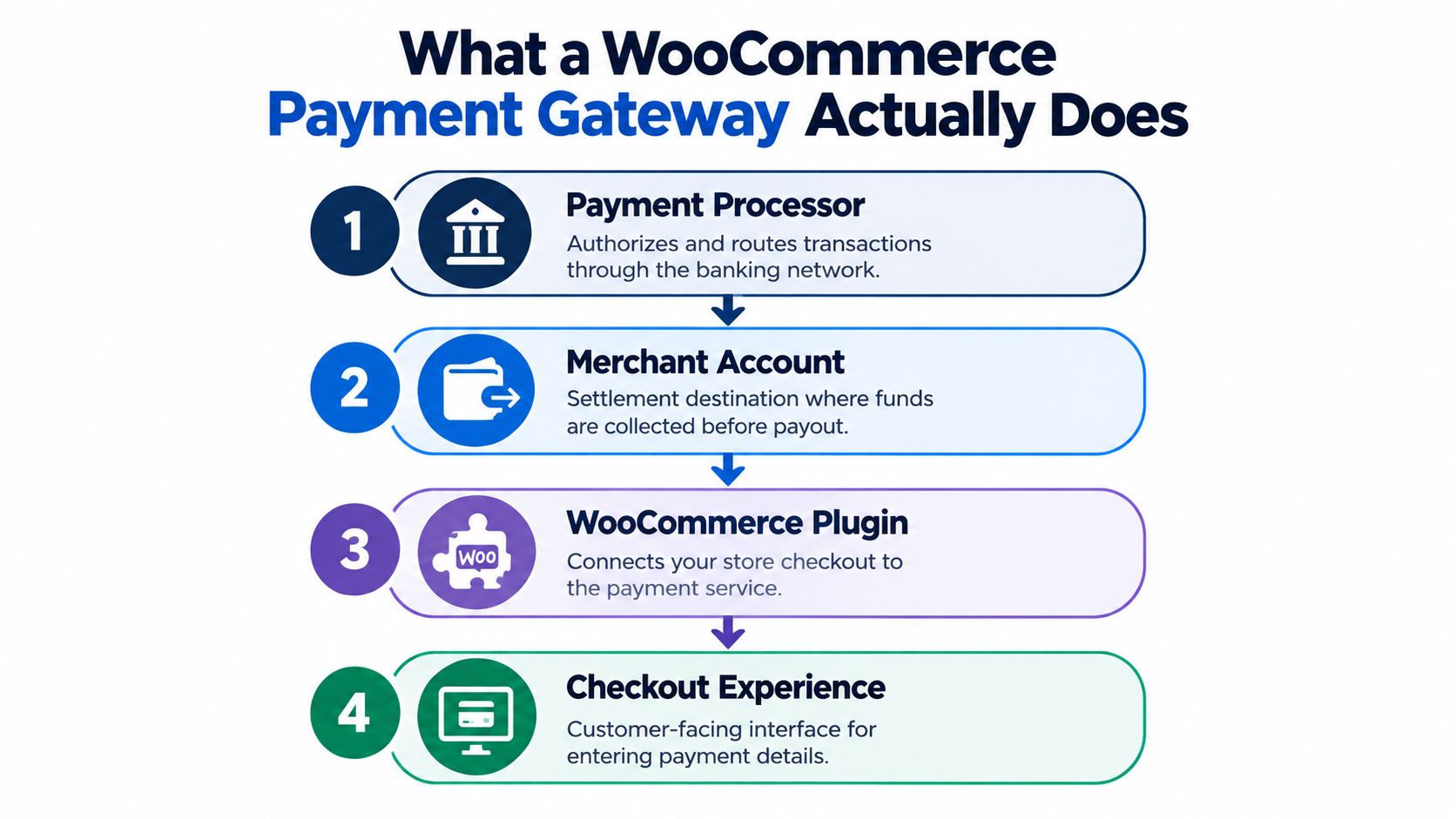
A WooCommerce payment setup is a chain of separate systems. WooCommerce runs the catalog, cart, checkout logic, taxes, and order records. The gateway service and its plugin connect that order flow to card networks, wallets, bank rails, fraud checks, token storage, and payouts.
That separation matters because payment failures rarely come from one place. The customer can submit a valid order while the plugin mishandles the response, a webhook never reaches the site, or the processor declines a transaction that the checkout UI made look accepted. If you manage stores for clients, this is the difference between a clean support path and a messy blame cycle.
The four layers that actually matter
A working payment stack usually includes four parts:
Payment processor
The processor authorizes and routes the transaction through the banking side of the payment flow.Merchant account or settlement destination
Captured funds land here before payout reaches your business bank account.WooCommerce plugin
The plugin translates WooCommerce events into the gateway's API calls. It also handles webhooks, tokenized cards, refunds, saved methods, subscription renewals, and status updates.Checkout surface
The customer interacts with this layer. It might be a redirect, hosted fields, an embedded card form, wallet buttons, or a mix of those patterns.
Any weak layer can drag down the whole path.
The plugin is usually where operational cost hides. It decides whether an order moves cleanly from pending to paid, whether a refund syncs back correctly, whether a failed renewal retries properly, and whether saved cards survive account updates without creating support tickets. Two gateways with the same headline features can behave very differently here, and agencies feel that difference fast across a portfolio.
Checkout design changes risk as much as conversion. A hosted flow usually reduces PCI exposure and gives your site less to break. An embedded flow can lift basket completion for higher intent shoppers, but it also adds more JavaScript, more theme sensitivity, more checkout conflicts, and more maintenance after plugin and WooCommerce updates.
This is why gateway choice is a basket-quality decision, not just a payment-method decision.
Low-AOV impulse stores can tolerate a simpler, more hosted path if it stays stable and cheap to support. High-AOV stores, subscription stores, and stores with a lot of returning customers need cleaner token handling, better off-session payment behavior, and fewer edge-case failures around retries, expired cards, and partial captures. If those flows are weak, your payment stack starts filtering out the orders you want most.
Treat the gateway as a service layer with its own failure modes, support burden, and maintenance bill. That gives you a much better read on which setups will hold up in production.
Comparing the Major WooCommerce Gateways
A store doing fine on one gateway can still be carrying bad payment risk. I have seen agencies switch processors to shave a few basis points, then spend the next six months cleaning up failed renewals, confused refunds, and checkout bugs across ten client stores. The right comparison is not feature count. It is basket quality, operational fragility, and how much support debt the plugin creates.
Major WooCommerce payment gateways at a glance
| Gateway | Typical fee (card) | Geographic fit | Settlement view | Best fit | Main risk |
|---|---|---|---|---|---|
| WooPayments | Varies by country and account terms | Broad international coverage, as noted in this gateway comparison | Managed inside WooCommerce | Standard stores that want fewer dashboards and fewer training issues for support staff | More platform constraint if you need custom payment flows or unusual business logic |
| Stripe | Varies by country and account terms | Broad global fit | Via Stripe account | Agencies managing customized stores, subscriptions, or higher-AOV checkouts | More options means more decisions, and bad setup can create its own complexity |
| PayPal | Varies by country and account terms | Strong buyer recognition in many markets | Via PayPal account | Secondary wallet option that lifts trust for certain customer segments | Weak choice as the only gateway if you want tighter checkout control and cleaner ops |
| Square | Varies by region and account terms | Better fit where Square already runs POS and retail operations | Via Square account | Stores that need online and in-person sales tied together | Less attractive for stores with broader international or subscription-heavy requirements |
| Authorize.net | Varies by merchant arrangement | Best fit in US-centric setups | Via merchant account setup | Established B2B or legacy merchant-account environments | More setup overhead, older workflows, and more moving parts to maintain |
| Regional option such as Mollie or Razorpay | Varies by market and method | Strong in the markets they actually serve | Depends on provider | Stores where local methods materially affect conversion | Another plugin, another support path, and another point of failure in the stack |
What I'd actually recommend
Stripe is the best default for agencies and developers managing multiple WooCommerce stores. It gives you the cleanest path when stores grow more complex, when AOV rises, or when you need better handling for subscriptions, saved payment methods, and custom checkout logic. It usually costs less in maintenance than it first appears, because the plugin and API model are easier to work with under change.
WooPayments is the best default for simpler stores that want operational convenience over flexibility. Support teams like it because they can manage orders, payouts, and basic payment admin in one place. That convenience is real. So is the tradeoff. If the store later needs more control over payment behavior, you will hit the edges faster.
PayPal belongs on many stores, but rarely as the only gateway. It works best as a trust layer and alternate payment path. It works worse as your primary processor if you care about consistent checkout control, tidy dispute handling, and fewer odd edge cases for support.
One data point is worth paying attention to. Analysts cited by Stacked Review found clear differences in average order value by payment method across a very large WooCommerce order set. Bank transfer came in highest, with Stripe above PayPal and WooPayments in that sample. Do not treat that as a universal ranking. Do treat it as a warning. Gateways shape who completes checkout and what kind of basket gets through.
Choose for payment mix, not just acceptance rate
High-AOV stores, subscription stores, and stores with repeat buyers should bias toward gateways that handle tokenization, off-session charges, retries, and account updates cleanly. Stripe usually wins that argument.
Catalogs with older buyer demographics, strong wallet preference, or a trust gap at checkout should add PayPal, even if it is not your operational favorite.
Square is the right answer when retail POS is already part of the business. Authorize.net still fits some US B2B setups where the merchant account structure is already in place and nobody wants to rebuild finance operations around a new processor.
If you sell regulated or restricted products, approval risk changes the shortlist before checkout UX even enters the conversation. Read this guide to avoid payment gateway rejections WooCommerce before you commit to a processor that accepts your application but rejects your actual catalog.
My rule is simple. Migrate gateways to improve basket quality, reduce support load, or remove a technical constraint that is already costing real money. Do not migrate for tiny fee deltas that disappear into plugin maintenance, failed edge-case payments, and agency cleanup time.
Security, PCI Scope, and Fraud Protection
Friday night. A checkout customization goes live across six client stores. Orders still process, so everyone relaxes. Two weeks later, one store gets hit with card testing, another fails a PCI questionnaire nobody expected to answer, and your agency is now paying for a "small UX improvement" with fraud cleanup, support tickets, and compliance work.
That is how gateway risk shows up in WooCommerce. Not as a feature gap. As operational fragility.
PCI scope starts with checkout architecture. Hosted fields, wallet redirects, and standard tokenized flows usually keep card handling more contained. Heavily embedded or custom-rendered payment experiences give you more control over branding, but they also create more ways for theme code, scripts, or checkout plugins to interfere with how sensitive payment data is handled.
PCI Scope and Fraud Tools by Gateway
| Gateway | Typical SAQ Level | Built-in Fraud Tool | 3D Secure 2 | Dispute Flow |
|---|---|---|---|---|
| WooPayments | Often lower scope with standard hosted elements | Platform-managed fraud controls | Supported | Managed inside WooCommerce workflow |
| Stripe | Often lower scope with hosted elements, broader exposure if heavily customized | Stripe Radar | Supported | Managed in Stripe with WooCommerce plugin coordination |
| PayPal | Often lower scope due to wallet and hosted flows | PayPal risk tooling | Supported where applicable | Managed through PayPal workflows |
| Square | Usually simpler in standard implementations | Square risk controls | Supported where applicable | Managed through Square workflows |
| Authorize.net | Varies more by implementation style | Advanced fraud filters | Supported depending on integration path | Managed through merchant and gateway workflow |
For agencies managing a portfolio of stores, lower PCI scope is not just a compliance preference. It is a maintenance cost control. Every custom payment layer you support increases the chance that a plugin update, checkout edit, or script conflict turns one merchant's payment stack into an expensive exception.
How stores drift into a worse risk profile
The usual failure is not choosing a bad gateway. It is taking a sensible gateway and customizing it past the point where the operational cost still makes sense.
A store launches with standard hosted fields. Later, someone adds conversion scripts, custom checkout validation, a template override, or a page builder checkout tweak. Payments still go through, but now you have more moving parts around the most sensitive step in the funnel. That raises the odds of frontend breakage, PCI confusion, and harder debugging during declines or disputes.
High-AOV and subscription stores feel this pain faster. Failed renewals, false fraud flags, and account updater issues cost more when each order is worth more and customer lifetime value depends on retries working properly.
If you need a broader reference for cross-border compliance decisions, this guide for international merchants is useful alongside each processor's own documentation.
Fraud tools matter. Review workflow matters more.
Stripe Radar, PayPal risk controls, Square filters, and Authorize.net fraud settings all help. None of them fix a sloppy operating model.
Fraud protection succeeds or fails in the boring parts. Who reviews flagged orders. How fast they act. Whether fulfillment evidence is stored properly. Whether support can spot card testing before the gateway account gets hammered. Whether renewal retries, partial captures, and manual review rules are documented well enough that another developer or account manager can step in without guessing.
Security on WooCommerce also extends well beyond the payment plugin. Admin access, outdated extensions, vulnerable themes, and script sprawl all affect payment risk and dispute exposure. If the stack itself needs attention, this WooCommerce security guide for plugin, theme, and admin hardening is worth reading before you change checkout architecture.
My recommendation is blunt. Default to the most standard implementation your store can live with. Custom payment UX rarely improves basket quality enough to justify the extra PCI scope, debugging time, and maintenance burden across a multi-store portfolio.
Why Gateway Choice Is Really a Revenue Mix Decision
Most articles ask the wrong question. They ask which gateway is best.
That's too blunt. The better question is which payment mix fits your order profile, customer geography, and risk tolerance.
Recent WooCommerce order data points to a sharp spread in average order value by payment method. Bank transfer orders averaged $281, compared with $119 for Stripe, $101 for PayPal, and $82 for WooPayments (Metorik). You shouldn't read that as “bank transfer is best.” You should read it as proof that payment method influences the type of basket that closes.
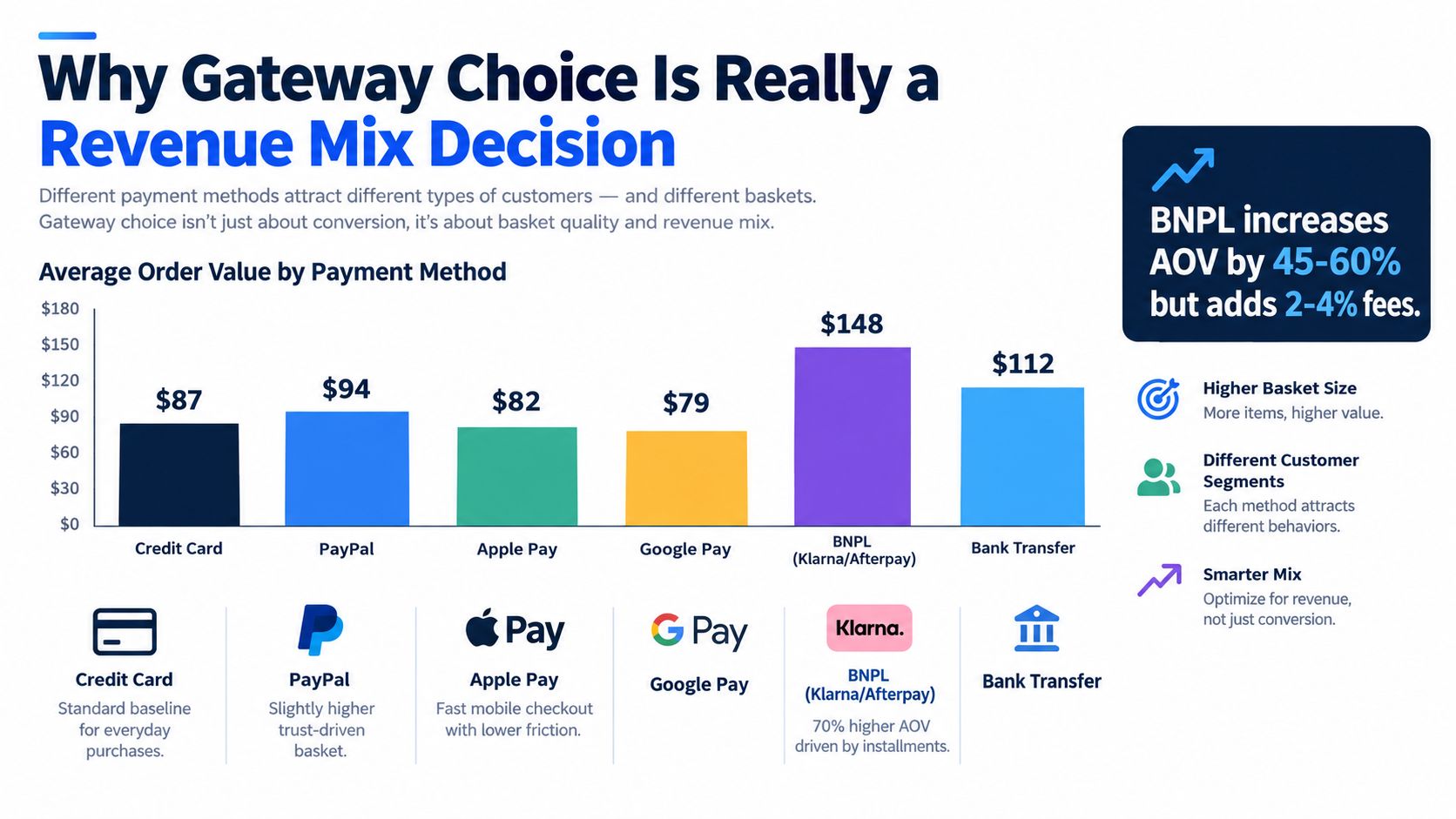
Different rails attract different buyers
A store selling everyday essentials has a different checkout problem than a store selling premium bundles, wholesale replenishment, or configurable products with longer consideration cycles.
That means your payment setup should reflect who buys what:
- Lower-friction cards and wallets usually suit quick-buy consumer behavior.
- PayPal often works well where trust is the bigger hurdle than method breadth.
- Bank transfer tends to align better with higher-intent or higher-ticket orders.
- Localized methods matter when regional expectations are strong enough that card-only checkout feels foreign.
The worst recommendation an agency can make is “just use one gateway everywhere.” That's operationally neat, but commercially lazy.
Basket quality beats feature count
Generic comparisons fail. They optimize for method count, dashboard polish, or fee tables. They don't tell you whether enabling a method changes the kind of customer who finishes checkout.
The infographic below simplifies the principle, even if every store's exact mix is different. Use it as a framing device, not a universal forecast.
A lot of teams chase marginal fee savings while ignoring basket quality. That's backwards. If one payment path closes stronger orders or reduces customer hesitation in your top markets, it can easily matter more than a small rate difference.
Operational lens: choose payment methods the way you choose acquisition channels. Judge them by the revenue mix they produce, not just by the cost to switch them on.
My advice is to audit checkout by segment. Separate domestic from international. Separate new customers from repeat buyers. Separate low-ticket from high-ticket carts. Then decide which methods deserve prime placement and which belong as secondary options.
Plugin Compatibility and Developer Experience
Glossy gateway comparisons often fall apart. In production, the question isn't whether a gateway "supports WooCommerce." The question is whether it behaves cleanly with your exact plugin stack, your PHP version, your checkout customizations, and your order flow.
What breaks more often than merchants expect
Stripe usually gives developers the smoothest overall experience, but that doesn't mean it's maintenance-free. Webhook handling, intent confirmation, saved payment methods, and off-session renewals can all get messy when another plugin interferes with checkout state or AJAX behavior.
WooPayments feels simpler because the integration is more native to the WooCommerce ecosystem. That's useful until you run into a store that needs behavior outside the intended path. Then direct Stripe often gives you more room to solve the problem without fighting the abstraction.
PayPal is still valuable, but the plugin ecosystem around it has created confusion for plenty of stores over time. Legacy implementations, renamed plugins, and different checkout modes mean inherited builds often carry historical baggage.
Compatibility checklist before you pick anything
Run this review before you recommend a gateway:
- Check order storage compatibility. If the store uses modern WooCommerce features and a busy plugin stack, confirm the gateway plugin fully supports the current order architecture.
- Review subscriptions properly. “Supports recurring payments” is not enough. Test renewals, failed retries, card updates, and manual renewal edge cases.
- Inspect tax and shipping behavior. Embedded payment scripts can interact badly with dynamic checkout recalculations, especially when tax or shipping plugins add their own logic.
- Test sandbox webhooks. Plenty of integrations look fine until asynchronous events fail to update the order correctly.
- Look for stale template overrides. Theme-level checkout overrides are still one of the fastest ways to create invisible breakage after gateway plugin updates.
What I trust by store type
For standard stores with minimal customization, WooPayments is hard to argue against if it's available in the merchant's country and the payment method mix is enough.
For customized stores, multi-method checkout, or subscriptions-heavy builds, I usually prefer Stripe direct because the developer experience is stronger when you have to diagnose behavior instead of just click through settings.
Square makes sense if the merchant already relies on Square in physical retail. If not, I rarely choose it first for pure WooCommerce builds.
Authorize.net still has a niche, but it tends to fit merchants who already have legacy payment processes and know why they need it. I almost never recommend it for a fresh general-purpose WooCommerce build.
The boring choice is often the right one. The more custom your checkout becomes, the more expensive every future gateway update gets.
Rolling Out Gateways Across a Multi-Site Portfolio
A gateway rollout is a deployment. Treat it like one.
Agencies get into trouble when they install a plugin, enter keys, place one test order, and declare success. That's not validation. That's wishful thinking.
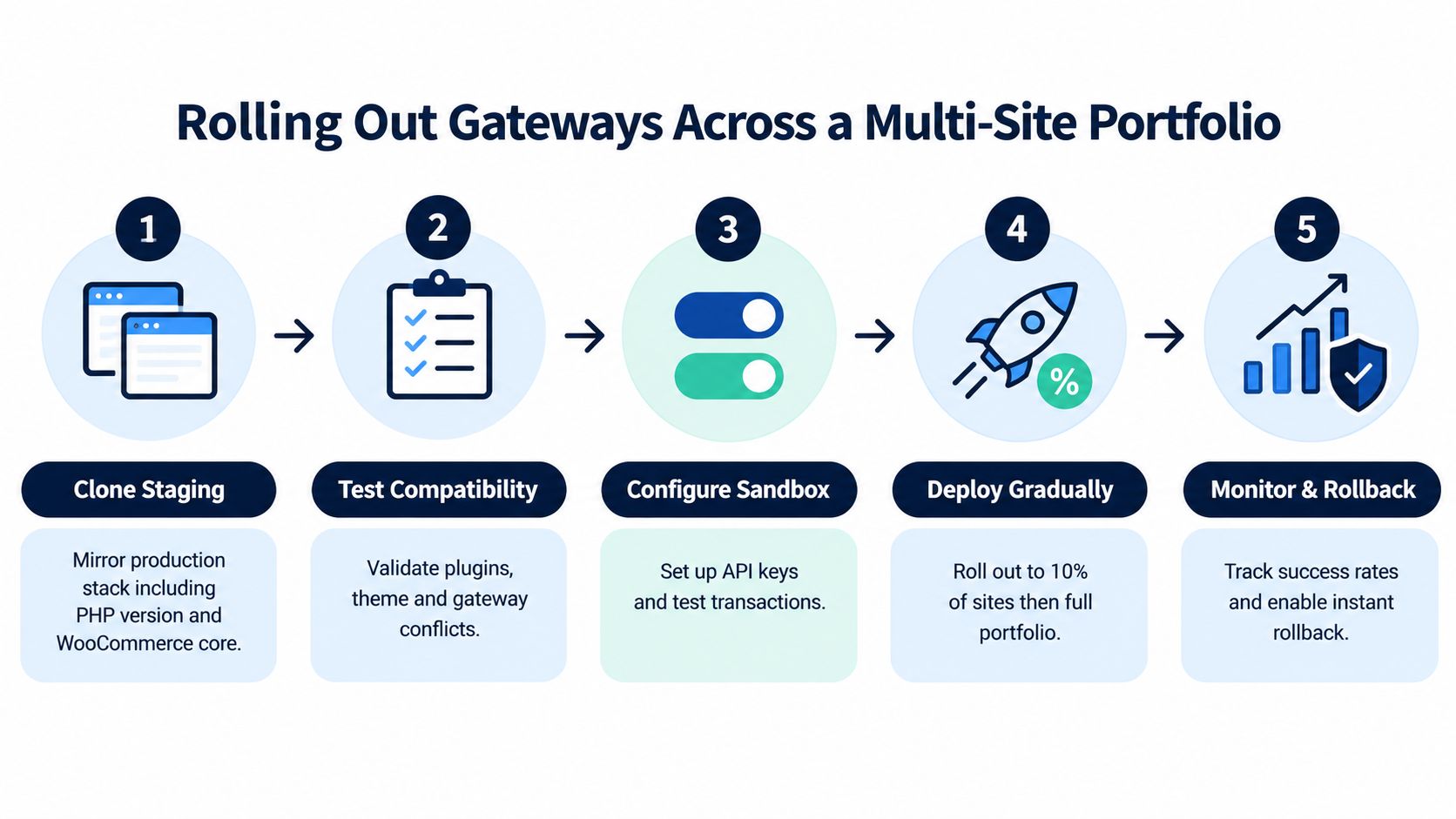
The rollout sequence that saves time later
Start with a staging clone that matches production as closely as possible. Same PHP line, same WooCommerce version, same theme, same mu-plugins, same checkout extensions.
Then test like someone paid you to be suspicious:
Run multiple basket types
Put low-ticket products, higher-ticket products, coupons, shipping variants, and subscriptions through checkout.Verify post-payment behavior
Confirm order statuses, stock reduction, emails, webhook events, refund handling, and saved payment methods.Document rollback before launch
Know which plugin version you are reverting to, which settings need restoring, and who owns the change window.Roll out to the least risky store first
Don't begin with the store that funds everyone else's payroll.
A portfolio team also needs a maintenance baseline. If you're standardizing gateway rollouts across many client sites, a practical PCI compliance check list helps make sure the payment change doesn't outrun your operational discipline.
Standardize configuration, not just plugin choice
This part gets missed all the time. Two stores can both use Stripe and still be wildly different to support because one has wallets configured correctly, webhook endpoints documented, checkout scripts audited, and renewal flows tested, while the other doesn't.
Good portfolio management means repeating a known-good configuration. It does not mean repeating the same logo at checkout.
My advice for agencies is to maintain one reference implementation per gateway you actively support. Same settings pattern, same test checklist, same rollback notes, same known incompatibilities. That alone cuts a lot of avoidable support noise.
Which Gateway Fits Which Store
A store that sells $40 impulse buys does not need the same gateway setup as a store closing $4,000 wholesale orders or chasing renewals across five markets. Treat gateway choice like risk allocation. You are deciding which checkout failures you can tolerate, which payment methods protect basket quality, and how much support debt your team wants to carry six months from now.
The right fit comes from three things: order value mix, payment behavior, and operational fragility. A gateway that looks fine on a feature sheet can still be the wrong call if refunds are awkward, renewals are brittle, or every plugin update turns into a support ticket.
Gateway Fit by Store Type
| Store Type | Primary Gateway | Secondary Gateway | Key Reason | Avoid If |
|---|---|---|---|---|
| Single-store SMB selling physical goods | WooPayments | PayPal | Fast setup, low admin overhead, good default checkout flow | The store needs custom payment logic or operates in unsupported countries |
| Multi-store agency portfolio | WooPayments | Stripe | Easier to standardize and cheaper to support across many client stores | Each client runs a heavily customized checkout or unique payment requirements |
| High-AOV B2B store | Stripe or Authorize.net | Bank transfer option | Better support for saved cards, account-based buying, and manual finance workflows | The merchant wants the simplest possible setup and no payment ops complexity |
| International DTC store | Stripe | PayPal | Stronger method coverage and better flexibility for cross-border checkout | The business depends on specific local methods the gateway does not support |
| Subscriptions-heavy store | Stripe | WooPayments | Better control over tokens, renewals, failed payment recovery, and card updates | The store chose checkout speed over recurring billing reliability |
| Region-specific local-method store | Regional gateway | PayPal or Stripe | Local payment preference often matters more than broad global coverage | The audience is spread across many countries with different payment expectations |
My direct recommendations
Single-store SMB
Use WooPayments if the store sells standard physical products, has a modest customization layer, and needs checkout to stay boring. Boring is good here. Fewer moving parts usually means fewer failed orders, fewer admin questions, and less agency time wasted tracing webhook or token issues.
Skip it if the merchant already has complex tax, shipping, or checkout rules that will keep expanding. That store usually outgrows the clean default faster than the owner expects.
Multi-store agency
For agencies, gateway choice is a portfolio decision before it is a store decision. Every exception costs money. Every one-off configuration creates another checkout flow your team has to remember, test, and rescue after updates.
Standardize on WooPayments where the client profile is conventional. Keep Stripe for stores that need custom fields, subscription depth, or more control over payment flows. That split keeps maintenance cost under control without forcing advanced stores into the wrong box.
High-AOV B2B
Use Stripe unless the merchant already has a strong reason to stay with Authorize.net. High-ticket B2B stores care less about flashy wallets and more about card-on-file reliability, manual review tolerance, invoicing support, and finance team workflow.
Add bank transfer if large baskets often start with sales approval, purchase orders, or repeat accounts. Consumer-style hosted checkout patterns can drag down conversion in B2B because they interrupt the buying process and create extra confusion for staff placing orders on behalf of customers.
International DTC
Use Stripe as the primary rail. Add PayPal where buyer trust and account-based checkout still lift conversion. For international stores, the question is not who supports the longest country list. It is which gateway gives you the best payment-method coverage in the markets that drive margin, while keeping disputes, failed payments, and support effort under control.
If you are still deciding on the broader stack around checkout, review these WordPress ecommerce plugins for WooCommerce stores before you commit to a gateway that your current plugin mix will fight.
Short checklist and FAQ
Before you commit, check four things:
- Match the gateway to basket quality. Low-AOV impulse carts, high-AOV sales-assisted orders, and subscription renewals fail in different ways.
- Test your real order mix. Use discounted orders, shipping variations, saved cards, refunds, and failed payment retries.
- Price the support cost, not just transaction fees. A slightly cheaper rate is a bad deal if the plugin creates monthly fire drills.
- Pick for the markets that matter. Do not optimize for theoretical global reach if most revenue comes from two countries.
A few practical answers:
- Will switching gateways affect historical orders? No. Existing WooCommerce orders stay where they are. Only future payments change.
- Should PayPal be the only option? Usually not. It works better as a support method than the whole strategy.
- Does recurring billing narrow the field? Yes. Renewals expose weak integrations fast.
- Does gateway choice affect PCI work? Yes. The checkout implementation and tokenization flow matter as much as the gateway brand.
If you manage multiple WooCommerce stores, payment gateways should be treated like infrastructure risk. WP Triage helps agencies and operators see which sites carry the most update, compatibility, and security risk first, so the stores most likely to break get attention before checkout revenue does.