An agency inherits a group of WordPress stores and discovers that “ecommerce platform” means something different on every account. One site runs WooCommerce with a payment gateway, subscription tools, reviews, and a page builder. Another uses Easy Digital Downloads for software. A third has a lightweight checkout embedded into a content-led site. The business owners see product catalogs and order screens. The agency sees update sequencing, compatibility testing, performance headroom, vulnerability exposure, and support tickets waiting to happen.
That difference matters. Choosing among WordPress ecommerce plugins isn't only a feature decision. It determines how much code sits between a customer and checkout, how many extensions must remain compatible, how quickly a team can investigate a security notice, and how difficult it becomes to prioritize fixes across a portfolio. WooCommerce may be the obvious choice for a complex physical-product store, while a narrower plugin can be the more responsible choice for digital downloads or a simple payment flow.
This comparison uses an agency operator's lens. It considers ecosystem depth, extensibility, front-end payload, maintenance surface, security posture, and multi-site triage, alongside commerce functionality. The aim isn't to declare one universal winner. It's to help agencies, freelancers, and WooCommerce operators choose a foundation they can maintain deliberately, then rank the work that follows.
Table of Contents
- Introduction Why Choosing the Right Ecommerce Plugin Matters Now
- WordPress Ecommerce Overview at a Glance
- How We Compare WordPress Ecommerce Plugins
- Detailed Comparison of Leading WordPress Ecommerce Plugins
- Performance Extensibility and Operational Overhead
- Security Posture and Maintenance Risk Across Ecommerce Plugins
- Choosing the Right Plugin for Your Use Case and Next Steps
Introduction Why Choosing the Right Ecommerce Plugin Matters Now
A plugin can look inexpensive at installation and become expensive in operations. Every added integration creates another version to track, another compatibility relationship to test, and another component that can affect checkout, order status, customer data, or payment processing. Those costs often stay invisible until an update breaks a template or a vulnerability demands an emergency response.
For a single store owner, the decision may come down to product type and checkout requirements. For an agency managing multiple client sites, the decision is broader. One client may need WooCommerce's catalog flexibility, another may only need a recurring payment form, and a third may sell downloadable products without shipping, inventory, or physical fulfillment. Standardizing everything on one platform can simplify staff training, but it can also force every site to carry complexity it doesn't need.
Operational rule: choose the smallest commerce foundation that supports the business's real workflow, not the largest feature list that looks impressive in a demo.
That rule doesn't make WooCommerce a poor choice. Its adoption and extension depth make it practical for many stores, especially when clients need unusual shipping, payment, subscription, or merchandising workflows. It does mean agencies should price and plan the maintenance surface instead of treating the core plugin as the whole system.
The comparison below separates capability from exposure. A plugin with fewer extensions may be less adaptable, but it may also reduce update coordination. A plugin with a large marketplace may solve unusual requirements quickly, while increasing the number of components an agency must monitor. Performance follows the same pattern. A feature-rich architecture can provide room for growth, yet still require more tuning before a campaign or seasonal traffic increase.
The useful question isn't “Which plugin is best?” It's “Which plugin gives this store the required commerce capability with a risk profile the owner and operator can sustain?”
WordPress Ecommerce Overview at a Glance
A store can launch with a familiar plugin and still inherit an expensive operating model. WordPress supplies the publishing foundation, while plugins add products, checkout, payments, orders, and integrations. That flexibility makes plugin selection a structural decision. It determines the number of components an agency must patch, test, monitor, and triage across sites.
As of 11 September 2026, W3Techs reports that WordPress powers 40.3% of all websites. WooCommerce appears on 8.0% of all websites and represents 47.8% of ecommerce systems in its surveys (W3Techs data summarized by Apex Digital). A separate roundup reports more than 7 million active WooCommerce installs on WordPress.org and 344 million total downloads (WordPress statistics roundup).
Scale creates practical advantages. Agencies can usually source developers, extensions, documentation, integrations, and troubleshooting experience for WooCommerce. Those advantages reduce staffing and recovery friction, but they do not establish a universal technical fit. Familiarity can also turn into default adoption, leaving a site with more update exposure, database work, and performance payload than its workflow requires.
A large ecosystem increases both options and exposure
The WordPress repository reports more than 59,000 free plugins, while premium offerings bring the total above 70,000. WordPress.org has recorded more than 2.4 billion total plugin downloads. The same WordPress statistics roundup lists 800+ official WooCommerce marketplace extensions and 6,000+ third-party extensions available through WordPress.org.
That range helps agencies address specialized requirements without building every integration from scratch. It also shifts risk into extension selection. Release cadence, documentation, compatibility testing, vulnerability response, and update sequencing become part of the commerce system, not administrative details.
One report cites an average of 58 active plugins per WooCommerce store. That figure illustrates why a single-site fix may become a multi-site triage problem when agencies manage many installations. A vulnerable add-on, incompatible payment update, or heavy script payload can affect revenue workflows even when the commerce core remains unchanged.
| Adoption signal | What it tells an operator |
|---|---|
| WordPress powers 40.3% of websites | The publishing ecosystem is large |
| WooCommerce powers 8.0% of all websites | WooCommerce has substantial deployment scale |
| WooCommerce represents 47.8% of ecommerce systems in the cited survey | Its ecosystem is deeply established among WordPress commerce options |
| More than 59,000 free plugins are reported in the repository | Agencies have broad integration choice |
| 58 active plugins per WooCommerce store is reported as an average | Compatibility and update sequencing need explicit ownership |
For teams assessing the commercial side, Crescade's resource on ecommerce growth for SaaS founders provides growth-planning context. The operating conclusion is clear: broad deployment can lower staffing risk, while a broad extension portfolio can raise exploitability, testing effort, and maintenance cost. Plugin choice should therefore be treated as portfolio risk management, not a feature checklist.
How We Compare WordPress Ecommerce Plugins
A useful comparison needs more than a star rating. Agencies should evaluate the plugin against the store's revenue workflow and the team's ability to maintain it after launch.
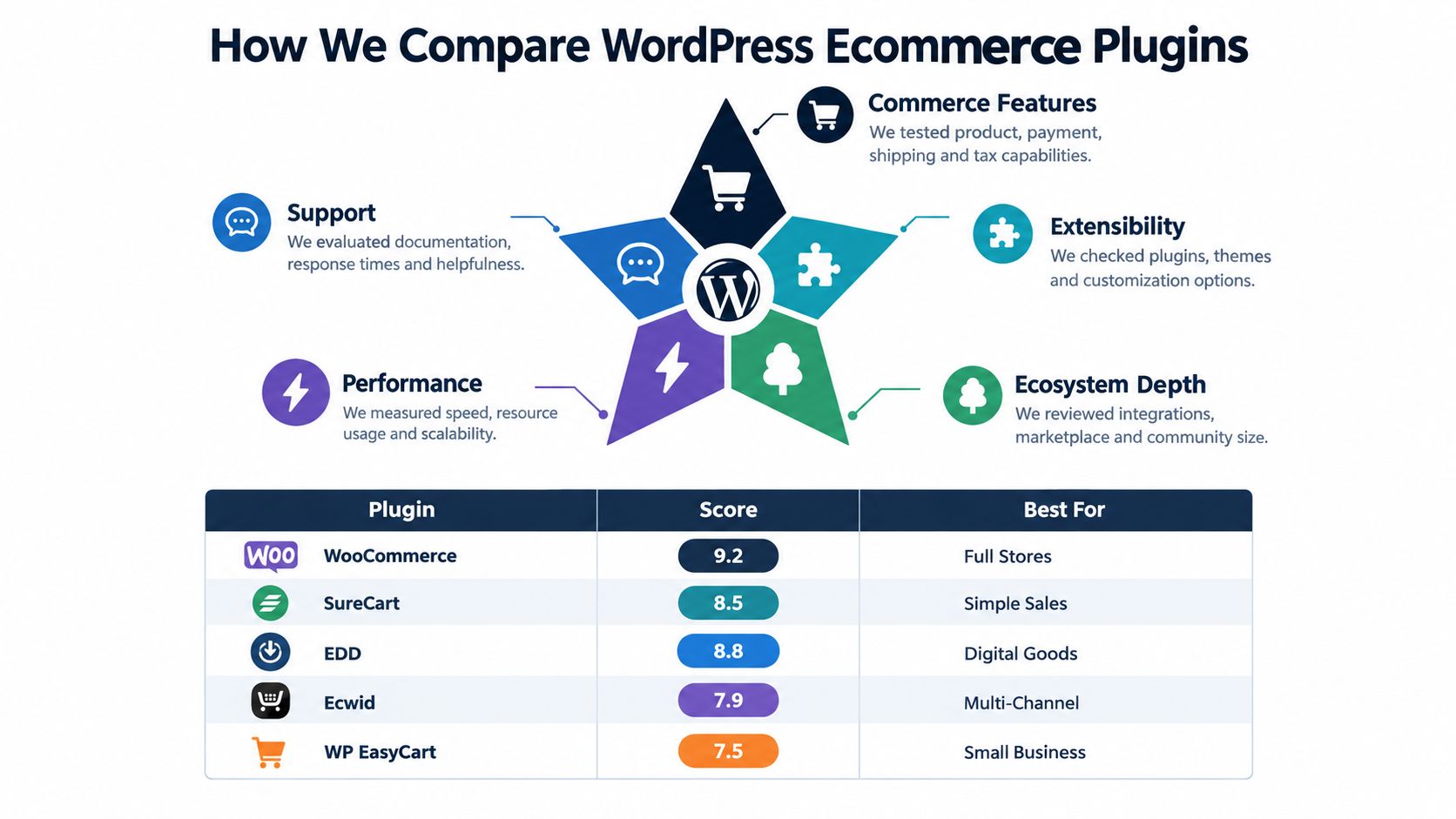
The matrix below uses six criteria. Core commerce features covers the product, cart, checkout, payment, order, customer, and fulfillment capabilities the store needs. Extensibility asks whether the plugin can support custom workflows without forcing the team into fragile overrides. Performance impact considers page weight, request volume, rendering work, and the tuning required to protect Core Web Vitals.
Security deserves its own criterion because commerce plugins process sensitive workflows. The review should include release activity, vulnerability history, extension quality, update paths, and the consequences of an outdated component. A minor design add-on and a payment gateway shouldn't receive the same operational priority because both appear in the plugin list.
| Criterion | What to Evaluate | Why It Matters Operationally |
|---|---|---|
| Core commerce capability | Products, checkout, payments, orders, subscriptions, downloads, shipping | Determines whether the foundation matches the business model |
| Extensibility | APIs, hooks, official extensions, third-party integrations | Affects custom development and future change risk |
| Performance footprint | Payload, requests, scripts, database work, cache behavior | Sets the tuning effort and available speed headroom |
| Security and updates | Vulnerability handling, maintenance activity, update compatibility | Influences exposure and emergency workload |
| Portfolio fit | Reporting, standardization, staging, rollback, team familiarity | Determines whether agencies can operate multiple sites consistently |
| Total ownership cost | Licenses, hosting pressure, testing, support, and remediation | Reveals costs that aren't visible at installation |
Weighting should vary by situation. A catalog-heavy store with complex fulfillment may value WooCommerce's extension depth more than a creator selling a small collection of files. A portfolio operator may prefer consistency and monitoring visibility over an individual site's maximum customization.
The comparison also avoids unsupported precision where the available evidence doesn't justify it. The benchmark data is especially useful for showing architectural differences, but it shouldn't be treated as a universal prediction for every theme, host, or extension stack.
Detailed Comparison of Leading WordPress Ecommerce Plugins
WooCommerce
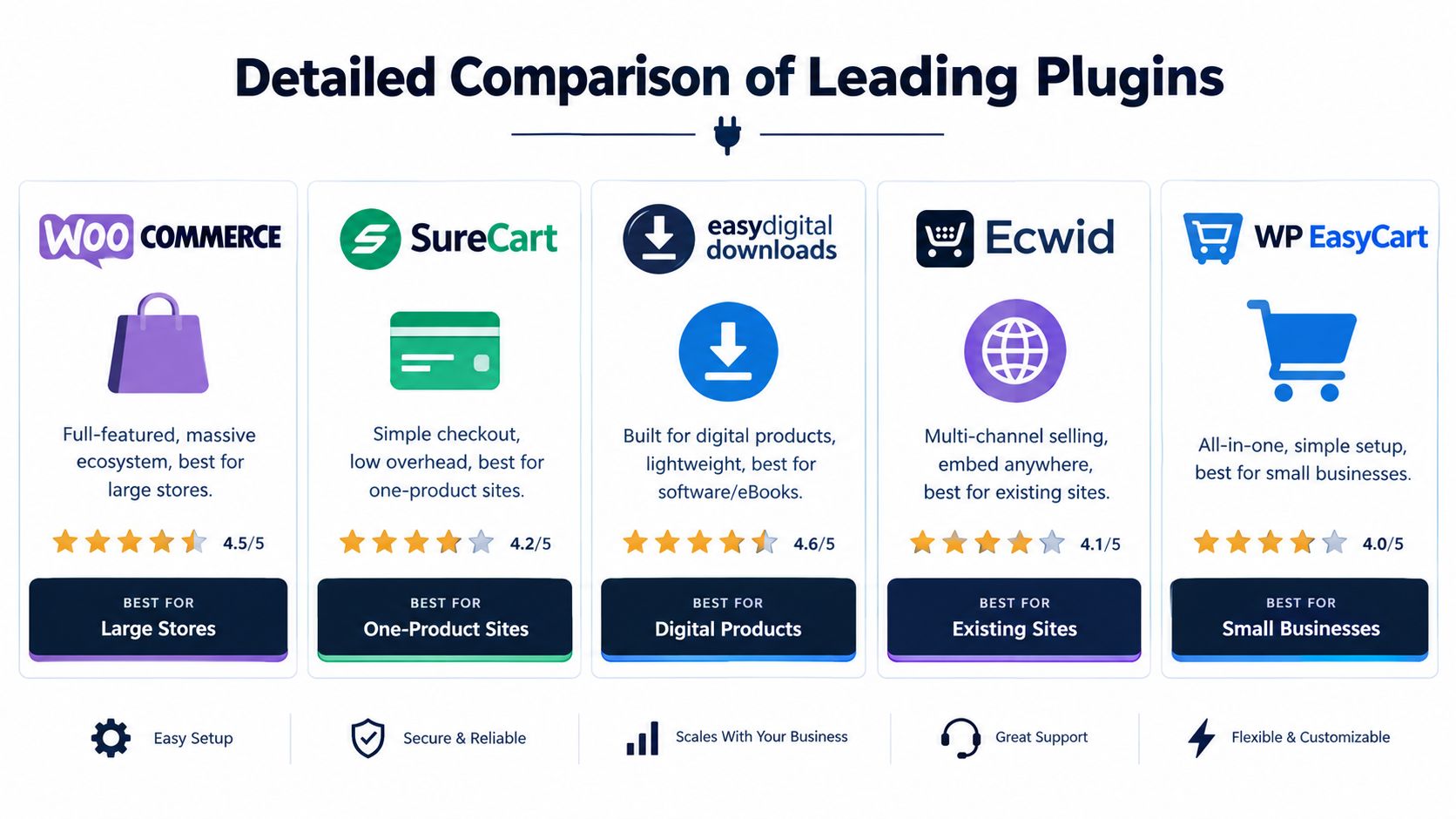
WooCommerce is the default candidate for a full online store because it supports a broad range of physical-product and service workflows and has an unusually deep extension ecosystem. W3Techs reports 7M+ active installs in independent comparison data, while the next listed options are substantially smaller: SureCart at 90K+, Easy Digital Downloads at 50K+, Ecwid at 20K+, and WP EasyCart at 10K+ (independent WordPress ecommerce plugin comparison).
WooCommerce buys flexibility, but agencies should budget for the testing and update coordination that flexibility creates.
Its strength is not only the core store. Agencies can usually find an integration for an unusual payment, shipping, subscription, membership, or merchandising requirement. Its weakness is architectural sprawl. Once several extensions, a builder, a theme layer, and custom code interact with checkout, a seemingly routine update can require staging validation and a rollback plan.
SureCart
SureCart suits operators who want a simpler selling workflow and less dependence on a large WordPress-side catalog stack. It can be attractive for straightforward products, services, or checkout-led sites where the store doesn't need WooCommerce's broad inventory and fulfillment model.
The trade-off is narrower ecosystem depth. If a client later requires a specialized order workflow, complex catalog logic, or a niche integration, the agency should verify the available path before committing. A smaller footprint can reduce maintenance work, but it can also reduce escape routes when requirements expand.
Easy Digital Downloads
Easy Digital Downloads is purpose-built for digital goods such as software, files, or other downloadable products. That focus can help an agency avoid carrying physical-commerce concepts that the business doesn't use, particularly around shipping and fulfillment.
Its best fit is a digital-only operation with clear file-delivery requirements. A store that later adds physical inventory or complex mixed-product workflows may find WooCommerce's broader model more suitable. The decision isn't about which interface looks cleaner. It's about whether the plugin's data model matches the product being sold.
Ecwid
Ecwid is a candidate for existing WordPress sites that need commerce without turning the entire WordPress installation into an integrated store. Its multi-channel positioning can appeal to businesses that want to embed selling capabilities across established content properties.
That separation may reduce some WordPress-side complexity, but it also means the agency must understand where catalog, order, payment, and reporting responsibilities live. A split operational model can simplify one layer while creating dashboard and integration boundaries elsewhere.
WP EasyCart
WP EasyCart targets small businesses that want an all-in-one setup with less configuration than a highly extended WooCommerce build. It may suit a modest catalog and a team that values a direct setup path over a large customization ecosystem.
Its smaller adoption footprint can make specialist troubleshooting and extension selection less familiar to agencies. Before standardizing on it, confirm that the client's required payment, shipping, tax, and reporting workflows are supported and maintainable.
For checkout-specific decisions within a WooCommerce build, agencies can also consult this focused guide to checkout plugins for e-commerce stores. Security planning should remain separate from conversion design, and the WooCommerce security guide is a useful internal reference for that work.
Performance Extensibility and Operational Overhead
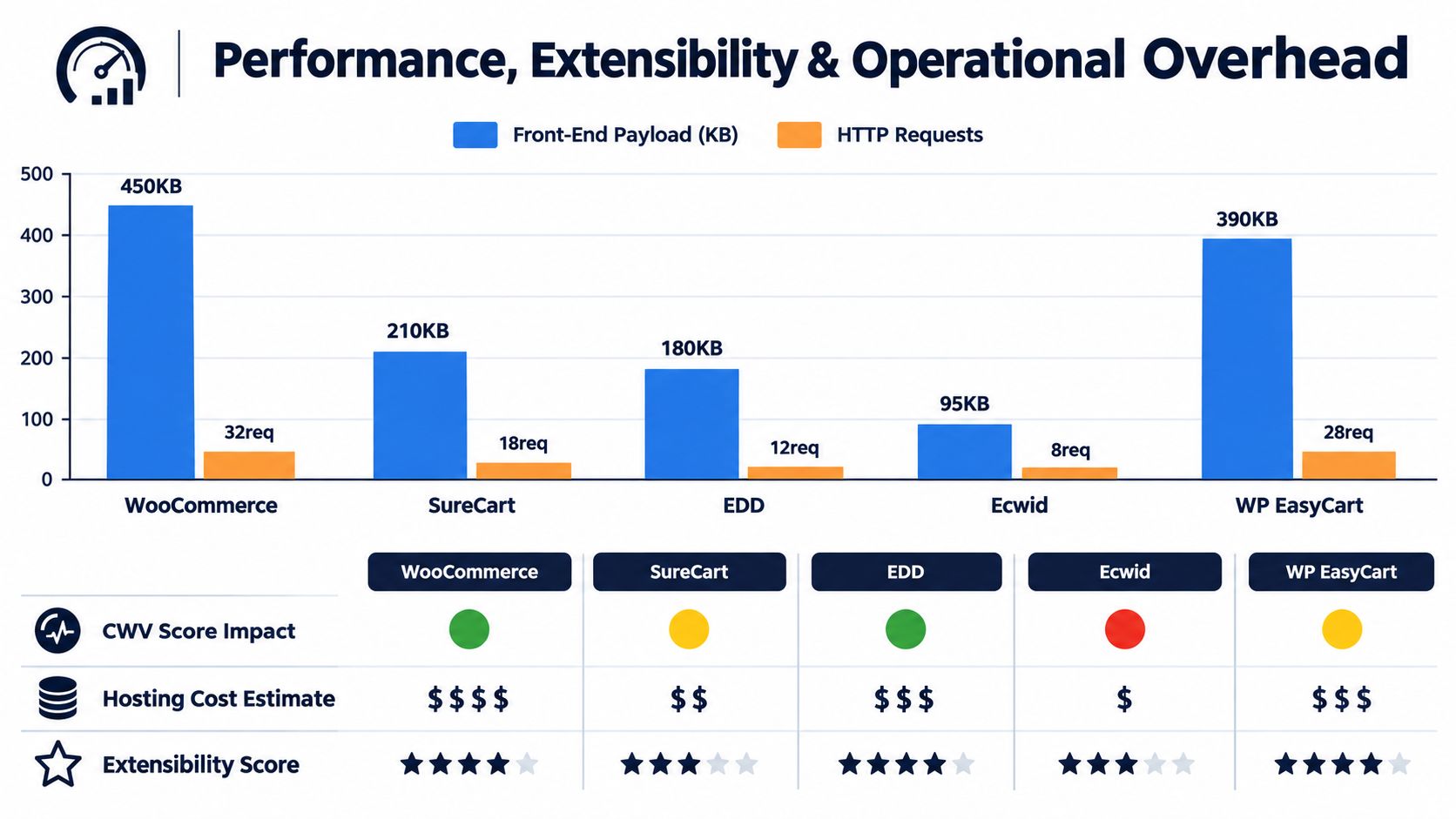
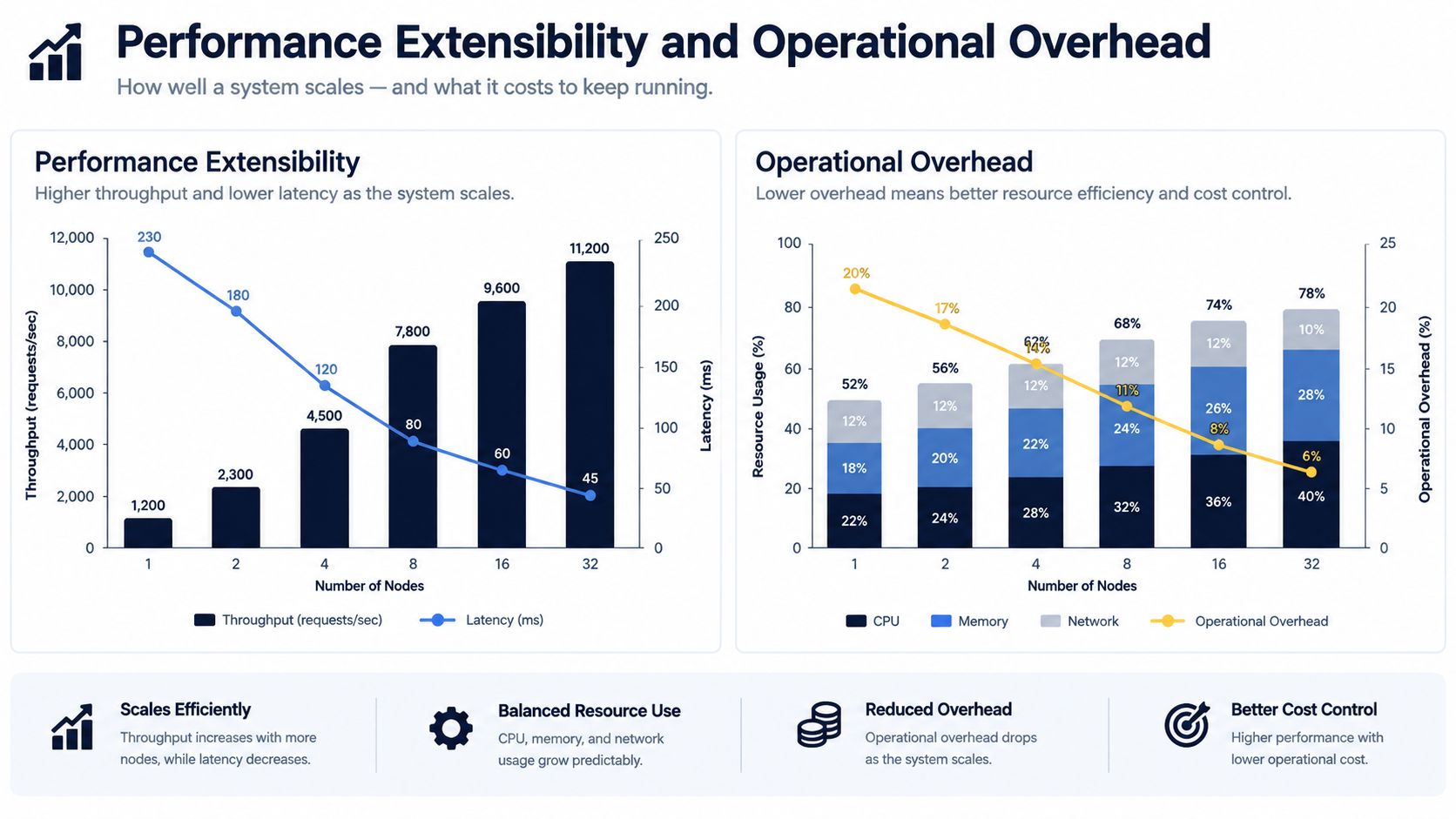
Performance differences become easier to understand when measured as browser work rather than plugin reputation. An independent benchmark compared a FluentCart shop page at 288 KB across 18 requests with a WooCommerce shop page at 814 KB across 40 requests. On the cart page, FluentCart loaded 60 KB versus 895 KB, with 93% lower page weight in that test (WordPress ecommerce plugin performance comparison).
The benchmark doesn't mean every WooCommerce site will match those figures, or that a lighter architecture automatically wins every business decision. It does show that architecture can materially change the amount of JavaScript, CSS, and network activity a browser must process. That affects the performance headroom available before an agency needs to tune templates, defer scripts, audit third-party tools, or revisit hosting capacity.
Payload is only one layer of the workload
A plugin's front-end weight is visible to a browser. The maintenance burden also includes database queries, administrative workflows, scheduled tasks, integration calls, and the number of places where extensions can alter cart or checkout behavior.
An agency should ask:
- What loads everywhere: Does commerce code appear on pages that don't need product or cart functionality?
- What runs at checkout: Which payment, analytics, fraud, shipping, and marketing scripts execute in the most sensitive flow?
- What changes together: Can the team update one extension independently, or must it test a group of related components?
- What fails visibly: Will a conflict stop checkout, corrupt order status, or only affect an administrative screen?
WooCommerce's ecosystem creates a strong answer for specialized requirements. It also creates more combinations to validate. Leaner plugins may reduce front-end and administrative overhead, but their narrower ecosystems can require custom work when the business model falls outside their intended use.
Extension depth creates future options and future obligations
A large marketplace helps an agency deliver unusual functionality without building everything from scratch. The same marketplace makes extension selection a governance task. Teams should record the purpose of every add-on, its owner, its update history, its dependency relationships, and the business process affected if it fails.
Image optimization can't compensate for a heavy checkout architecture, but it can remove avoidable media weight from product pages. Teams working on WooCommerce catalogs can use this practical guide to optimize product photos for speed.
Maintenance boundary: don't approve an extension because it solves today's ticket. Approve it when the team can explain how it will be tested, updated, replaced, and monitored.
For agencies, a staging environment and documented update sequence matter more than a one-time benchmark. The WordPress plugin updates guide can support that process, especially when several plugins touch the same revenue path.
Security Posture and Maintenance Risk Across Ecommerce Plugins
The most important plugin question may not be “Does it have the feature?” It may be “What happens if this component is outdated, abandoned, or exploited?”
In 2026, vulnerability reports involving WooCommerce-related plugins included privilege escalation, stored XSS, missing authorization, file deletion, and arbitrary upload flaws. Reported affected products included Abandoned Cart Pro for WooCommerce, Customer Reviews for WooCommerce, WooCommerce Stripe Payment Gateway, and Subscriptions for WooCommerce (Abandoned Cart Pro vulnerability report). These categories matter because they can affect administrative control, customer-facing content, payment workflows, and stored business data.
A separate mid-2026 WordPress vulnerability report counted 331 publicly disclosed vulnerabilities, with 211 patches available at the time of reporting (Customer Reviews for WooCommerce vulnerability report). The practical lesson isn't that every disclosure is immediately exploitable on every site. It's that risk changes faster than a quarterly maintenance habit can comfortably handle.
Triage revenue paths before low-impact findings
An agency managing multiple sites shouldn't treat every alert as equal. A vulnerability in a payment gateway, subscription handler, membership layer, or order-status component deserves a different response from an issue in an unused admin utility.
Rank findings using operational questions:
- Is the affected component installed and active?
- Does the vulnerable path touch checkout, payments, subscriptions, orders, customer accounts, or administrator access?
- Is exploitation known or plausible under the site's configuration?
- Is a vendor patch available, and can the team test it safely?
- What temporary control reduces exposure while testing takes place?
This process also catches abandoned extensions and version drift that a feature inventory can miss. PCI work should sit alongside, not replace, plugin triage. Agencies can use this PCI compliance checklist to structure the broader payment environment review.
Portfolio risk changes the order of work
Across a portfolio, the urgent site isn't necessarily the one with the longest plugin list. It may be the site with an exploitable component in a payment path, an outdated version, weak staging discipline, or a client campaign starting soon. Teams need a ranked queue, not a stream of disconnected notifications.
That is why agencies should record the plugin, installed version, affected workflow, patch status, exploit status, site owner, and validation result for each material finding. A repeatable record lets the team explain why one site moved ahead of another and prevents emergency work from becoming an improvised search through every dashboard.
Choosing the Right Plugin for Your Use Case and Next Steps
Start with the product model, then test the operational consequences.
Physical catalogs and complex fulfillment generally justify WooCommerce when the store needs broad product, shipping, payment, subscription, or marketplace flexibility. The agency should pair that choice with extension inventory, staging tests, update ownership, and a documented rollback path.
Digital downloads are a stronger match for Easy Digital Downloads when the store doesn't need physical fulfillment. A focused data model can keep the installation leaner, provided the required payment and delivery workflows are supported.
Simple services, memberships, or focused checkout flows may suit SureCart or another narrower solution. Confirm the client's reporting, recurring payment, integration, and ownership requirements before choosing simplicity over ecosystem depth.
Existing content sites with embedded commerce may benefit from Ecwid when the business wants selling functionality without a integrated WordPress store. Document the boundaries between WordPress and the external commerce workflow so support teams know where to investigate failures.
Small businesses with straightforward catalogs can consider WP EasyCart when its supported workflows meet current and foreseeable needs. Don't choose it solely because setup appears simpler. Validate the payment, shipping, tax, reporting, and maintenance path first.
For a portfolio, use a short decision checklist:
- Business fit: What must the store sell and fulfill?
- Extension fit: Which integrations are mandatory, and who maintains them?
- Performance fit: What pages carry the heaviest commerce payload?
- Security fit: Which components touch revenue-critical workflows?
- Agency fit: Can the team monitor, stage, update, and roll back consistently?
WP Triage is one portfolio option for this last operational layer. Its agent collects daily snapshots of installed plugins, themes, WordPress, and PHP versions, then matches installed plugins against known vulnerabilities and produces a 0–100 risk score with ranked issues and a recommended fix order.
Don't wait for a checkout outage to create the inventory. Build the site list, capture the current stack, rank revenue-path vulnerabilities, and schedule maintenance by impact rather than by whichever alert arrived most recently.
WP Triage helps agencies and commerce teams turn multi-site WordPress inventories into risk bands, prioritized fixes, and clearer maintenance queues. Visit WP Triage to assess how its portfolio snapshots and ranked remediation workflow can support your WordPress ecommerce plugin operations.