On a routine Monday review, everything can look normal right up to the moment it doesn't. Thirty client sites may show the same plugin updated overnight, the dashboards stay green, uptime checks stay quiet, and no one gets an alert worth escalating. Then someone opens the plugin directory on one site and finds a PHP file your team didn't expect, in a folder that changed through a channel everyone trusted.
That gap is where the WordPress supply chain problem lives. Not in a dramatic zero-day headline, but in a normal update flow that carries altered code into production. For agencies running dozens of sites, the practical question isn't just whether a plugin has known vulnerabilities. It's which identity, update channel, or build path in your stack could change installed code without your team noticing until after deployment.
Table of Contents
- When Trusted Updates Become the Threat
- How a Supply Chain Attack Actually Works
- Famous Attacks and What WordPress Operators Can Learn
- The Four Attack Paths That Hit WordPress Sites
- Detection Signals You Can Catch Early
- Mitigation Controls That Matter for Multi-Site Portfolios
- Your First 24 Hours of an Incident Response
- Building a Portfolio Habit That Outlasts Any One Breach
When Trusted Updates Become the Threat
An agency owner checks client dashboards before standup. A shared plugin updated across dozens of sites overnight. Nothing is broken. The version number looks current. Auto-updates did what they were supposed to do.
A junior developer opens one affected site anyway and spots an unfamiliar PHP file inside the plugin directory. No visible outage. No obvious admin warning. Just code in production that no one on the team can account for.
That's a supply chain attack in plain terms. An attacker doesn't need to break into each WordPress site one by one. They compromise a vendor, maintainer account, build system, or update server so the software you think you're installing isn't the software you receive.
Why WordPress makes this risk immediate
WordPress sites inherit trust from everywhere. Plugin authors, theme shops, premium download portals, update APIs, deployment scripts, and agency management tools all become part of the path that delivers code to production.
That's why routine update discipline still matters. A controlled process for keeping plugins updated with SiteSelf helps teams avoid stale software, but update speed alone isn't enough if the trusted channel itself is compromised. Teams need both timely updates and a way to question provenance when something changes unexpectedly.
If you manage a portfolio, treat every plugin as more than a code package. It's a trust relationship with an upstream publisher and a delivery mechanism.
Practical rule: Every installed component carries its own trust path. Your agency inherits all of them.
The framing that changes triage
A majority of teams still talk about supply chain risk like it's only an open-source package poisoning problem. That's too narrow for WordPress. Your actual exposure usually sits in update rights, account access, and silent changes moving through normal maintenance flows.
A useful starting point is to review how your team handles WordPress plugin updates across multiple sites. Not because every update is dangerous, but because the update workflow is where trust gets exercised at scale.
When one plugin can change code on thirty sites in a single cycle, your real asset isn't just patching discipline. It's visibility into who can publish, what changed, and how fast you can compare the same component across the whole portfolio.
How a Supply Chain Attack Actually Works
The cleanest way to understand a supply chain attack is to map it as a chain of trust. In WordPress, that chain is usually short. Vendor to package to site. If one link is compromised, the rest still behaves as designed, which is why these incidents are so easy to miss.
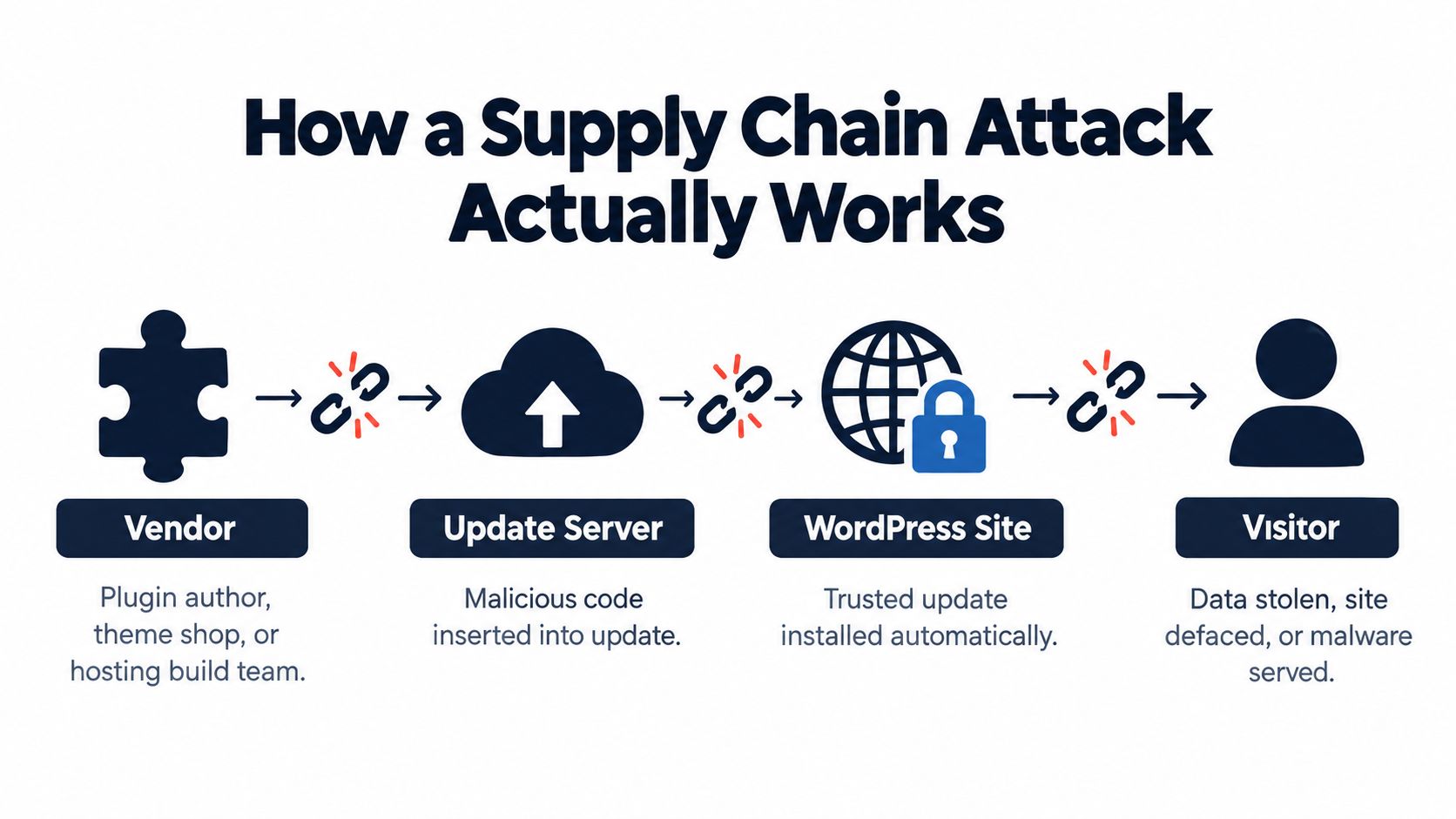
Link one is the vendor
The vendor is the person or organization that controls release authority. That might be a plugin author, a premium theme shop, or the team account that publishes builds.
One compromise here changes everything downstream. A maintainer account gets phished. A release token leaks. A CI identity gets abused. The code may still look official because, in a technical sense, it came from the official publisher path.
Link two is the package
This is the actual ZIP, artifact, or build output that gets distributed. In WordPress terms, it might be a plugin update pushed through a repository or premium updater.
Attackers increasingly target this layer through code injection or build manipulation rather than obvious defacement. One of the more important recent shifts is the move toward identity and pipeline compromise, where attackers abuse legitimate trust paths instead of finding novel perimeter flaws, as discussed in Sygnia's reporting on Q4 2025 supply chain campaigns.
Link three is the site
The WordPress site receives the package and executes it with the privileges available to that component. At that point, the attacker doesn't need a second exploit if the malicious code already arrived through a trusted update.
For agencies, portfolio impact shows up. Sites that look independent on a client list often share identical upstream dependencies.
What to map this week
If you want a practical audit exercise, start with three questions:
- Who can publish: List every plugin, theme, and premium vendor your sites trust.
- What gets installed automatically: Identify components with auto-update enabled, including custom or premium updaters.
- Where risk is already known: Cross-check installed components against a current CVE vulnerability list for WordPress operators.
A supply chain attack works because your systems keep trusting the chain after one upstream link has already failed.
Once your team sees the stack as a trust chain instead of a patch list, monitoring becomes more obvious. You watch publishers, update origins, and deployment behavior, not just version numbers.
Famous Attacks and What WordPress Operators Can Learn
The best-known enterprise example is SolarWinds. In 2020, attackers inserted malicious code into a software update, and the campaign was later estimated to have affected about 18,000 organizations before discovery in December 2020, according to Shielded Stack's summary of major supply chain attacks. The reason that incident still matters is simple. Customers received the update through a channel they already trusted.
Now bring that pattern closer to WordPress.
A plugin maintainer account gets taken over, or malicious code is inserted before release. The compromised version ships as a normal update. Agencies with that plugin deployed broadly don't see a smashed login page or a broken site. They see a routine version bump.
The common lesson
SolarWinds showed that signed, legitimate-looking software can still be hostile once an upstream trust path is compromised. WordPress operators don't need the same scale for the lesson to hold. A mid-tier plugin distributed through a trusted updater can create the same operational problem inside an agency portfolio.
The key issue isn't fame or install count. It's concentration. If one extension appears across many client sites, that component carries disproportionate blast radius in your environment.
Supply Chain Attacks Compared
| Attack | Trust Path Broken | Blast Radius | WordPress Lesson |
|---|---|---|---|
| SolarWinds | Vendor build and update path | Broad downstream exposure across customers | Trusted updates can distribute malicious code without obvious warning |
| Compromised WordPress plugin release | Maintainer account, plugin code, or updater path | Every site that accepts the update | One shared plugin can become a portfolio-wide incident overnight |
What an operator should actually do with that lesson
Don't file this under “enterprise stuff.” It belongs in your plugin review process. If a plugin is present across many client sites, it deserves more scrutiny than a niche extension installed once.
That means checking publisher reputation, update behavior, support activity, and how quickly you can inventory affected sites if something goes wrong. A stronger review standard for widely deployed extensions is part of basic WordPress plugin security practice, not paranoia.
The Four Attack Paths That Hit WordPress Sites
Not every WordPress supply chain attack looks the same. In practice, most agency incidents fit one of four trust paths. Naming the path early helps your team decide where to investigate first.
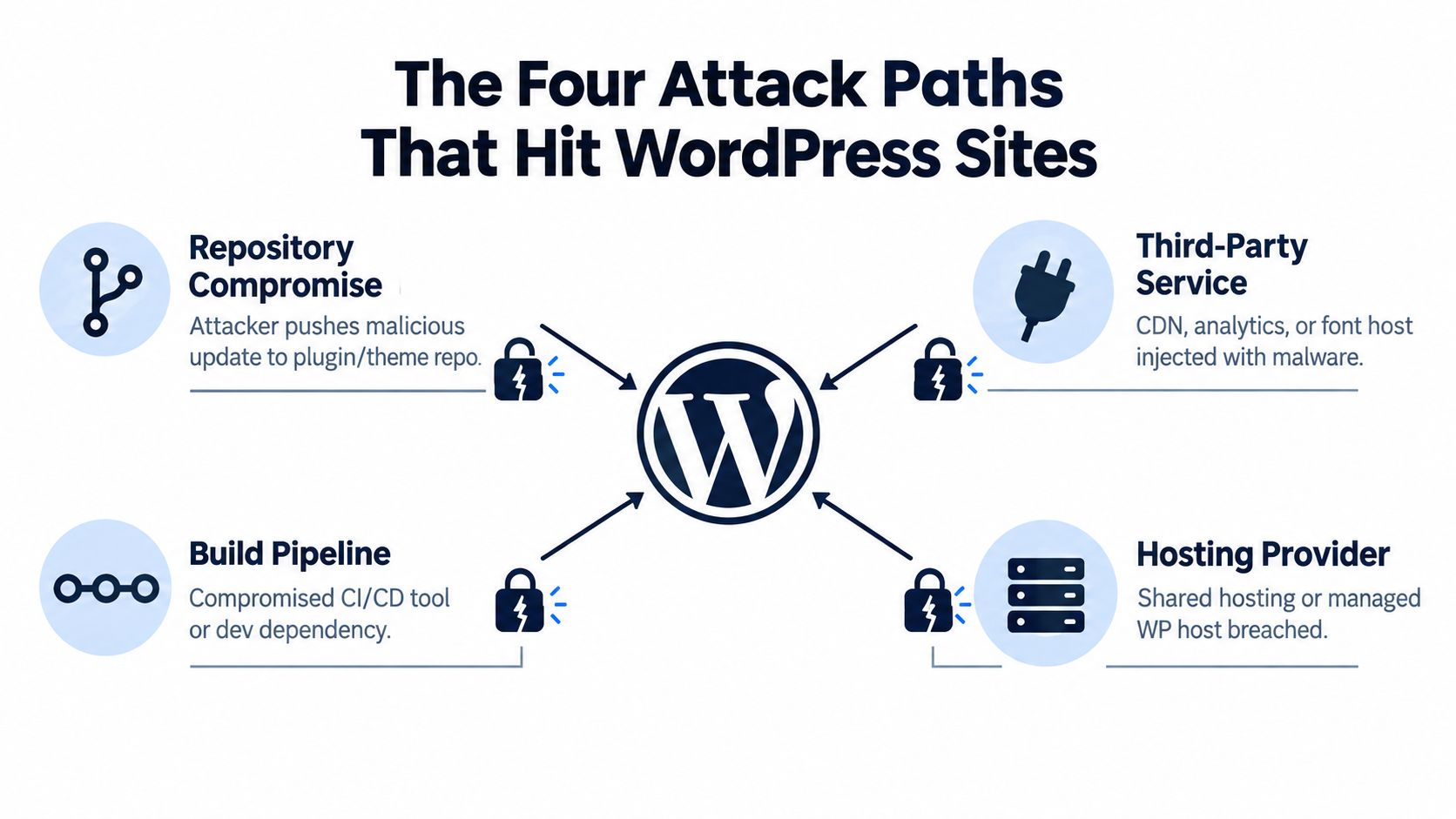
Repository compromise
A plugin or theme repository becomes the distribution point for malicious code. That may happen through a stolen maintainer account, a poisoned release, or a compromised update endpoint.
This is the path many teams picture first, and for good reason. It creates fast propagation because WordPress sites are built to trust updates and install them efficiently.
Abandoned extension takeover
An extension stops receiving serious maintenance. Ownership changes hands, or the project effectively drifts out of active control. Attackers like these situations because site owners keep trusting the old name long after the original trust basis is gone.
For agencies, this is why “still works” isn't a safe maintenance standard. A plugin can function perfectly and still become a bad trust dependency.
If no one on your team can explain who currently maintains a plugin and how it ships updates, you're already accepting blind trust.
Upstream dependency inside a legitimate plugin
This path gets missed constantly. A premium plugin can pull in outside PHP libraries, front-end packages, SDKs, or build artifacts. Your site may never install those dependencies directly, but their code still arrives inside the plugin you trust.
That's where the strategic shift matters. ENISA's analyzed supply chain incidents found about 62% abused customer trust in suppliers and 66% targeted suppliers' code, a pattern summarized in SecurityWeek's coverage of supply chain attack mechanics. For WordPress operators, that means transitive risk matters as much as plugin age.
Managed update channel compromise
Sometimes the weak point is your own delivery system. A staging sync process, deployment script, internal package mirror, or agency-wide management layer becomes the distribution path for altered code.
This is often the hardest scenario politically because the compromise sits inside the operator's own tooling. The fastest way to reduce exposure here is to harden admin and maintainer identities. Teams that need a refresher on common manipulation patterns should review these social engineering warning signs, because many upstream compromises still start with account takeover rather than code wizardry.
Triage action for agencies
Run a portfolio label exercise this week:
- Mark shared components: Which plugins and themes appear across many client sites.
- Mark uncertain ownership: Which tools have unclear maintenance status or unusual update mechanisms.
- Mark indirect trust: Which premium plugins bundle outside libraries or rely on vendor APIs.
- Mark internal distribution: Which code changes move through your own staging or deployment systems.
Once every component sits in one of these paths, the audit gets sharper fast.
Detection Signals You Can Catch Early
You usually won't catch a supply chain attack because someone admits it upstream. You catch it because a legitimate process produces an abnormal result. That's the mindset shift that matters in daily operations.
Detection signals and fast verification steps
| Signal | What it looks like | Quick verification |
|---|---|---|
| Version drift across similar sites | Sister sites that should match suddenly show different plugin versions, or many auto-updates cluster in a narrow window | Pull a portfolio-wide WP-CLI plugin inventory and compare active versions against your baseline |
| Unplanned file changes | New PHP files appear in plugin folders, long-stable files change, or obfuscated strings show up in ordinary extension files | Diff the changed files against a clean upstream copy or a known-good internal archive |
| Unexpected update origin | A site reaches out to an unfamiliar update host or pulls updates through a path your team didn't approve | Check edge, proxy, or hosting logs and compare outbound update requests with your allowlist |
| Behavioral drift after an update | New admin users, unfamiliar scheduled tasks, odd REST traffic, or plugin actions outside normal maintenance windows | Review user creation events, scheduled cron entries, and recent access logs tied to the update window |
What version drift really tells you
Version drift matters most when it breaks expected sameness. If thirty sites run the same approved stack and only a subset reports a different plugin build, that's not routine noise. It's a reason to stop and compare.
The same goes for synchronized update timestamps. If updates land across many sites during a period no one on your team initiated work, validate the source before treating it as harmless automation.
File-system changes beat dashboards
Dashboards only tell you what WordPress knows. They don't tell you whether the plugin directory contains an extra loader, hidden PHP dropper, or altered file your team never reviewed.
Watch for these clues:
- New executable files: Fresh PHP files in plugin paths that don't belong to the expected release.
- Strange string patterns: Encoded payloads, compressed blobs, or unreadable variable blocks in files that used to be ordinary.
- Unexpected persistence hooks: New cron entries, admin creation logic, or silent remote callbacks added to extension code.
Field note: In portfolio work, the fastest validation step is comparison, not analysis. If one site looks odd, compare it to five sibling sites before you start reverse engineering.
Build a daily routine, not an incident ritual
Agencies do better when these checks already exist before the first compromise. A daily portfolio diff, routine integrity check, and short review of update activity catch more than emergency malware scans performed after clients are already asking questions.
The point isn't to inspect every line of every plugin. It's to notice when trusted delivery produced an outcome your baseline didn't expect.
Mitigation Controls That Matter for Multi-Site Portfolios
The most effective controls fall into three lanes. Build-time, deploy-time, and run-time. Agencies that separate them clearly make better decisions because they stop expecting one tool to solve every trust problem.
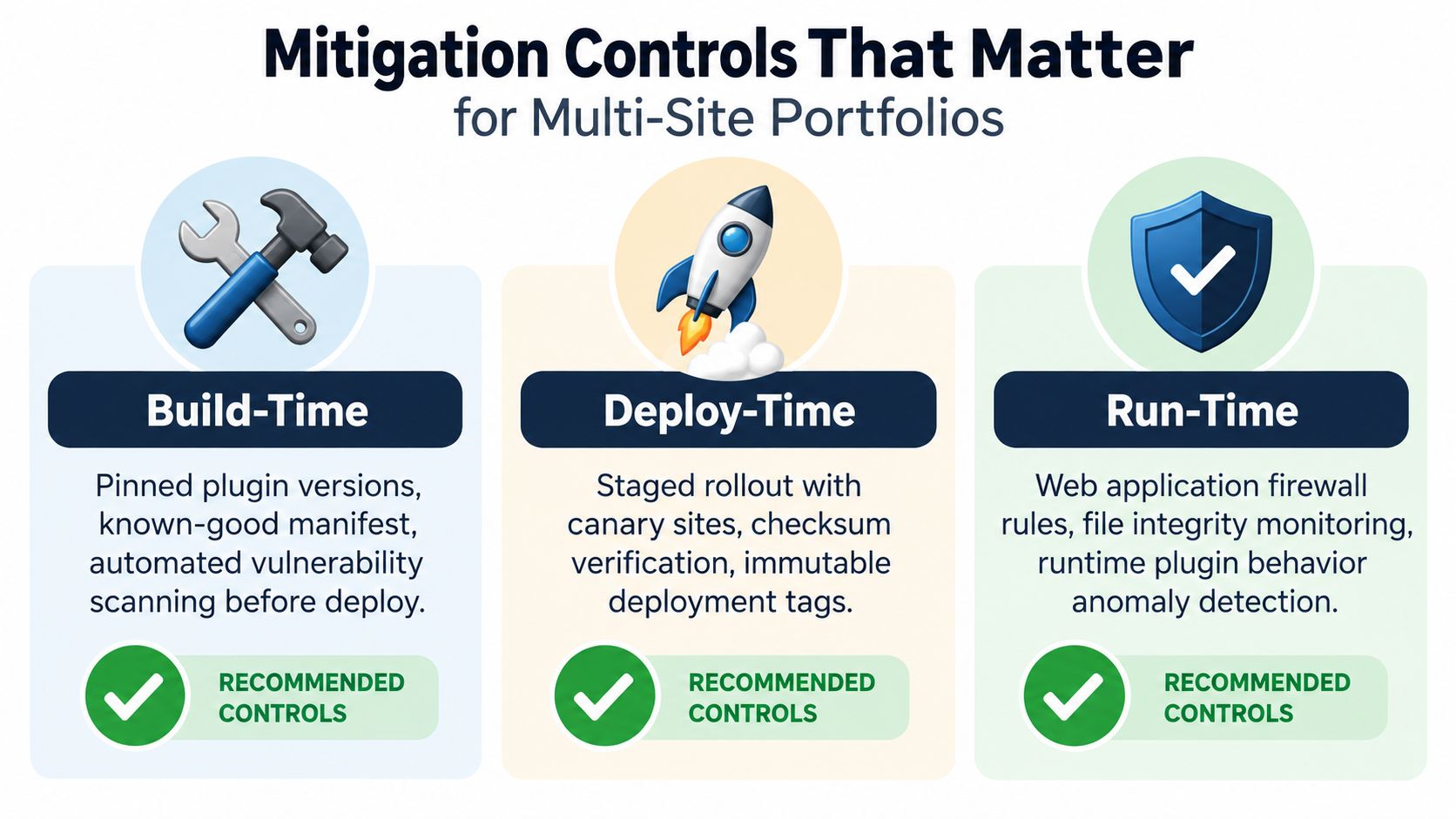
Build-time controls
These happen before code reaches production. Pin plugin versions for important sites. Maintain a known-good manifest of approved plugins and themes. Verify premium plugin downloads against the expected vendor source, not a copied archive floating around Slack or an old shared drive.
This is also where you decide whether production should auto-update directly, or whether updates first land in a controlled ring. For most agencies, direct production auto-updates across the full portfolio create more risk than convenience.
Deploy-time controls
Many WordPress teams still have a blind spot. If you can stage updates to a smaller ring first, you reduce the chance that one bad release hits every site at once.
Useful controls here include:
- Staged rollout: Promote updates from canary sites to broader groups only after review.
- Checksum and package verification: Compare deployed files with known-good versions where possible.
- Immutable release tagging: Keep a reference to exactly what package version was approved and when.
Run-time controls
Run-time controls limit damage after bad code lands. File integrity monitoring matters. Egress filtering matters. Least-privilege file ownership matters because compromised plugin code shouldn't have an easy path to persist or call home freely.
This is also the most natural place to use one portfolio-level decision tool among your existing stack. WP Triage can help agencies monitor plugin, theme, core, and PHP versions across connected sites, match installed components against known vulnerabilities, and prioritize what to investigate first based on risk. That doesn't replace integrity monitoring or log review, but it does help teams spot high-risk clusters faster.
What usually works best
For a typical multi-site portfolio, the strongest baseline combination is:
- Integrity monitoring
- Egress filtering
- A delayed rollout ring for production
- Strong identity controls on publisher and deployment accounts
Recent supply chain reporting underscores why. ENISA analyzed 24 supply chain attacks from January 2020 to early July 2021, with around 62% abusing customer trust in suppliers and 66% targeting supplier code. The same source also notes third-party involvement in breaches rising from 15% to 30%, with the average supply-chain compromise costing about $4.91 million and taking 267 days to identify and contain, according to ENISA's supply chain threat landscape report.
Those numbers aren't there to scare anyone. They explain why “just patch fast” is too small a strategy.
Your First 24 Hours of an Incident Response
Monday morning, three client sites report the same odd behavior right after an automatic plugin update. One new admin account. One unfamiliar outbound domain. One file change that does not match the vendor package. At that point, stop treating it as a single-site cleanup job. Treat it as a trust-path failure across the portfolio.
The first 24 hours are about one question. What identity, update channel, or build path changed installed code on these sites, and where else did that same path exist?
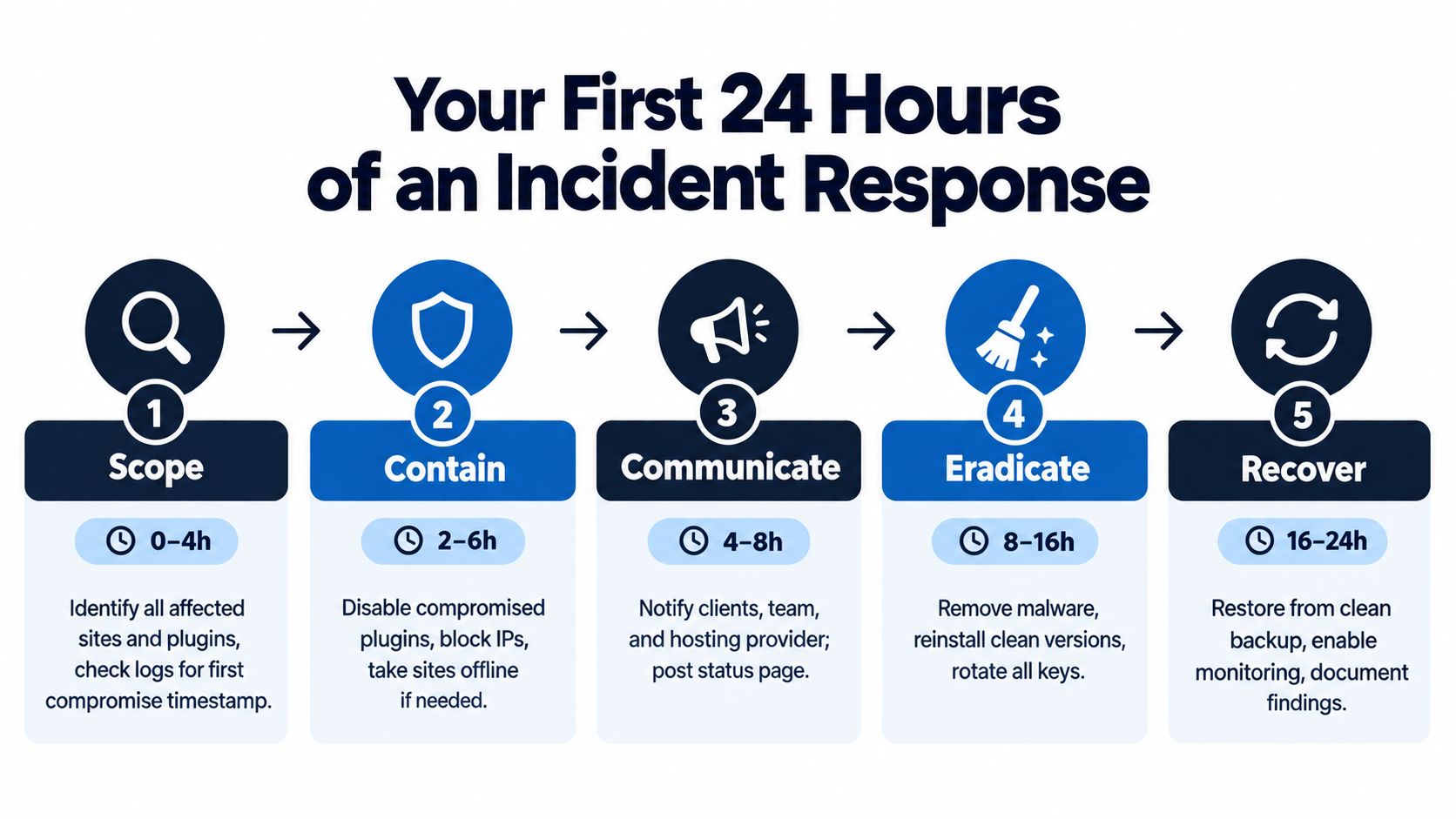
I run the day in five phases. Scope, contain, communicate, eradicate, recover. The order matters because rushed cleanup destroys evidence and rushed restoration puts the same bad code back into production.
Scope and contain
Start from the shared component, not from the loudest site.
Pull a portfolio-wide inventory of the affected plugin or theme, including version, file hashes if you have them, update timestamps, and which sites received the change. Then compare the installed files against a known-good archive from the original vendor source or your own approved copy. The goal is to answer two practical questions fast. Which sites took the same code path, and which ones show code drift beyond the expected release?
Containment works best in batches:
- Freeze the suspect component on every affected site. Roll back to a previously verified version where that is safe.
- Pause automatic updates for that component until you verify publisher identity, package integrity, and update origin.
- Block active indicators such as known callback domains, malicious admin-ajax routes, or new cron-driven requests seen after the update.
- Preserve evidence on the most affected sites before broad cleanup starts. Copy plugin directories, access logs, scheduled task entries, and user audit logs.
If the same plugin is installed on 40 sites, assume all 40 need review unless you can prove update ring separation or different package sources.
Communicate and eradicate
Agency teams lose time here when they overexplain or go quiet.
Clients need a short status update with three points. What component is under review, what actions are already in place, and whether they need to pause logins, content edits, or credential use. Keep it factual. Do not speculate on impact before you verify it.
Then move into eradication with a bias toward persistence checks, not just file deletion:
- Remove unauthorized code: Delete dropped PHP files, modified loader code, hidden include statements, and any backdoor placed outside the plugin directory.
- Rotate exposed secrets: Invalidate admin sessions, reset privileged passwords, rotate API keys, and change database credentials if the plugin had access to them.
- Review the update window: Check for new admin users, option changes, cron jobs, plugin self-reinstalls, outbound requests, and writes to writable directories.
- Verify neighboring trust paths: Inspect deployment accounts, SFTP users, CI jobs, and any license or updater credentials tied to the compromised component.
A simple checklist keeps teams from skipping steps under pressure:
- Confirm affected sites and versions
- Preserve suspect files and logs
- Pause the update source
- Block active outbound traffic
- Rotate reachable credentials
- Remove persistence
- Recheck admin users and scheduled tasks
- Restore only from a verified clean point
Recover without reintroducing the problem
Recovery fails when teams restore the newest backup and call it done.
Use a restore point that predates the malicious code path, then validate the plugin or theme package before it goes back on the server. If you do not have a verified clean copy, leave the component disabled and restore site function another way. A temporary feature gap is cheaper than a second compromise.
Watch for recurrence on the rebuilt sites. File rewrites, recreated admin users, repeated outbound requests, and the same checksum mismatch usually mean the original trust path is still open. Recovery is complete only after the code is clean and the path that delivered it has been checked, restricted, or removed.
Building a Portfolio Habit That Outlasts Any One Breach
The single decision I'd push an agency owner to make this week is simple. Build a centralized inventory of every plugin, theme, and update source across the portfolio, then treat that inventory as a living trust map.
Not a spreadsheet you make once and forget. A working record of what's installed, where it came from, who maintains it, and how it updates.
The weekly habit that actually holds up
A durable routine looks like this:
- Review version drift alerts: Look for plugins that changed unevenly across similar sites.
- Run integrity checks: Compare plugin files against expected checksums or known-good archives where possible.
- Audit admin roles: Confirm no unexpected privileged users appeared after update activity.
- Verify update origin: Make sure automatic updates still route through the original vendor channel, not a mirror or altered endpoint.
If one site throws a suspicious signal, compare it against the rest of the portfolio within the same hour. Supply chain compromise rarely lands on just one property when the same component exists elsewhere.
The mindset worth keeping
Treat every plugin update as an unverified code change until provenance is confirmed. That doesn't mean fear every release. It means your team documents why a change was trusted, what was checked, and what the clean reference point was.
That documentation is more valuable than expected. It gives the next analyst context fast, shortens incident scope work, and turns security from individual memory into repeatable practice.
A WordPress supply chain attack is ultimately a trust-path problem. Agencies that map trust well detect faster, contain earlier, and stop one compromised component from turning into a week-long portfolio fire.
WP Triage helps WordPress operators see portfolio-wide version drift, vulnerable components, and site risk in one place so supply chain review doesn't depend on manual spot checks. If you're managing many sites and need a clearer fix order when one shared plugin becomes suspect, it's built to support that triage work.