You open the morning dashboard and find that several client sites need attention. One WooCommerce store runs an outdated payment extension, another uses an old theme, and a third has a PHP version your team flagged during the last maintenance review. A public CVE vulnerability list adds more entries to the queue, but it doesn't tell you which site deserves the first fix.
That distinction matters. A CVE list is an inventory of publicly known vulnerability identifiers, not a ready-made maintenance plan. WordPress agencies need to connect each identifier to an installed plugin, theme, WordPress core version, or PHP runtime, then add exposure, exploitation, patch availability, and site importance before deciding what to do.
This guide builds that process from the ground up. You'll learn how to read a CVE record, distinguish the CVE Program from NVD and CISA KEV, interpret feeds, filter irrelevant entries, and turn matches into a practical sequence across a WordPress portfolio.
Table of Contents
- Introduction to CVE Vulnerability Lists and Why They Matter
- How to Read a CVE Record Field by Field
- Where CVE Data Lives and How Sources Relate
- Why CVE Counts and Severity Alone Mislead Triage
- Curated CVE Feeds and Lists Relevant to WordPress
- From CVE Matches to Portfolio Risk Scoring
- Integrating CVE Data Into Your Triage Workflow
- Quick Decision Matrix for Prioritizing CVEs
- Quick Reference Glossary and Cross Referenced Lookup
Introduction to CVE Vulnerability Lists and Why They Matter
The CVE Program launched in 1999 as a shared system for identifying publicly known cybersecurity vulnerabilities. MITRE reports that the program began with 321 CVE Records in 1999 and grew to more than 240,000 by October 2024 in its CVE 25th anniversary report. That growth explains why a search for a CVE vulnerability list can produce an overwhelming result: the catalog has become an international reference layer used by security products, researchers, vendors, and operations teams.
A CVE record gives a vulnerability a stable identifier, such as CVE-2024-1234. The identifier helps different systems discuss the same issue without relying on inconsistent product names or descriptions. It doesn't prove that your site is affected, that attackers are exploiting the issue, or that the vulnerability deserves immediate remediation on every installation.
The difference between inventory and triage
Suppose a plugin advisory references a CVE affecting versions of a contact form extension. Your agency manages several sites, but only some have that extension installed. Even among affected sites, the order of work can differ:
- A revenue-critical store with public account registration deserves close attention.
- A brochure site with the same vulnerable plugin may have less exposed functionality.
- A site with a patched plugin release available needs a different action from one using an abandoned extension.
- A match without complete product or version context needs validation before anyone labels it confirmed exposure.
The CVE list supplies the starting signal. Your asset inventory supplies relevance. Your operational context supplies priority.
Practical rule: Treat every CVE match as a question to validate, not as an automatic ticket to close or escalate.
The rest of this guide uses that mental model. The field-by-field section helps you understand the record itself. The source comparison shows where enrichment and exploitation information appear. Later sections turn those details into WordPress filters, portfolio scoring, workflow checkpoints, and a quick decision matrix.
How to Read a CVE Record Field by Field
A CVE entry contains more than its identifier. The canonical NVD schema exposes fields including the CVE ID, source identifier, vulnerability status, published timestamp, last modified timestamp, evaluator notes, and reference lists. NIST documents these fields in the NVD CVE API JSON 2.0 schema.
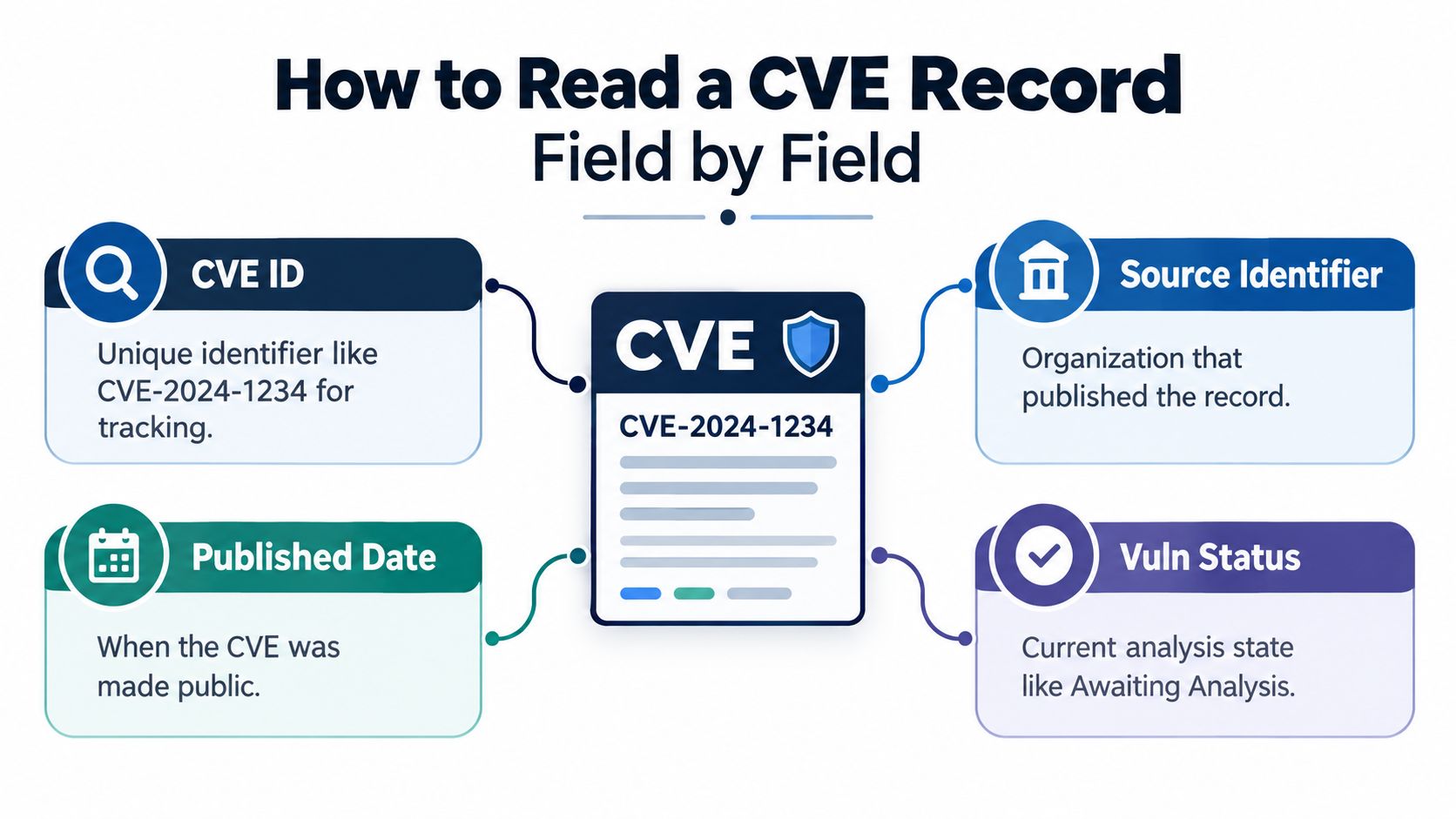
Take a WordPress plugin CVE and read it in this order.
Start with the identifier
The CVE ID is the stable lookup key. Normalize it before matching it against inventory or advisory data. In practice, normalization means handling capitalization consistently, removing accidental whitespace, and ensuring separators follow the expected format. A malformed value can cause a real match to disappear from a portfolio report.
The ID alone isn't enough for a remediation decision. It identifies the record, but it doesn't tell you whether the installed plugin version falls inside the affected range.
Identify the publishing source
The source identifier indicates the organization or authority responsible for submitting or maintaining the record. That context helps you understand where the initial description came from and which source may provide the most relevant follow-up information.
For a WordPress plugin, the source could point you toward a vendor advisory, a security researcher, or another coordinating organization. Follow the references rather than assuming the source identifier is also the patch provider.
Check the vulnerability status
Vulnerability status describes the record's current state in the catalog. A status such as Awaiting Analysis signals that the entry may not contain all the context you expect. Don't treat missing enrichment as evidence that the issue is harmless.
Many automated reports go wrong. A scanner that stores only the CVE ID can lose the status change, revised timestamps, or reference additions that explain why the record now deserves a different review.
Read dates and references together
The published timestamp tells you when the record became public in the catalog. The last modified timestamp tells you that the record changed later, which could reflect new references, corrected affected-product data, status updates, or other metadata changes.
The reference list is often where operational answers live. Look for a plugin vendor advisory, a fixed version, a vulnerability description, and evidence that connects the issue to the specific software component. Evaluator notes can add useful context, but they shouldn't replace checking the referenced advisory and your installed version.
A reliable portfolio matcher ingests the full record metadata, not just the CVE string.
For each WordPress match, compare the record with your inventory. Confirm the plugin or theme slug, installed version, affected range, and available update. Then record the dates and status so a later modification triggers re-evaluation instead of leaving an old conclusion in place.
Where CVE Data Lives and How Sources Relate
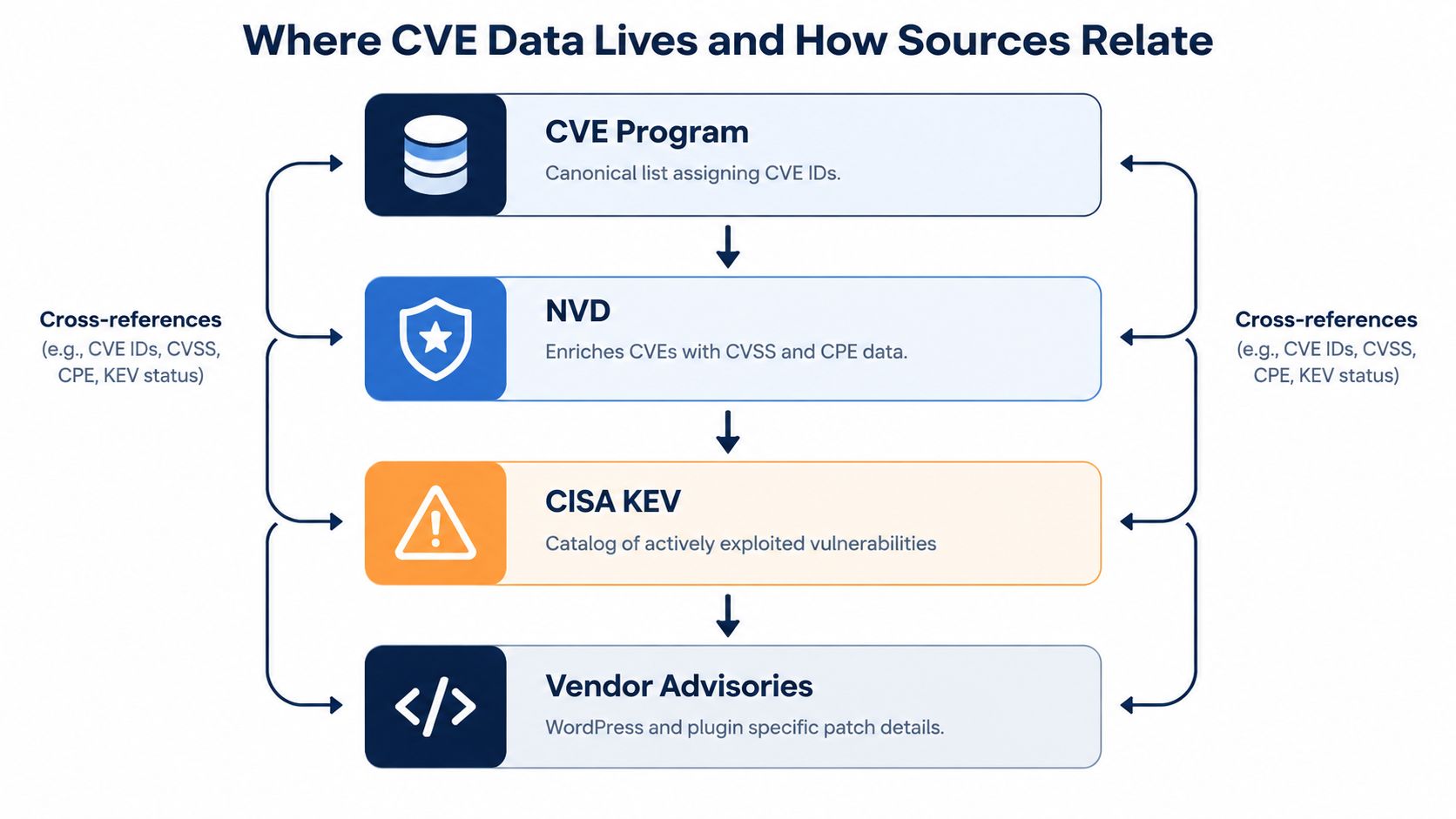
The same vulnerability can appear in several systems, but each system answers a different question. Confusion starts when teams treat all sources as interchangeable.
CVE Program
The CVE Program provides the shared identifier layer. If a WordPress plugin issue receives a CVE ID, the identifier gives vendors and defenders a common reference point. It answers, “What vulnerability are we talking about?”
It doesn't necessarily answer whether the flaw affects your installed version or whether attackers are using it.
NVD
The National Vulnerability Database distributes CVE data in machine-readable formats and adds vulnerability context where available. NVD records can expose product mappings, severity information, references, timestamps, and status fields. It answers, “What structured information is available about this record?”
NVD enrichment can change over time, so an entry that looked incomplete during an initial ingestion may need another review after modification.
CISA KEV
The CISA Known Exploited Vulnerabilities catalog answers a narrower operational question: does CISA list this vulnerability as known to be exploited? A KEV match is a powerful prioritization signal, but a CVE missing from KEV isn't automatically safe. Public exploitation can move faster than catalog updates, and not every relevant issue appears there.
The difference is especially important for WordPress, where plugin vulnerabilities can attract attention before agencies update every public database or before a portfolio's scanner refreshes its findings.
Vendor and ecosystem advisories
A vendor advisory usually provides the remediation detail that a global catalog lacks. For a plugin, it may identify the vulnerable release range, the fixed release, the affected feature, and upgrade instructions. WordPress-specific vulnerability databases and plugin advisories can also make product matching easier than a broad CPE search.
| Source | Primary question | WordPress use |
|---|---|---|
| CVE Program | What is the shared identifier? | Correlate records across tools |
| NVD | What structured metadata is available? | Enrich and process records |
| CISA KEV | Is exploitation catalogued? | Raise urgency when the match is confirmed |
| Vendor advisory | What component and release are affected? | Validate impact and find the patch |
Use the sources together. The CVE ID joins the records, NVD provides structured fields, KEV contributes exploit context, and the vendor or WordPress advisory helps you confirm the affected component and remediation path.
Why CVE Counts and Severity Alone Mislead Triage
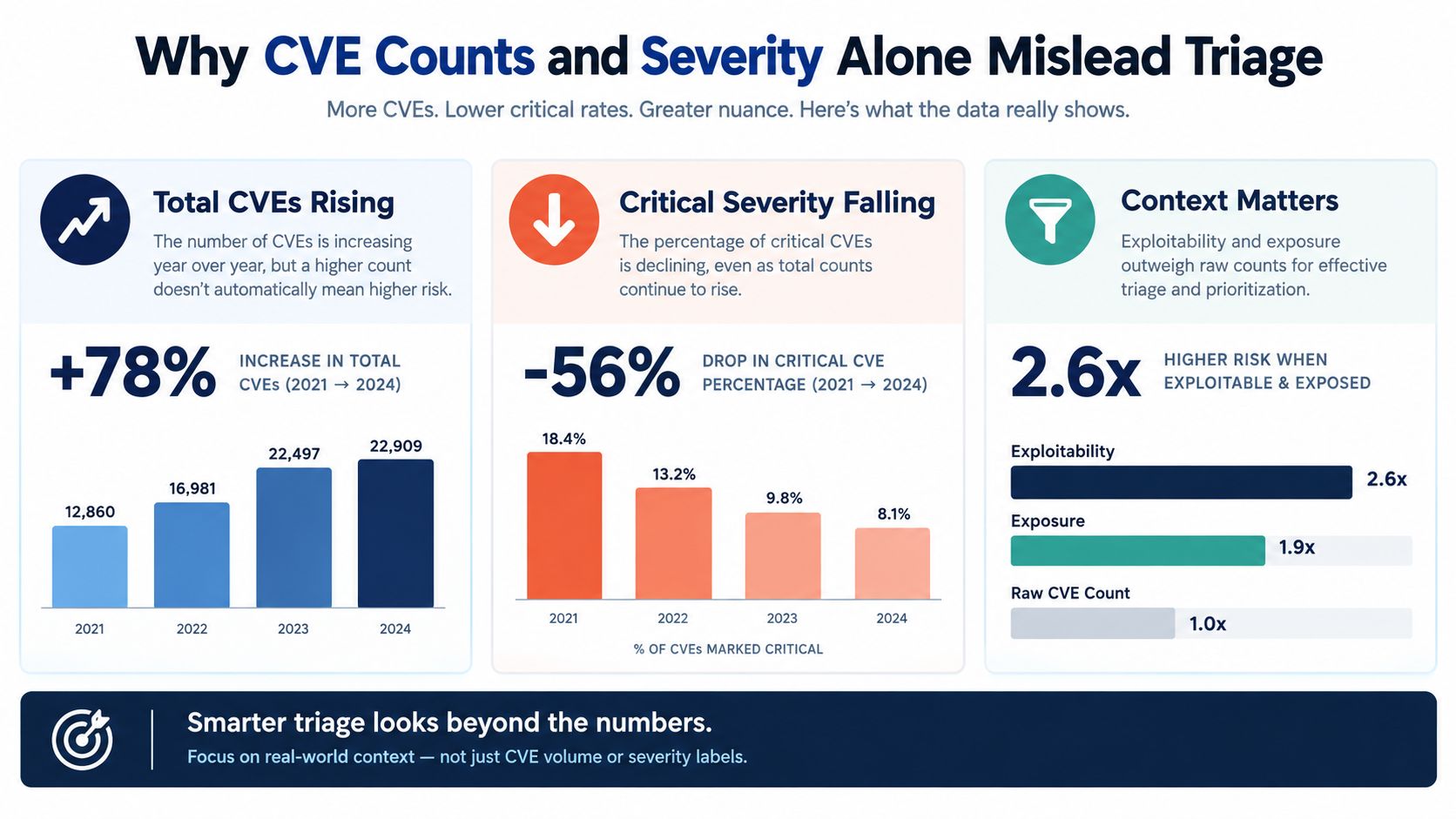
A longer CVE vulnerability list doesn't automatically mean that your WordPress portfolio is in greater danger. Disclosure volume measures how many records entered the catalog. It doesn't measure how many match your installed software, how exposed those installations are, or whether attackers are actively using the flaws.
The recent data makes that distinction clear. 46,407 CVEs were published in 2025, up 16% from 2024, while the share classified as critical fell to 7.4% from 12.8%. At the same time, NVD fully analyzed only 28% of newly disclosed CVEs, compared with 46.2% in 2024, according to Zafran's analysis of the 2025 vulnerability spike.
What the numbers mean for a WordPress agency
A severity label is useful, but it compresses a complex question into a broad category. Two plugin CVEs can share a severity label while differing in exposure, exploit maturity, affected functionality, patch availability, and relevance to a specific site.
The analysis also projects approximately 66,000 CVEs for 2026, which suggests that volume may continue to accelerate rather than settle. For an agency, counting every entry creates a growing backlog without showing which client sites need work first.
That makes analysis status important. If a record hasn't received complete enrichment, your process should flag it for validation instead of treating a missing score as a low-risk result. Product and version matching, vendor references, and exploit intelligence can provide the missing decision context.
Add context before assigning urgency
A WordPress portfolio magnifies the problem because each site can contain a different combination of plugins, themes, core versions, PHP runtimes, traffic patterns, and business functions. Raw global counts don't distinguish an unused plugin from an exposed checkout component.
Teams also need a broader security perspective. If you're reviewing how information moves through systems and how short-lived sensitive data should be handled, Ciphar's guide to encryption and ephemerality provides useful background. It doesn't replace vulnerability triage, but it helps place software exposure inside a larger data-protection model.
Use a CVE count as an inventory signal. Use severity as one input. Then add:
- Affected software: Is the exact plugin, theme, core, or PHP version installed?
- Exposure: Is the vulnerable feature reachable or enabled?
- Exploitation: Is there credible evidence of active use?
- Remediation: Is a fixed release available, or is replacement required?
- Business impact: Would compromise affect checkout, accounts, editorial access, or only a low-value brochure page?
For a WordPress-specific discussion of filtering noisy findings, see which WordPress CVEs to fix first. The practical conclusion is simple: risk comes from the intersection of vulnerability, exposure, exploitability, and consequence, not from the size of a public list.
Curated CVE Feeds and Lists Relevant to WordPress
A useful WordPress monitoring setup begins with a broad feed and ends with a narrow, validated match. NIST's NVD data feeds documentation states that NVD distributes JSON 2.0 feeds, refreshes recent and modified feeds every two hours, and updates year feeds daily. Its APIs also accept comma-separated CVE IDs, which supports bulk enrichment and delta processing across many sites.
Start with the right feed type
Use the recent feed to catch newly published records and the modified feed to detect changes to records you've already processed. Use year feeds for historical rebuilds, audits, and backfills. A portfolio service shouldn't repeatedly reprocess every historical entry when a modified-record delta can identify what changed.
For a WordPress agency, the ingestion sequence can look like this:
- Pull recent and modified records.
- Normalize each CVE ID.
- Compare identifiers with stored records.
- Reprocess entries whose timestamps or metadata changed.
- Match affected products and versions against the site inventory.
- Enrich confirmed matches with vendor and ecosystem advisories.
An API lookup that accepts several CVE IDs is practical after a plugin advisory produces a short list. A feed is better for broad monitoring; an ID lookup is better for targeted verification.
Filter by WordPress component
Global feeds contain records unrelated to WordPress. Filter by product and version only after you understand how the source represents the software. Plugin and theme names can vary across advisories, package records, and inventory systems, so maintain normalized slugs and aliases.
For plugins and themes, verify the component name, affected version range, fixed release, and advisory references. For WordPress core, compare the installed core version with the vulnerable range and confirm the update path. For PHP, check the runtime used by the site, not merely the version installed on a server that hosts several applications.
| Source or Feed | Update Cadence | Best Use for WordPress |
|---|---|---|
| NVD recent JSON 2.0 feed | Refreshed every two hours | Detect newly published records |
| NVD modified JSON 2.0 feed | Refreshed every two hours | Reprocess changed metadata and status |
| NVD year feeds | Updated daily | Historical imports and audit rebuilds |
| NVD API CVE lookup | Supports comma-separated CVE IDs | Bulk enrichment after targeted matches |
| WordPress ecosystem advisories | Depends on the publisher | Confirm plugin, theme, and fixed-version details |
| Vendor advisories | Depends on the vendor | Validate affected functionality and remediation |
Don't confuse a match with confirmation
A product name match is only a candidate. Check whether the installed version falls inside the affected range, whether the vulnerable feature is present, and whether the advisory describes a condition that applies to the site. Store the source URL, record status, published timestamp, last modified timestamp, and validation result so another engineer can reproduce the decision.
That approach keeps a CVE vulnerability list useful without allowing unrelated records to overwhelm your maintenance queue.
From CVE Matches to Portfolio Risk Scoring
Matching a CVE to a plugin is detection. Deciding which site gets fixed first is prioritization.
A transparent scoring model should combine several signals instead of allowing one severity label to dominate. WP Triage describes a model that weights exploitability, software age, known CVEs, and severity into a 0 to 100 risk score, with a ranked fix sequence for each site. Its WordPress risk scoring approach illustrates how an agency can turn separate findings into a comparable portfolio view.
Why the same count can produce different work
Consider two sites with the same number of confirmed CVE matches.
Site A is a WooCommerce store with public customer accounts, an exposed checkout, and a plugin that has a fixed release available. Site B is a brochure site where the matching extension supports a form that isn't enabled, and the site owner can schedule an update without affecting revenue.
The count is identical. The action order shouldn't be.
A useful scoring system gives more weight to the signals that change immediate exposure and consequence:
- Exploitability: Evidence of exploitation or a credible exploit path raises urgency.
- Software age: Older plugins, themes, or runtimes can indicate broader maintenance risk.
- Known CVEs: Multiple confirmed findings may signal concentrated technical debt.
- Severity: Useful as a baseline, but not a substitute for exposure and business context.
- Site importance: Checkout, authentication, customer data, and editorial access change the cost of compromise.
The score should explain itself. A site owner needs to see why the score moved, which finding contributed most, and what action would reduce the risk. A black-box number creates another queue instead of resolving the existing one.
Keep scoring separate from execution
A triage engine isn't a firewall, malware scanner, backup system, or full WordPress management dashboard. It should identify and rank work, while your existing tools handle updates, testing, backups, rollback, and deployment.
For teams assessing automated decision support beyond vulnerability management, an AI risk assessment tool can provide useful comparison material. Apply the same standard here: understand the inputs, inspect the rationale, and keep a human review step for high-impact changes.
Integrating CVE Data Into Your Triage Workflow
A reliable workflow moves through four states: ingested, matched, prioritized, and verified. Mixing those states creates false confidence. A record may be successfully ingested but still fail to match the installed plugin version, or it may match correctly but rank below a more urgent issue on another site.
Build the daily snapshot
Capture the current state of WordPress core, plugins, themes, and PHP for each connected site. Store version data with the site identifier and collection time. Without a current inventory, a CVE vulnerability list can only produce theoretical matches.
Pull recent and modified vulnerability records, then normalize IDs and compare them with stored metadata. Recheck records whose status, references, affected-product information, or modification timestamp changed. The purpose of a daily snapshot is not to notify everyone about everything. It's to maintain a dependable baseline for change detection.
Validate before you notify
A candidate match should pass a site-level review:
- Component check: Confirm the plugin, theme, core release, or PHP runtime.
- Version check: Compare the installed version with the affected and fixed ranges.
- Feature check: Determine whether the vulnerable functionality is enabled or reachable.
- Source check: Review the vendor or WordPress-specific advisory.
- Exploit check: Look for evidence of active exploitation and relevant catalog status.
Security scanning helps discover weaknesses, but it isn't the same as deciding what to fix first. For a plain-language explanation of the discovery layer, consult what vulnerability scanning means.
Limit the work queue
After validation, rank the findings and give engineers a short action list. A practical agency process can highlight the top three issues per site, then let the team execute updates in its existing maintenance tools. Send targeted notifications for critical CVEs and material score drops, while reserving lower-urgency changes for a weekly portfolio review.
Verification closes the loop. Record the new version, rerun the match, confirm the CVE no longer applies, and note any compensating control or accepted exception. A WordPress vulnerability scanner workflow can help frame the distinction between finding a result and turning it into a verified remediation.
Quick Decision Matrix for Prioritizing CVEs
When an engineer has limited maintenance time, the question isn't “Which CVE has the highest label?” It's “Which confirmed exposure creates the most urgent combination of attacker opportunity and business consequence?”
Use this matrix during a standup or maintenance review. It ranks signals qualitatively, so your team can apply judgment instead of pretending that a universal score fits every site.
| Criterion | Fix first when | Lower urgency when |
|---|---|---|
| Exploit status | Reliable evidence indicates active exploitation | No exploitation evidence is available and exposure is limited |
| Affected install | The vulnerable component runs on an exposed site or many managed sites | The component isn't installed or the match is unconfirmed |
| Severity | The issue can affect authentication, code execution, sensitive data, or administrative access | Impact is narrow and the vulnerable feature isn't enabled |
| Software abandonment | The plugin or theme has no clear patch or maintenance path | A supported fixed release is available and tested |
| PHP lifecycle | The runtime is unsupported and affects important production workloads | The site runs a supported runtime with a planned upgrade path |
| Business role | WooCommerce, membership, booking, or customer-data workflows are involved | The site is a low-impact brochure presence |
Apply the matrix to two common cases
For a WooCommerce store, exploitation status and checkout exposure should usually outweigh a simple count of low-context findings. A plugin CVE affecting authenticated users may rise sharply if the store allows account creation and stores valuable customer information.
For a brochure site, the same plugin may still need an update, but a confirmed exploit affecting public administration or a PHP runtime problem could take precedence. The business impact is different, so the fix sequence can differ even when the software inventory overlaps.
Use this short checklist before assigning the next ticket:
- Is the component and installed version confirmed?
- Is the vulnerable function exposed or enabled?
- Is there evidence of active exploitation?
- Is a fixed release available and compatible?
- Would compromise affect customers, payments, accounts, or publishing?
- Does the software lack a supported maintenance path?
- Can the team verify the fix after deployment?
If the evidence is incomplete, label the item needs validation rather than forcing it into a false high or low category. That label preserves attention without turning uncertainty into panic.
Quick Reference Glossary and Cross Referenced Lookup
Use this glossary as a desk reference when a CVE vulnerability list appears in a ticket, dashboard, or client report.
- CVE: A standardized identifier for a publicly known vulnerability. The record itself is explained in How to Read a CVE Record Field by Field.
- CVE Program: The shared global system that coordinates CVE identifiers and records. It provides the common naming layer, not a complete remediation decision.
- NVD: NIST's vulnerability database, which distributes structured CVE information and related metadata. See Where CVE Data Lives and How Sources Relate.
- KEV: CISA's Known Exploited Vulnerabilities catalog. A match indicates that exploitation is catalogued, but absence from KEV doesn't prove that exploitation isn't occurring.
- CVSS: A severity scoring framework commonly shown alongside vulnerability records. Use it as one signal, not as a complete portfolio priority.
- CPE: A structured product naming format used by vulnerability systems to describe affected software and versions. Always validate CPE-style matches against your actual WordPress inventory.
- Vulnerability status: The current record state, such as awaiting analysis or published. Status affects how much confidence you should place in the available context.
- Last modified timestamp: The change marker that tells your ingestion process to revisit an existing record.
For daily lookup tasks, use these entry points:
- Find a plugin or theme issue: Start with the component advisory, confirm the installed version, then use the CVE ID for cross-source enrichment.
- Check whether exploitation is catalogued: Search the CVE in CISA KEV and review other exploitation intelligence before deciding urgency.
- Interpret a changed record: Compare the last modified timestamp and updated references with your stored copy.
- Investigate a PHP concern: Confirm the runtime used by the site, then check the vendor or platform guidance alongside general vulnerability data.
- Review a portfolio finding: Open the site-level inventory and ask why the match matters for that site's exposure and business role.
A CVE list becomes operationally valuable only after your team adds component identity, version relevance, exploit context, and a verified action. Keep those fields together in tickets and reports so a future reviewer can understand the decision without repeating the investigation.
WP Triage connects daily snapshots of WordPress core, plugins, themes, and PHP with CVE matching, a transparent 0 to 100 risk score, and a ranked top-three fix sequence per site. Visit WP Triage to see how it can help your team turn a long vulnerability list into a focused portfolio maintenance queue.