Monday morning starts with a familiar dashboard: 40 flagged issues spread across 12 WordPress sites, a hosting provider asking about a file-integrity alert, and a client waiting for confirmation that checkout is safe. Without a remediation plan, every warning competes for attention. The operator patches the easiest plugin first, postpones the account review, and closes tickets based on activity rather than verified risk reduction.
That approach fails once a portfolio grows beyond a few installs. Core versions drift, plugin updates can disrupt WooCommerce flows, former contractors retain admin accounts, and brute-force noise can obscure the compromised credential. A useful remediation plan example turns that panic into a ranked backlog with owners, deadlines, treatment decisions, and proof that each fix worked.
Table of Contents
- Why WordPress Operators Need a Remediation Plan Today
- The Building Blocks of a Strong Remediation Plan Example
- A Prioritized Task List for a Real WordPress Portfolio
- Assigning Owners, Timelines, and Verification
- When to Defer, Mitigate, or Escalate a Fix
- Running the Plan Across a 30-Day Portfolio Cycle
- Habits That Keep the Plan From Going Stale
Why WordPress Operators Need a Remediation Plan Today
The problem isn't a lack of findings. WordPress operators already receive scanner alerts, hosting notifications, uptime warnings, integrity reports, and update prompts. The problem is that those systems usually describe individual symptoms, while the operator has to decide what matters across the entire portfolio.
A plugin vulnerability on an abandoned brochure site isn't automatically more urgent than a less severe weakness on a public store. The decision depends on exploitability, exposure window, business impact, and blast radius. A checkout-facing custom plugin deserves attention because exploitation could affect transactions and customer data. A similar flaw on an isolated staging site may need tracking, but not the first production change window.
What goes wrong without a portfolio view
Several failure modes appear repeatedly across multi-site operations:
- Version drift: One site runs a current WordPress core release while another still depends on an older PHP or plugin combination that nobody has inventoried.
- Unsafe patching: An operator updates a payment extension without testing the checkout, then spends the day handling a production regression.
- Orphaned access: A former editor, subcontractor, or agency account remains active long after the person stopped working on the site.
- Alert overload: Repeated login attempts and low-value scanner notices bury the signal that points to a real credential compromise.
- Unverifiable closure: A ticket says “updated,” but nobody confirms that the vulnerable version disappeared from the affected install.
The Wistec WordPress solutions resource is useful context for teams reviewing how development, maintenance, and operational decisions fit together. The remediation plan itself should stay narrower: identify exposure, choose an action, assign responsibility, and verify the outcome.
Practical rule: Rank work by the risk an exposed site creates, not by the order in which alerts arrived.
The rest of the workflow is designed for that Monday morning. By the end of the cycle, the operator should have a single inventory, a defensible priority order, clear ownership, and evidence that risk decreased.
The Building Blocks of a Strong Remediation Plan Example
A reliable plan has six parts. Each part should produce something a developer, project manager, or client reviewer can inspect.
Scope defines the boundary. List the production sites, subsites, staging environments, and connected services included in the cycle. Add a staging-parity check so a fix tested against one plugin set isn't assumed to work on a different production stack.
Asset inventory establishes the baseline. Record WordPress core, active plugins, themes, PHP versions, custom code, hosting tier, and business role. A vulnerability can't be prioritized consistently if the portfolio record doesn't show which installations are internet-facing or revenue-critical.
Findings register turns alerts into stable work items. Give each finding an identifier, affected site, scanner source, raw evidence path, reproduction notes, and impacted component. Preserve the original evidence, even after the fix, so a reviewer can understand what existed before deployment.
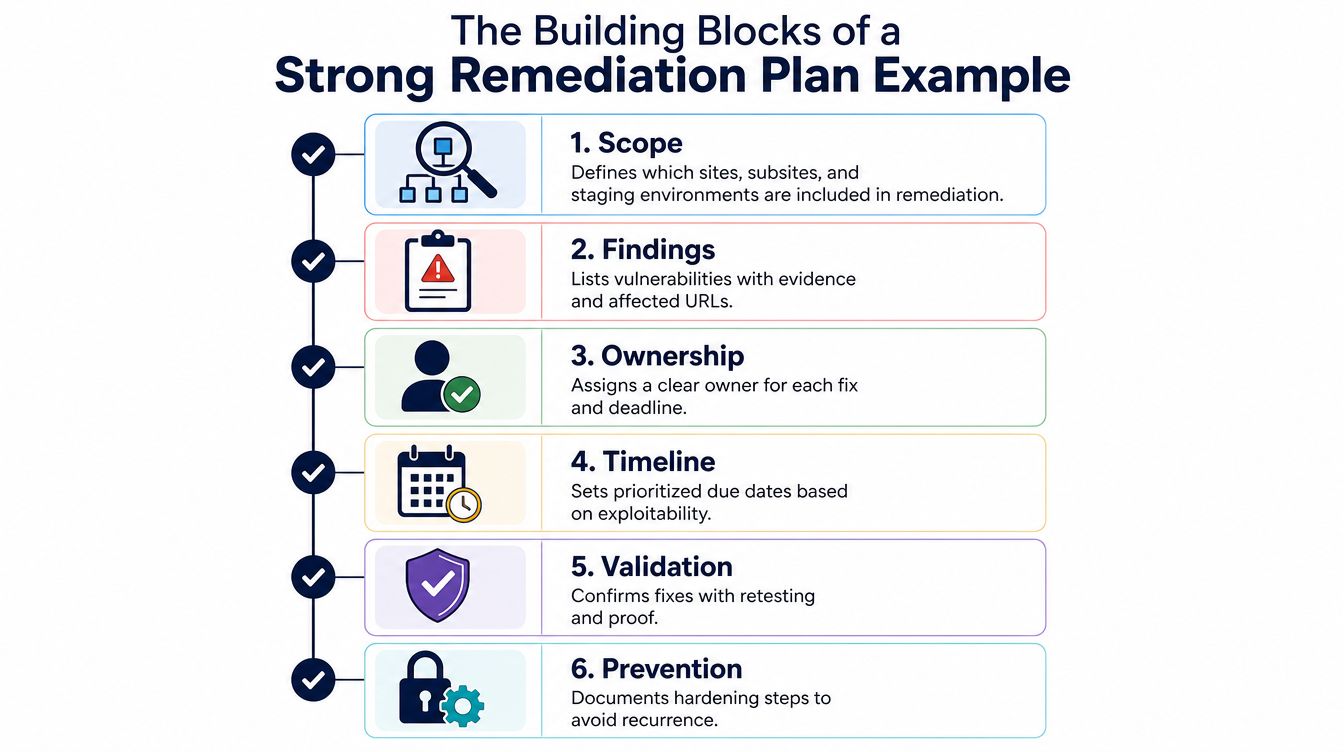
Risk scoring combines technical severity with context. Include CVSS where available, exploit availability, internet exposure, asset criticality, and dependencies such as WooCommerce checkout or membership authentication. The score isn't the decision by itself. It gives the team a repeatable starting point.
Treatment decision records whether the team will fix, mitigate, defer, or accept the issue. A deferral needs a reason, a review date, and any interim control. “Waiting for approval” isn't a treatment decision unless someone owns the approval and has a date.
Closure evidence proves the action worked. Depending on the finding, that might be a rescanned result, a before-and-after screenshot, a version record, a hash comparison, or a successful functional test. The row should show who verified the outcome and what residual risk remains.
Without all six, the document becomes a ticket queue nobody trusts. A list of plugins without evidence is an inventory, not a remediation plan. A list of owners without risk context creates busywork. A list of closed tickets without retesting creates false confidence.
A Prioritized Task List for a Real WordPress Portfolio
Consider a portfolio containing 12 sites, including WooCommerce stores, editorial publications, and membership sites. The findings below aren't arranged by scanner severity alone. They're ordered by the combination of current exploitability, public exposure, business consequence, and the availability of a practical fix.
| Rank | Site | Issue | Score Inputs | Treatment |
|---|---|---|---|---|
| 1 | WooCommerce store | Unauthenticated SQL injection in a checkout-facing custom plugin | Public endpoint, exploitable now, revenue flow exposed, patch available | Emergency remediation and post-deploy verification |
| 2 | Magazine site | Former editor's admin username remains active, with a weak password reused in a known breach dump | Privileged access, public login, credential reuse, editorial impact | Disable account, rotate related credentials, review logs |
| 3 | WooCommerce store | PHP 7.4 on a host that has announced end-of-support | Unsupported runtime, production exposure, forced host upgrade risk, dependency uncertainty | Upgrade through staging and validate extensions |
| 4 | Membership site | Vulnerable authentication extension with restricted exploit path | Account data, authenticated path, active feature dependency | Patch in a controlled release window |
| 5 | Magazine site | Stored XSS in an SEO plugin reachable by contributors | Contributor access, editorial workflow, stored payload possibility | Remove contributor role temporarily, then patch |
| 6 | Brochure site | Outdated media plugin with a public upload concern | Public form, limited business impact, exploit conditions unclear | Mitigate upload path and schedule update |
| 7 | Editorial site | File-integrity change in a theme directory | Evidence of unexpected modification, content impact, uncertain cause | Preserve evidence, compare hashes, investigate before cleanup |
| 8 | Membership site | Excessive administrator accounts | Privilege sprawl, account-management exposure, no confirmed compromise | Review owners, remove inactive accounts, enforce individual access |
| 9 | WooCommerce store | Medium-severity reflected XSS in an internal search parameter | Public endpoint, user interaction required, checkout not directly involved | Patch during the next tested maintenance release |
| 10 | Magazine site | Missing security headers on a legacy template | Defense-in-depth gap, broad page coverage, no direct exploit evidence | Add configuration change and retest key templates |
| 11 | Brochure site | Readme file discloses component version | Low direct impact, public information, easy cleanup | Defer to the next maintenance window with acceptance recorded |
| 12 | Staging site | High-severity plugin issue on an internal-only environment | Limited exposure, no production data, isolated access | Defer, restrict access, and attach a review date |
The important detail is the reasoning. Rank one has a working patch and a public revenue path, so waiting for a convenient release window is difficult to defend. Rank two may not involve a software CVE, but a live privileged account with reused credentials can create a more immediate route into the magazine site.
The PHP issue ranks above the medium plugin XSS because the host's announced support boundary creates a near-term operational constraint. The stored XSS is still actionable, but removing the contributor role reduces exposure while the team tests the update.
For a more formal way to document site-level security assumptions, use the WordPress site security risk assessment example as a reference point, then adapt the fields to your own portfolio and client obligations. The finished table should show not only what ranks first, but why a lower-ranked issue can safely wait.
Assigning Owners, Timelines, and Verification
“Web team” isn't an owner. It's a place where tickets disappear. Assign one accountable person to each task and name a reviewer who can confirm that the work is complete. The engineer may deploy a plugin update, while another operator tests checkout, login, forms, and cache behavior.
A practical RACI-style row includes the accountable owner, implementer, reviewer, client approver where needed, and escalation contact. Keep those roles separate when the change affects payment, authentication, database structure, or a high-traffic publishing path.
Match the deadline to the risk
The following timeline is an operating policy, not a substitute for judgment. If a finding has active exploitation evidence or touches a critical business function, shorten the path and escalate the change.
| Risk Tier | Owner | Deadline | Verification Step |
|---|---|---|---|
| Critical | Senior WordPress engineer | Within 24 to 72 hours | Deploy, rescan, review logs, and test the affected business flow |
| High | Site owner or assigned engineer | Within one week | Staging validation, production smoke test, and evidence attachment |
| Medium | Maintenance engineer | Within the current sprint | Targeted retest, compatibility check, and residual-risk note |
| Low | Operations queue owner | Next maintenance window | Confirm change, rerun the relevant check, and record acceptance if deferred |
Verification must match the fix. A plugin update needs staging coverage and a Plugin Conflict check, not merely an updated version number. A file-integrity finding needs a before-and-after hash comparison and an explanation for the original change. An authentication change needs a failed-login simulation, session rotation check, and review of active sessions.
The WordPress plugin updates guidance can help teams formalize update handling, but the plan still needs site-specific acceptance tests. WooCommerce checkout, membership registration, editorial publishing, transactional email, and caching each deserve their own smoke-test list.
Record the deployment timestamp, verification timestamp, result, evidence location, and residual risk in the same row. Verification should also have a validity window. If a scan is never rerun after a later deployment, the old “passed” result may no longer describe the current site.
When to Defer, Mitigate, or Escalate a Fix
CVSS is useful, but it doesn't know whether the vulnerable component is reachable, whether exploitation is occurring, or whether the site processes orders. A high score on an internal-only staging plugin can reasonably wait behind a lower-scored stored XSS on a public contact workflow that sends sales leads to staff.
Use three explicit treatment decisions:
- Remediate now: Ship the patch or configuration change when the fix is available, the exposure is meaningful, and testing can be completed within the required window.
- Mitigate temporarily: Reduce exploitability with a WAF rule, by disabling a vulnerable shortcode through a mu-plugin, or by restricting an
admin-ajaxaction to authenticated users. - Defer or accept: Record why the issue can wait, what control limits the exposure, who approved the decision, and when the team will reassess it.
A compensating control isn't a disguised closure. The underlying vulnerability remains open until the permanent fix lands. Give the control its own owner, expiry or review date, and verification step so it doesn't become invisible technical debt.
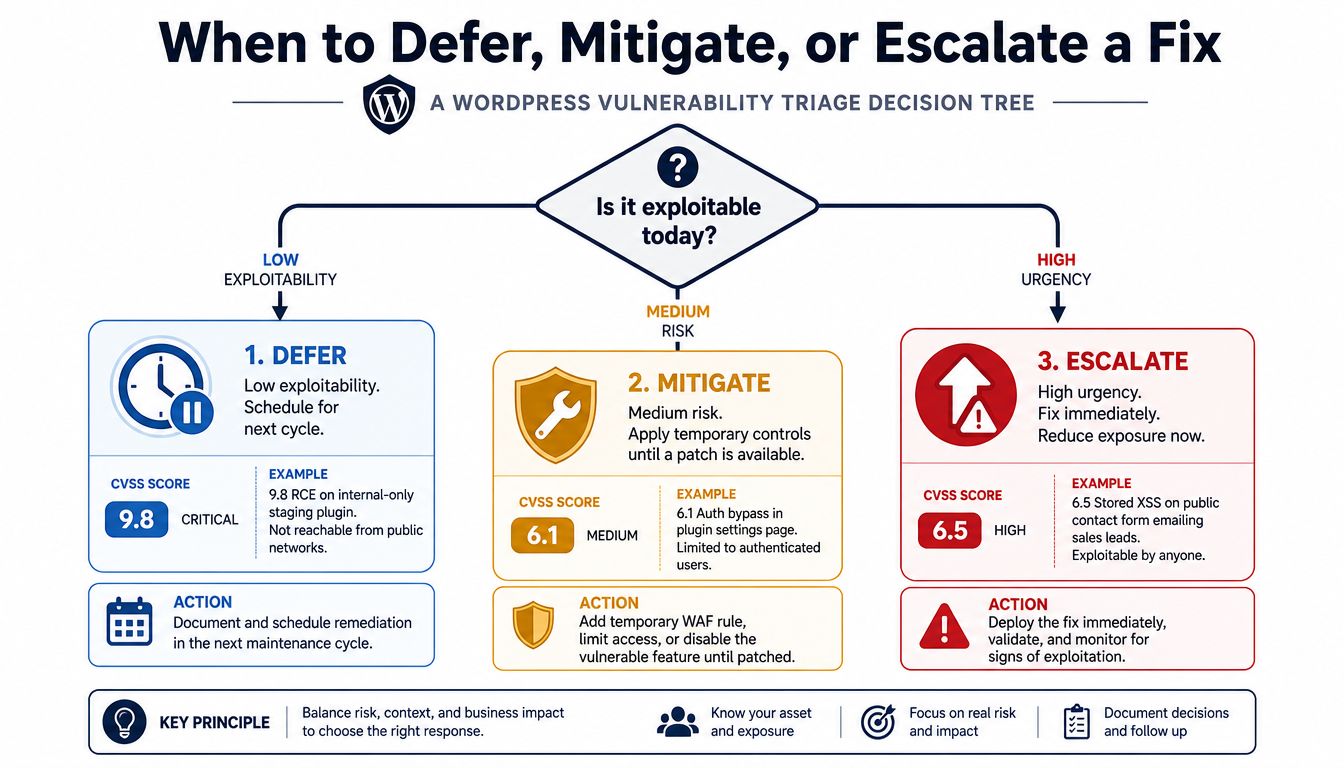
Escalation belongs in the plan rather than in an informal chat thread. Push the task to a senior engineer when it requires a schema change, risks breaking a paid extension, touches checkout, or needs a client decision about downtime. A deferral is defensible only when the reasoning survives review.
For broader technical-debt work, a guide to codebase modernization offers useful context for situations where replacing an old component is safer than repeatedly applying temporary controls.
Running the Plan Across a 30-Day Portfolio Cycle
A 30-day cycle works when each week has a distinct operating purpose. On a 12-site portfolio, week one is intake and triage. Pull scanner output, Sucuri reports, integrity alerts, update inventories, and uptime signals into one findings register, remove duplicates, confirm affected assets, and assign preliminary risk.
Week two is for the critical tier. The operator handles outdated core versions, exposed administrative paths, and exploited plugin vulnerabilities first. Production changes use staging where the environment is representative, and every deployment gets a rollback plan before the change begins.
Week three clears the high tier and deals with fallout from earlier work. If a plugin update causes a membership problem or a host migration blocks staging, the task doesn't vanish. It receives a new state, owner, blocker, and revised decision.
Week four is verification and reporting. Rerun targeted checks, confirm that closed findings are absent, record residual risk, and reset the queue with new scan output. The WordPress web maintenance workflow can help teams align recurring maintenance with this kind of review cadence.
| Metric | Day 0 | Day 30 |
|---|---|---|
| Open findings | 40 | 9 |
| Critical findings | 8 | 1 |
| Mean time to remediate | 21 days | 6 days |
Those figures describe the worked portfolio cycle, not a universal benchmark. They also don't tell the full story without the exceptions. Two medium-tier fixes moved into the next cycle because a hosting migration blocked staging. One low-tier item closed accidentally when a client moved hosts, so the operator had to reconcile the retired asset instead of treating the closure as a security win.
That context matters. A lower backlog is useful only when the team can explain which findings were fixed, which were mitigated, which were retired with the asset, and which remain open for a documented reason.
Habits That Keep the Plan From Going Stale
A remediation plan decays as soon as it stops being the place where decisions are recorded. The teams that close work consistently keep the recurring review narrow: the prioritized task list is the agenda, blockers are written down, and every skipped item gets a new due date before the meeting ends.
Verification notes belong in the ticket or plan row, not in Slack. The next operator should be able to see the deployed version, test result, evidence path, and residual risk without reconstructing a conversation from old messages.
Keep the data strict
Five habits prevent drift:
- Review the ranking regularly: Re-score against fresh scan output, newly published vulnerability information, current exploitability, and changed business importance. Add a one-line reason whenever an item moves.
- Require dated status: Ban free-form states such as “in progress” without a next action and date. Use states that describe evidence, such as identified, assigned, deployed, verified, mitigated, or accepted.
- Keep ownership singular: A team can collaborate, but one person remains accountable for moving each row forward.
- Retire assets cleanly: Remove decommissioned sites and transferred domains from the inventory so they don't continue generating misleading backlog.
- Measure closure, not motion: Track issue count, completion rate, aging backlog, and time from identification to verified remediation. The CDC's remediation-plan guidance illustrates why measurable outputs are more useful than a vague instruction to fix a problem.
For larger backlogs, prioritization has to account for capacity. The Action1 State of Vulnerability Remediation report describes the gap between discovery volume and remediation capacity, while recent remediation research reports that 62% of organizations rely on manual workflows and only 2% are fully automated (Mondoo's remediation research). Those findings support a practical conclusion: automate collection and routing where confidence is high, but keep ownership and verification explicit.
WP Triage helps WordPress operators aggregate portfolio findings, monitor core, plugin, theme, and PHP versions, match installed components to known vulnerabilities, and produce a ranked fix sequence with risk scoring. Use the WP Triage dashboard to turn your next multi-site review into an ordered remediation queue, then execute and verify the changes in the tools your team already uses.