You're an agency lead with a portfolio of client sites on one WordPress network. On an ordinary morning, a Slack thread starts with one client reporting a 503. Minutes later, four more clients are seeing the same thing. The cause isn't a hosting outage. One subsite is running an unindexed WP_Query loop during a traffic spike, consuming shared workers while unrelated sites wait.
That's the moment multisite WordPress hosting stops being a convenient admin shortcut and becomes an operations decision. The right question isn't which plan has the most impressive resource label. It's whether your team can contain a noisy neighbour, recover one client without damaging the rest, and rank security work across the portfolio before a shared weakness becomes a network incident.
WordPress Multisite became a built-in platform feature with WordPress 3.0 in 2010, allowing one installation to run a network of sites from a shared codebase and database structure, as documented in this history of WordPress Multisite. That centralization still makes sense for related sites, but only when the hosting model matches the portfolio's risk.
Table of Contents
- The Moment Multisite Hosting Stops Being a Feature
- What Multisite WordPress Hosting Actually Means
- The Four Hosting Categories Agencies Choose Between
- Comparing What Matters for Portfolio Workloads
- When Shared Infrastructure Becomes the Bottleneck
- Security Operations Across a Multisite Network
- Matching Hosting Type to Agency Profile
- Practical Questions Before You Commit
The Moment Multisite Hosting Stops Being a Feature
The first response to the Slack thread is usually tactical. Restart PHP. Clear the cache. Disable the suspicious plugin. Ask the client to wait. Those actions might restore service, but they don't answer the operational question: why could one subsite interrupt several others?
A multisite network puts multiple properties on the same infrastructure. A shared database, PHP workers, memory pool, storage layer, and deployment process create efficiency, but they also create dependencies. If one site generates expensive queries, performs a large import, or receives an unexpected campaign surge, the other sites don't get their own private lane.
That changes how an agency should evaluate hosting. A plan that looks adequate when every site is quiet can fail during a campaign, a WooCommerce sale, or a plugin update. You need to assess the portfolio as a single workload, then identify which subsites can create the most damage.
Practical rule: Treat every subsite as a potential production dependency, not as an independent account.
The operational test is simple. Can a junior developer identify the offending subsite quickly? Can they pause its expensive process without taking down the network? Can they restore that site without overwriting newer orders, comments, or configuration elsewhere? If the answer is no, adding more sites to the same network increases response complexity even if administration remains convenient.
This guide takes a firm position. Multisite is valuable when sites share ownership, branding, governance, and technical assumptions. It becomes a liability when unrelated clients need independent release schedules, security boundaries, scaling patterns, or recovery guarantees. Choose the topology first, then demand a host that supports it properly.
What Multisite WordPress Hosting Actually Means
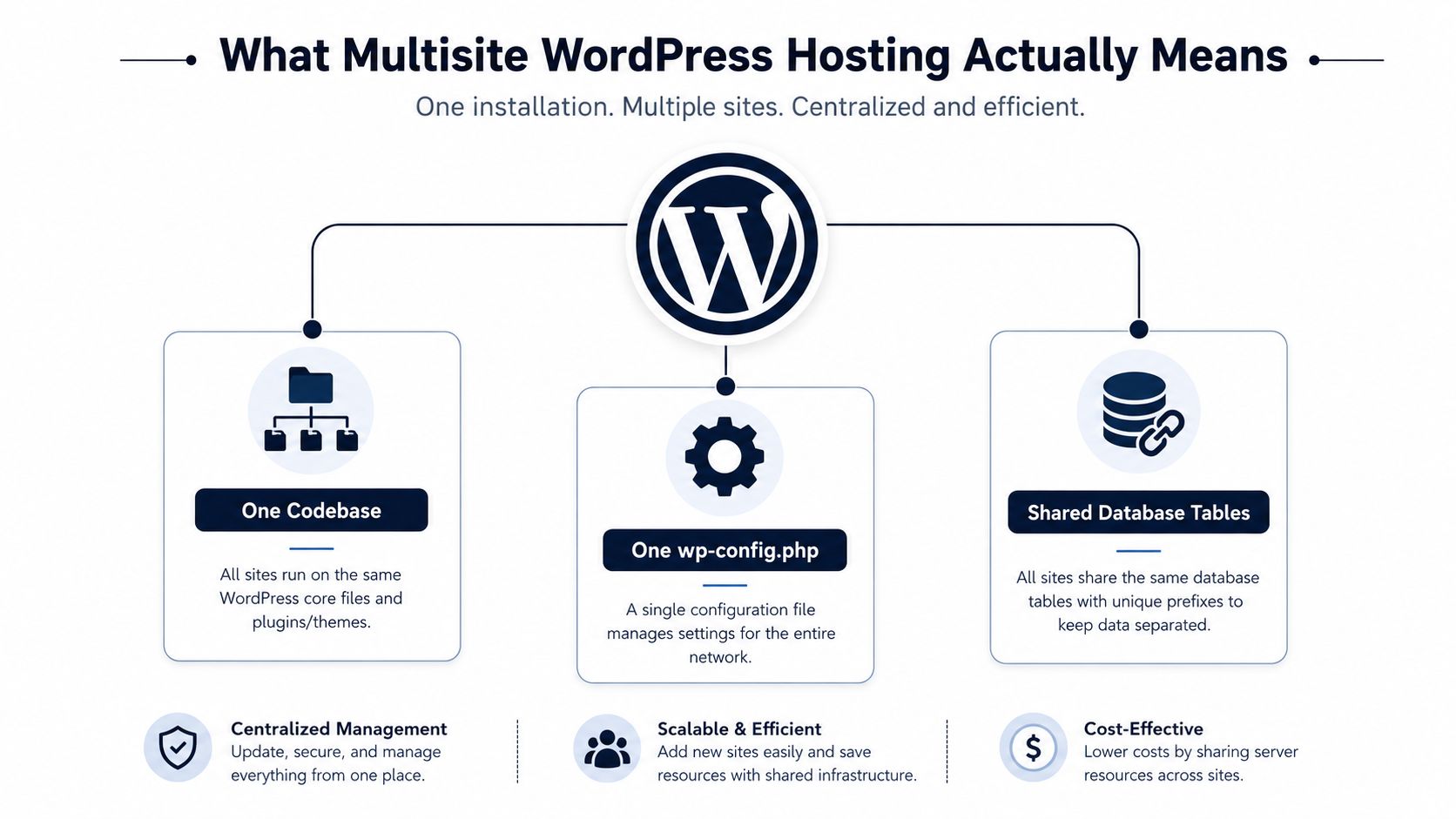
At infrastructure level, Multisite is one WordPress installation serving many sites from a common stack. The network shares the WordPress codebase, wp-config.php, themes, plugins, and core update path. Each subsite has its own content and settings, while network tables track sites, users, and network-level configuration.
The database model matters more than the dashboard. Site-specific tables are separated by site identifiers, while user data such as wp_users and wp_usermeta can be shared across the network. Tables such as wp_blogs describe the network's site structure. That arrangement makes centralized administration possible, but it also means a database mistake or privileged credential can affect more than one client.
Choose the URL topology deliberately
A subdirectory network places sites under paths such as site.tld/client-a. It's straightforward for closely related properties, but it can complicate branding and migration if every client expects a separate public identity.
A subdomain network uses addresses such as client-a.site.tld. This separates site identities more clearly, but the host must support wildcard certificate coverage, web server routing, and the required DNS behaviour.
A domain-mapped network presents each subsite on its own domain. Visitors see distinct brands, but the underlying network still shares its code and resources. Domain mapping therefore increases the importance of certificate management, redirects, staging parity, and a clean migration process.
Ask about the complete stack
Disk space alone tells you very little. Shared PHP workers, autoloaded options, database connections, uploads, object caching, and SSL handling determine whether the network remains stable. A host must understand Multisite at the web server and DNS layers, not merely allow multiple domains to point at one account.
For broader agency workflow guidance, the WebinOne guide for agencies is useful alongside infrastructure planning because it treats multi-site work as an ongoing management process rather than a one-time installation.
The Four Hosting Categories Agencies Choose Between
Agencies usually compare four categories, but the labels hide important trade-offs.
Shared hosting
Shared hosting keeps the bill and server administration simple. It can work for a small network of quiet brochure sites, especially when the host explicitly supports Multisite, wildcard SSL, domain mapping, and network-aware backups.
The problem is contention. Providers commonly cap PHP workers, database activity, and background processing across the account. Isolation from other customers may also be weak. A single expensive subsite can compete with every other site in the network, while your team has little control over queue limits, database tuning, or process prioritization.
Managed WordPress hosting
Managed WordPress hosting removes much of the server work. The provider typically handles core operations, caching, backups, security layers, and support. That's attractive for agencies that want developers focused on client work instead of PHP configuration and server patching.
The catch is platform policy. Some managed hosts support Multisite only in particular configurations, restrict network-level tools, or make wildcard SSL and domain mapping dependent on a specific plan or support request. Confirm the actual workflow before migrating.
VPS or dedicated infrastructure
A VPS or dedicated server gives you control over PHP pools, database settings, caching, deployment, logs, and monitoring. That control helps when sites have different performance profiles or when your team needs custom incident procedures.
You also inherit the operations burden. Someone must patch the operating system, secure the server, configure backups, test restores, tune capacity, and respond to failures. A VPS isn't automatically safer or faster. It's more configurable.
Specialised Multisite platforms
Specialised providers build around WordPress network patterns. They may offer wildcard SSL, domain mapping, per-site staging, cloning, and tooling that understands network relationships. That can reduce work for agencies managing repeatable builds.
You're trading flexibility for ecosystem dependence. Plugin restrictions, proprietary workflows, and migration friction can become serious problems if a client later requires an unusual server configuration or an independent installation.
| Category | Control Level | Wildcard SSL | Per-Site Staging | Ops Burden |
|---|---|---|---|---|
| Shared hosting | Low | Must be verified | Often limited | Low |
| Managed WordPress | Low to medium | Provider-dependent | Usually available, scope varies | Low |
| VPS or dedicated | High | Agency-managed | Agency-managed | High |
| Specialised Multisite | Medium | Usually designed for it | Often a core workflow | Medium |
The choice should follow your tolerance for operational work. If your team can't manage a server, don't buy control you won't use. If your clients need isolation, don't accept a cheap shared setup just because the network is easy to administer.
Comparing What Matters for Portfolio Workloads
Marketing pages tend to compare storage, visitor allowances, and generic performance promises. Agency portfolios fail for more specific reasons: inadequate PHP concurrency, weak restore granularity, slow domain mapping, and staging environments that don't match production.
A useful evaluation asks what happens during a real change. Can a junior developer stage one client site? Can they roll back that site without touching the other properties? Can the host show which process consumed workers? Can support explain whether a plugin conflict affects one site or the entire network?
| Criterion | Shared | Managed WP | VPS / Cloud | Specialised Multisite |
|---|---|---|---|---|
| PHP worker visibility | Low | Medium | High | Medium to high |
| Per-site backup restore | Often weak | Must be confirmed | Agency-controlled | Usually supported |
| Domain mapping workflow | Variable | Provider-dependent | Flexible, manual | Usually streamlined |
| Staging parity | Limited | Generally good | Agency-controlled | Often strong |
| Plugin conflict handling | Reactive | Platform-dependent | Fully controllable | Network-aware, with restrictions |
| Network-level logging | Limited | Variable | Strong | Usually available |
| Best fit | Quiet, simple portfolios | Managed agency operations | Technical teams with control needs | Repeated multisite delivery |
A managed platform usually wins for an agency that values predictable workflows and lacks dedicated infrastructure staff. A VPS or cloud environment wins when custom tuning, logs, and deployment control matter more than convenience. Specialised Multisite hosting is the strongest fit when domain mapping and per-site staging are routine, not occasional.
Shared hosting only wins when the portfolio is low risk and the provider can demonstrate network-level support. Don't confuse a low entry price with low operational cost. For a broader baseline on evaluating hosting architecture, use this complete WordPress hosting guide.
When Shared Infrastructure Becomes the Bottleneck
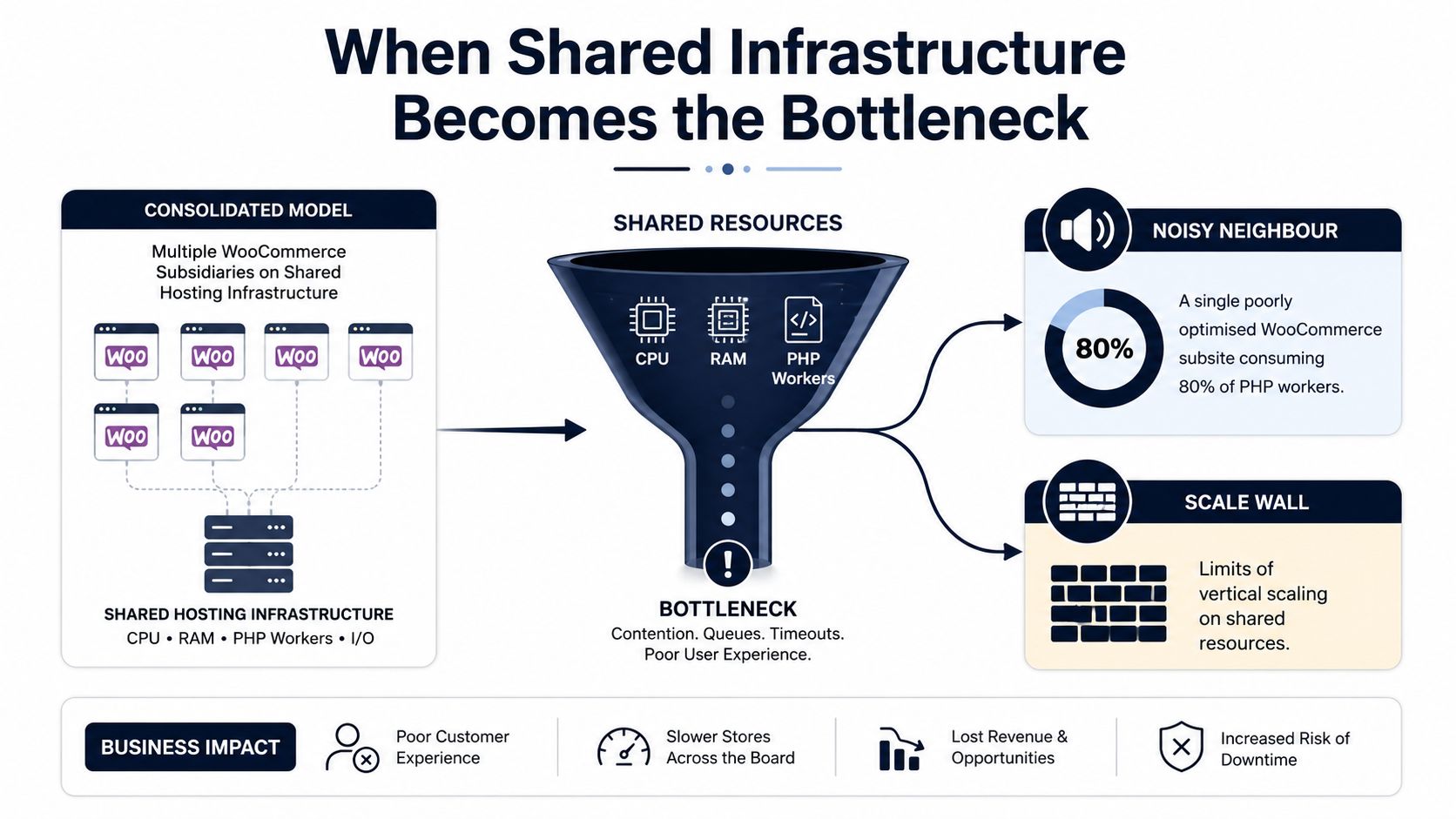
Consolidation doesn't always scale better. It reduces repeated administration, but it also concentrates resource demand and incident impact.
Consider a WooCommerce subsite that consumes 80% of the available PHP workers during a busy period, as illustrated in the multisite hosting bottleneck reference. Another site may be running an import that hammers MySQL while a sibling site processes checkout requests. A media-heavy landing page can create enough uncached work to increase response times across the network.
The failure isn't limited to speed. Recovery becomes dangerous because the network has shared structures. Restoring one subsite from an older backup may remove newer comments, orders, or settings associated with shared data. Restoring the full network may overwrite fresher content on unrelated sites. Your backup system must understand the network boundary, not just copy the whole installation.
The practical break-even point is often roughly 15 to 25 mid-traffic sites, based on the operational trade-off described in independent coverage of Multisite versus separate installations, including this analysis of higher-education networks. Treat that range as a decision signal, not a universal capacity limit. A network with mostly static sites may remain comfortable, while a smaller network with commerce, search, imports, and custom integrations may become fragile sooner.
Teams considering a move away from constrained shared infrastructure can use this shared hosting to AWS migration guide to think through the broader infrastructure transition.
Separate installs or sharded networks start to make more sense when one client's performance profile differs sharply from the rest. If incident response, contractual uptime, or independent release control matters, isolation is usually worth the duplicated administration.
Security Operations Across a Multisite Network
Multisite changes the blast radius of a security mistake. One compromised Super Admin credential can expose the entire network. A vulnerable plugin activated across multiple sites can create a common entry point. A rogue theme with unsafe PHP behaviour can reach shared code and uploads even when only one client first reports suspicious activity.
The response must operate at two levels.
Harden the network layer
Start with a Super Admin audit. Keep that role limited, remove stale accounts, enforce strong authentication, and require a documented approval process for network-wide plugin and theme changes. Maintain a plugin allowlist, and use network controls or MU-plugins where appropriate to prevent site administrators from activating unapproved code.
Treat shared user tables as sensitive infrastructure. A user who only needs editorial access on one site shouldn't receive network privileges. Review role assignments per site, especially after staff changes and client handoffs.
Contain and detect per site
Give each important subsite its own staging path and restore point where the host supports it. Use separate certificates for mapped domains when that fits the architecture, and monitor uptime at the subsite level rather than relying only on a network homepage check.
Detection should also watch for unusual changes in plugins, themes, administrators, and shared database structures. The goal isn't to generate an alert for every minor event. It's to identify the site, privilege, or component that changed the risk profile so a human can act quickly.
A single-site breach consumes a weekend. A breach on a 30-site network consumes a client relationship.
For a practical security baseline before you choose a platform, review this WordPress hosting security guide. The host should support your controls, but it can't replace disciplined access governance and a ranked response process.
Matching Hosting Type to Agency Profile
There's no universal winner. The correct architecture depends on site similarity, traffic behaviour, client expectations, and the people available to operate it.
Solo operators
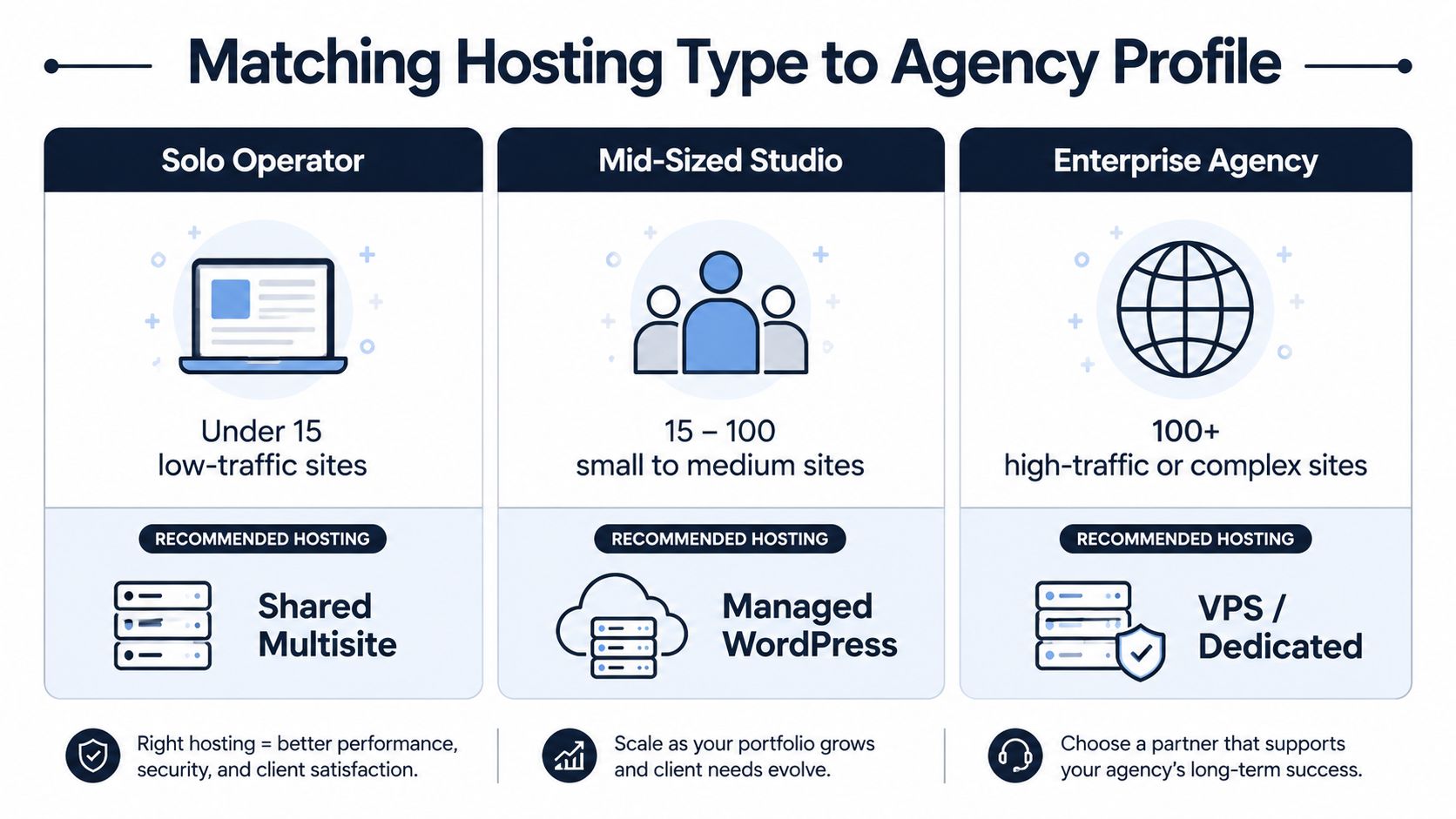
A solo operator managing under 15 low-traffic brochure sites can use managed WordPress Multisite with reliable domain mapping and clear support boundaries. Keep the network conservative. Avoid plugins that require different versions or unusual server settings across clients.
Move away from a basic shared arrangement when worker contention appears repeatedly, backups can't restore one site cleanly, or a client introduces commerce functionality.
Mid-sized studios
A shop handling 20 to 60 mixed sites should usually consider a tuned VPS or cloud setup, especially when it has someone who can own infrastructure. Separate high-demand sites from quiet brochure properties, and consider sharding rather than forcing every client into one network.
Plugin compatibility failures, recurring database contention, and client-specific deployment schedules are signals that centralization has become expensive.
Enterprise partners
Enterprise agencies consolidating client portals should evaluate specialised Multisite infrastructure or separate installs. SSO requirements, compliance obligations, contractual recovery objectives, and revenue-critical commerce make shared blast radius a serious design concern.
Use Multisite where governance and shared components reduce work. Use separate installations where independence is part of the service promise. The decision is about team capacity and client risk, not the monthly hosting tier.
Practical Questions Before You Commit
What will each subsite really cost?
Don't calculate only the hosting invoice divided by the site count. Include migration time, staging work, incident response, plugin testing, monitoring, backup verification, and the cost of isolating a demanding client later. Shared hosting may have the lowest direct cost, while a managed or specialised platform can reduce labour. A VPS may look efficient until you account for the engineer responsible for its maintenance.
Does WooCommerce belong on the network?
WooCommerce adds persistent sessions, checkout activity, background jobs, payment integrations, and order data. Those workloads compete with editorial sites and can make database contention visible quickly. Put commerce sites on isolated infrastructure unless the host can demonstrate adequate PHP workers, database capacity, object caching, queue handling, and subsite-level recovery.
How will migration work?
A subdirectory move is not the same as a subdomain or mapped-domain move. Domain changes affect redirects, serialized settings, cookies, certificates, staging URLs, and external integrations. Use this domain versus hostname guide to clarify the naming model before you ask a host to quote the migration.
Which components can break?
Some plugins assume a single site, expect direct control of cron, write files in unsafe locations, or use network-wide settings without clear site separation. Themes and custom code can also assume a particular URL structure. Test payment, membership, search, analytics, SSO, caching, backup, and security components on staging before network activation.
What must the host confirm?
Send prospective hosts a written checklist:
- Backup granularity: Can you restore one subsite without overwriting the network?
- Rollback window: How recent are restore points, and can the team perform a targeted recovery?
- Staging parity: Does staging reproduce PHP, caching, database, SSL, and domain-mapping behaviour?
- Resource visibility: Can you identify which subsite consumed workers, memory, or database capacity?
- Network support: Does support understand
wp_blogs, shared users, mapped domains, and network activation? - Security governance: Can you restrict Super Admin access and monitor changes by subsite?
- Exit path: Can you export one site cleanly if a client leaves the network?
Independent testing has shown that tuned Multisite-focused hosts can achieve full-load times as low as 0.8 seconds, generally under 2.5 seconds worldwide without a CDN, and under 1.5 seconds in global tests for another provider, with 100% uptime during testing, as reported in this hosting comparison. Those results demonstrate what tuned infrastructure can do, not what every plan will deliver.
For a network that needs portfolio-level maintenance prioritization, WP Triage monitors WordPress core, plugins, themes, and PHP versions, detects known vulnerabilities, and assigns a ranked risk score and fix sequence per site. It complements hosting, backups, and security tools by helping teams decide which subsite deserves attention first.
Use WP Triage to turn a scattered multisite maintenance queue into a ranked list of risks and fixes across your portfolio. Connect your sites, identify the subsites most likely to create security or operational exposure, and give your team a clear next action before the next shared-resource incident.