Monday morning starts with a familiar WordPress mess. Several sites need plugin updates, one client has forwarded a critical vulnerability notice, and a WooCommerce owner wants a simple answer to a difficult question: “Is my store safe?” Meanwhile, the security dashboard is producing more warnings than anyone has time to investigate.
That situation captures what web security means for operators. It isn't just a firewall, malware scan, backup, or hardening checklist. Web security is the ongoing work of protecting applications, data, accounts, and users while deciding which risks deserve attention first. For agencies and freelancers managing multiple WordPress sites, the difficult part is rarely finding alerts. It's converting them into a defensible order of action.
Table of Contents
- The Real Job of Web Security for Site Operators
- Core Concepts Behind Modern Web Security
- The Scale of Automated Attacks and Breach Impact
- The Hidden Attack Surface Beyond the Homepage
- Triage and Prioritization for WordPress Portfolios
- Checklist Security Versus Decision-Driven Security
- Building a Repeatable Web Security Workflow
The Real Job of Web Security for Site Operators
A site operator's first responsibility is knowing what exists. You can't protect a plugin you haven't inventoried, an API route you haven't mapped, or an administrator account nobody remembers creating. WordPress portfolios make this difficult because every site has its own combination of core versions, plugins, themes, hosting controls, integrations, payment services, and business importance.
A brochure site with no customer accounts doesn't deserve the same response as a WooCommerce store processing orders. A vulnerable extension on a low-traffic campaign site may still matter, but an exploited checkout, user-profile, or administrative endpoint can create immediate commercial and privacy consequences. Security work starts with context, not with the loudest notification.
What operators actually have to decide
A practical web security program answers four questions repeatedly:
- What is exposed? Record WordPress core, plugins, themes, PHP versions, administrator accounts, public endpoints, and connected services.
- What can be exploited? Match installed components with known vulnerabilities and consider whether exploitation is occurring in the wild. CISA maintains a Known Exploited Vulnerabilities Catalog specifically for vulnerabilities with evidence of real-world exploitation.
- What would compromise cost? Rank stores, membership sites, customer portals, and internal tools according to data access and business impact.
- What should happen next? Patch, disable, isolate, test, investigate, or accept the risk temporarily with a documented reason.
That last decision is where checkbox programs fail. “Run a scan” isn't a remediation plan. “Install a security plugin” doesn't tell a team whether to update a payment extension, remove an abandoned add-on, reset privileged credentials, or investigate suspicious activity first.
Practical rule: Treat every security alert as a proposed action, not as proof that the action is automatically the highest priority.
A firewall and malware scanner still have useful roles. Backups matter. Multi-factor authentication reduces account risk. Secure development practices prevent defects before deployment. But none of those controls removes the need to maintain an accurate inventory and make trade-offs under pressure. Operators who need broader business context can also review guidance on how to protect your business with Technovation LLC, particularly when website security connects with wider operational risk.
The most useful definition of web security is therefore operational: keep the web surface known, reduce exploitable exposure, detect compromise quickly, and spend limited maintenance time where it lowers risk most.
Core Concepts Behind Modern Web Security
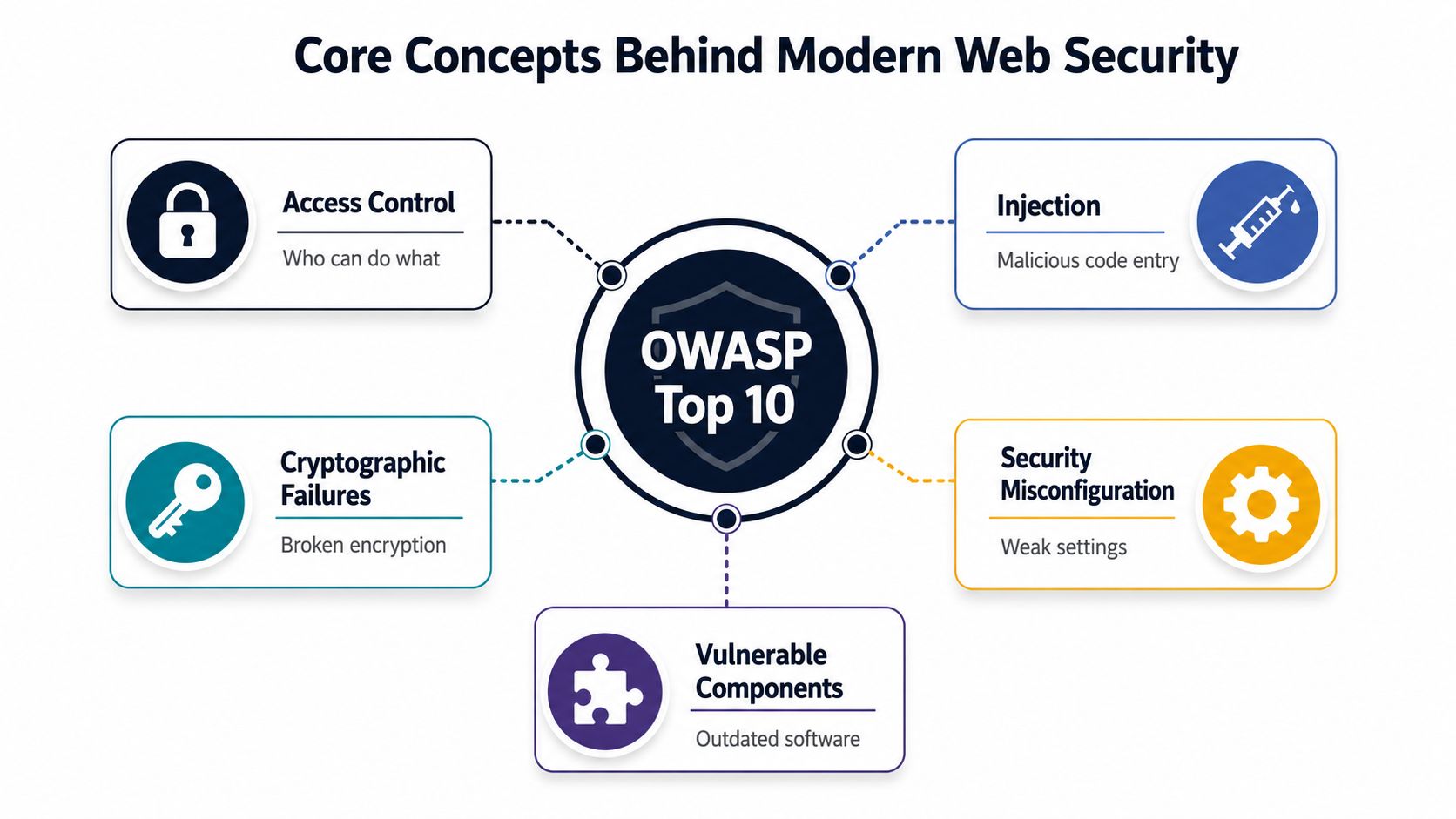
A WooCommerce checkout can authenticate a customer correctly and still expose another customer's order. An ordinary WordPress account might also reach an administrator action if the application checks identity but fails to enforce permissions. These are broken access control failures, and they show why web security requires examining what each request can do, not merely whether a login succeeded.
The OWASP Top 10 gives development and security teams a shared vocabulary for recurring application failures. OWASP first published the project in 2003 and later issued major updates in 2004, 2007, 2010, 2013, 2017, 2021, and 2025, according to its Top 10 project history. The labels change, but the underlying failures continue across frameworks, languages, and generations of web applications.
Think in failure classes, not isolated bugs
Authentication verifies identity. Authorization determines which records, actions, and administrative functions that identity may use. A weak endpoint can expose customer data, enable privilege escalation, or bypass a business rule even when the login system itself works as intended.
OWASP's 2021 data ranked broken access control first. The category appeared in 3.81% of tested applications and represented more than 318,000 CWE occurrences in the contributed dataset, according to the OWASP 2021 Top 10. The 2025 edition still ranks Broken Access Control as the most serious application security issue, with an average of 3.73% of tested applications showing at least one weakness in the category, according to the OWASP 2025 Top 10.
For operators managing several WordPress and WooCommerce sites, the practical question is where an attacker can reach sensitive functionality fastest. Review REST API routes, AJAX handlers, account pages, checkout actions, and administrative functions. Rank findings by reachable capability and business impact, then fix the path that grants the most access first.
The categories connect
Injection allows untrusted input to alter an interpreter's behavior. Authentication weaknesses let attackers obtain or misuse identities. Cryptographic failures expose protected information. Security misconfiguration leaves unsafe defaults, debugging features, permissions, or services available. Vulnerable components pass inherited risk into a site through outdated plugins, themes, libraries, or integrations.
These categories often combine. A vulnerable plugin may expose an endpoint, weak authorization may make that endpoint more damaging, and limited monitoring may let abuse continue unnoticed. A useful review therefore asks both “What flaw exists?” and “What access or business capability does it provide?”
Smaller organizations can apply the same reasoning through practical cybersecurity for SMBs. Start with the application surface, identify who can reach sensitive functions, verify server-side permission checks, and prioritize weaknesses that shorten the route from exploit to business impact.
A focused guide to web security vulnerabilities can turn these broad categories into a concrete WordPress review. The goal is not memorizing every OWASP label. It is recognizing recurring failure patterns and ranking remediation before an attacker combines them.
The Scale of Automated Attacks and Breach Impact
A WordPress site can be compromised without attracting a skilled attacker's personal attention. Automated systems find login pages, probe plugins, test leaked credentials, search for exposed administration routes, and repeat those checks across thousands of domains. The operator may see only a few failed logins or scanner entries while the underlying activity continues around the clock.
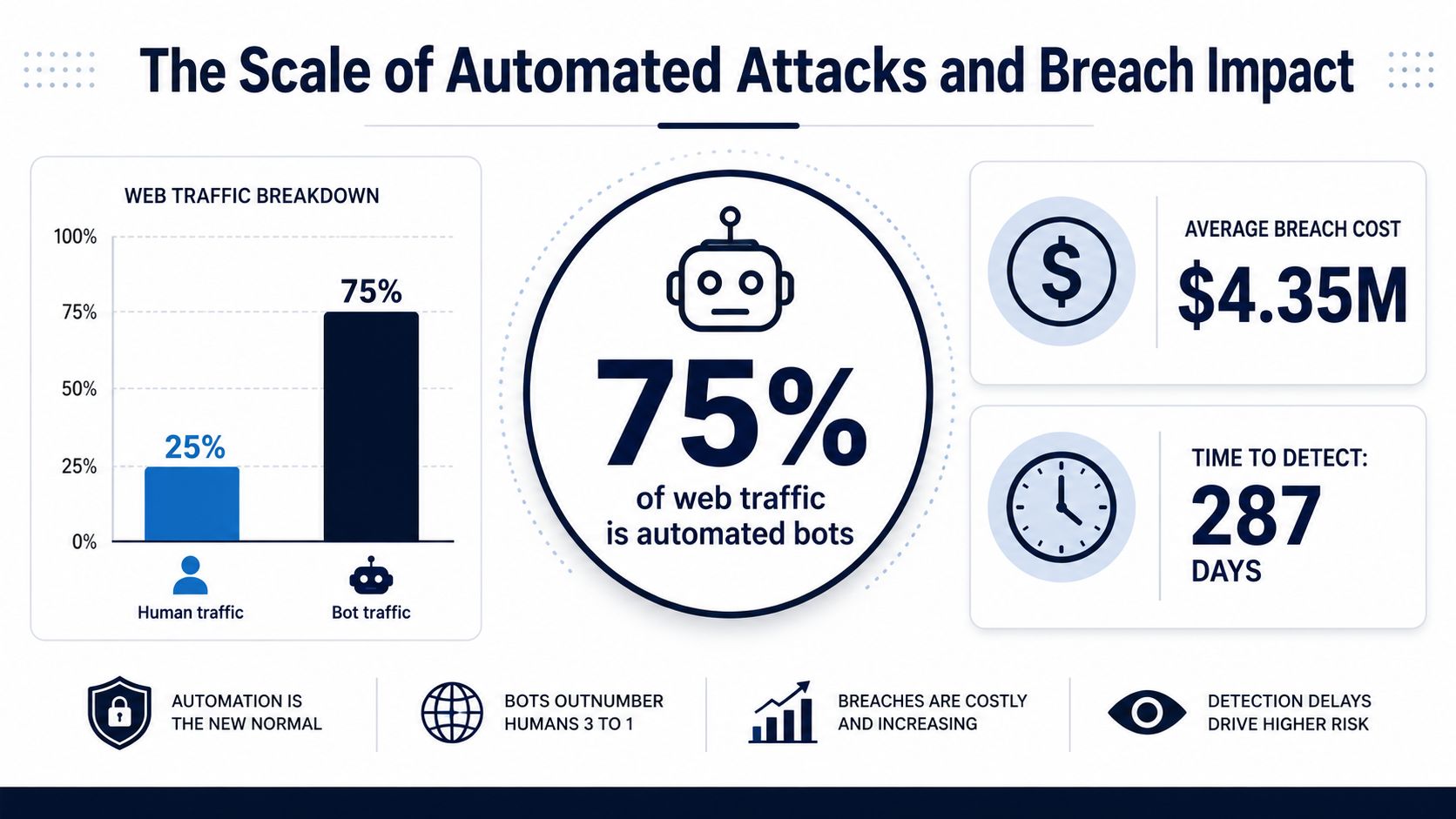
A 2026 industry summary reported that bots generated about 51% of all web traffic, malicious bots represented roughly 37%, and analysis of 7 million websites recorded 94 attacks per website per day. Those figures appear in the 2026 web security statistics summary. Results vary by site and measurement method, but the operational lesson is stable: assume persistent automated pressure and rank defenses by the access they protect.
Why detection speed changes the response
The same summary reported a global average data-breach cost of $4.44 million, an average of $10.22 million in the United States, and 241 days to identify and contain a breach. These figures do not predict the cost for a particular WordPress business, and they should not be copied into a client risk assessment without context. They do show why compromise creates more than a cleanup bill. With time, an attacker can create accounts, alter content, steal data, abuse email, add persistence, or damage search visibility.
WooCommerce operators have another problem: the storefront can keep serving pages while fraudulent orders, customer-account abuse, or payment-related tampering develops elsewhere. A clean homepage says little about checkout, order management, administrator accounts, scheduled tasks, or API activity.
Security controls should reduce both the chance of compromise and the time between compromise, detection, and containment.
That principle changes routine priorities. A daily inventory snapshot, an alert for a newly exploited component, and a named incident owner may help more than a large weekly report nobody reads. Rate limiting, strong authentication, least privilege, patching, logging, and tested recovery address different parts of the attack path. No single control closes every route.
Comment systems offer a smaller example of automated abuse. Apply moderation and application controls first, then review practical guidance on how to prevent comment spam via IP bans. Blocking abusive addresses can reduce repeat noise, but it cannot replace account protection, endpoint controls, or a response process for a compromised site.
The Hidden Attack Surface Beyond the Homepage
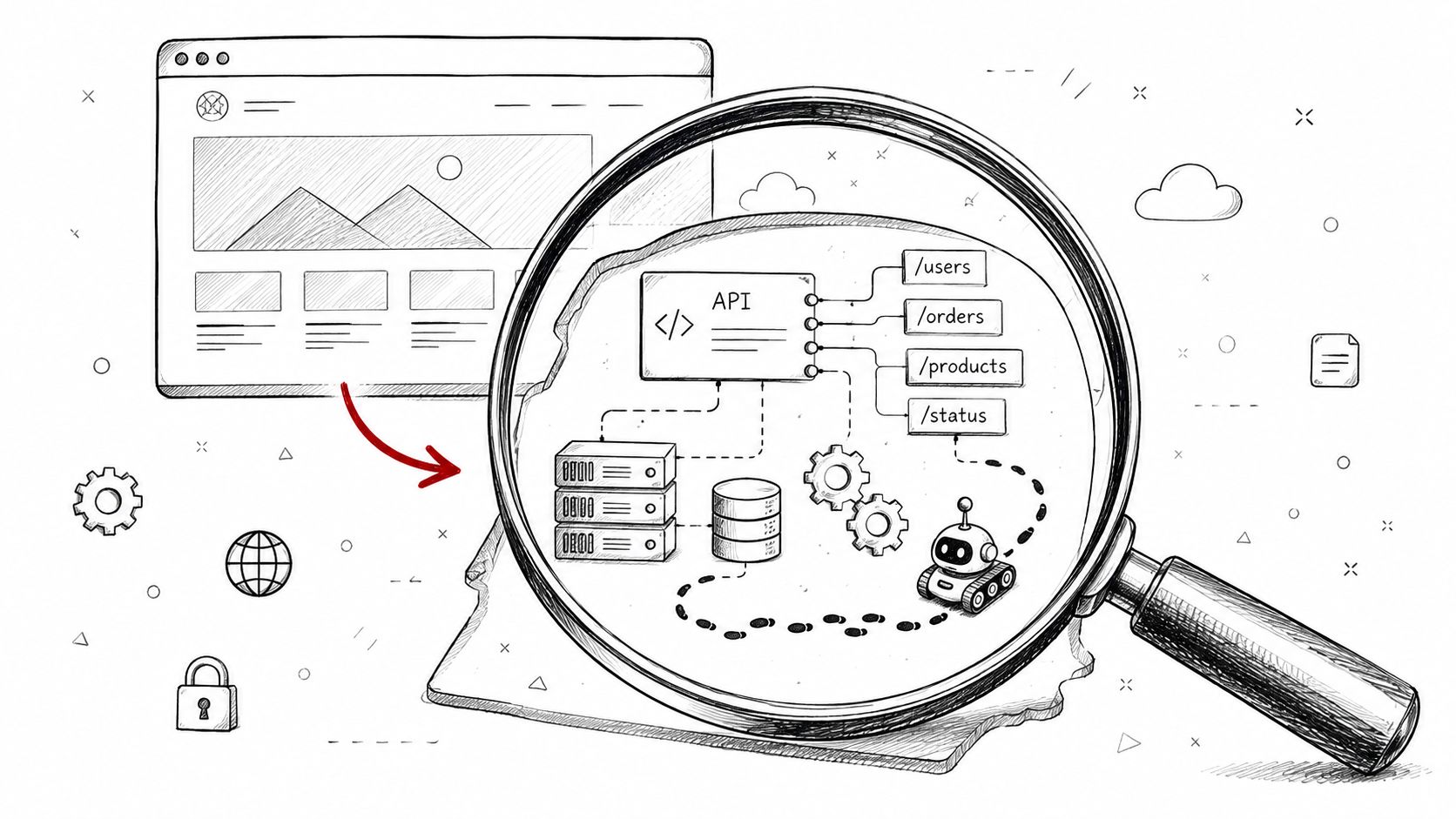
A homepage can look normal while an attacker works through an endpoint nobody checks. Site owners often review the homepage, login form, and contact form, then treat that visible layer as the application. On WordPress, plugins, themes, integrations, scheduled jobs, and APIs expose functions that visitors may never reach through ordinary navigation.
The REST API may return data or accept changes. WooCommerce adds order and customer workflows. Membership plugins create account endpoints, while marketing tools exchange data with external services. Administrative AJAX actions, webhooks, imports, exports, and background cron routes add more paths. Each route needs an owner, an authentication rule, and a reason to remain enabled.
The service layer deserves first-class attention
Recent reporting describes API attacks up 104% in the first half of 2025, APIs receiving 72% more attacks per host than websites, and IBM X-Force observing a 44% year-over-year rise in exploitation of public-facing applications, as summarized in Indusface's 2025 application security report. For operators, the useful conclusion is practical: attackers do not need to break the homepage when a less visible route accepts credentials, data, or state-changing requests.
Map each WordPress site by function:
- Public routes: List login, registration, password reset, upload, search, and form-processing functions.
- API behavior: Review REST routes, authentication requirements, exposed records, and write operations.
- Plugin actions: Check AJAX handlers, webhooks, scheduled tasks, and import or export features.
- Administrative access: Remove unused accounts, enforce strong authentication, and compare roles with current responsibilities.
- Third-party connections: Record payment, shipping, CRM, analytics, email, and identity integrations, including what each can read or change.
A plugin update can change routes, permissions, data handling, and compatibility with other extensions. Test complex stores in staging, but set a deadline so testing does not become indefinite delay. If a component is under active exploitation, temporarily disabling or replacing it may be safer than waiting for a perfect test result.
Testing must verify authorization, not just code patterns. Static analysis can identify unsafe input handling, yet it may miss whether one customer can access another customer's order. Exercise permissions around sensitive actions. Test expired credentials, repeated requests, role changes, and failed webhook deliveries.
On a compromised client site, the homepage is often the least informative place to start. Inventory the service layer, rank routes by exposure and business impact, and inspect the functions that can change accounts, orders, or data.
Triage and Prioritization for WordPress Portfolios
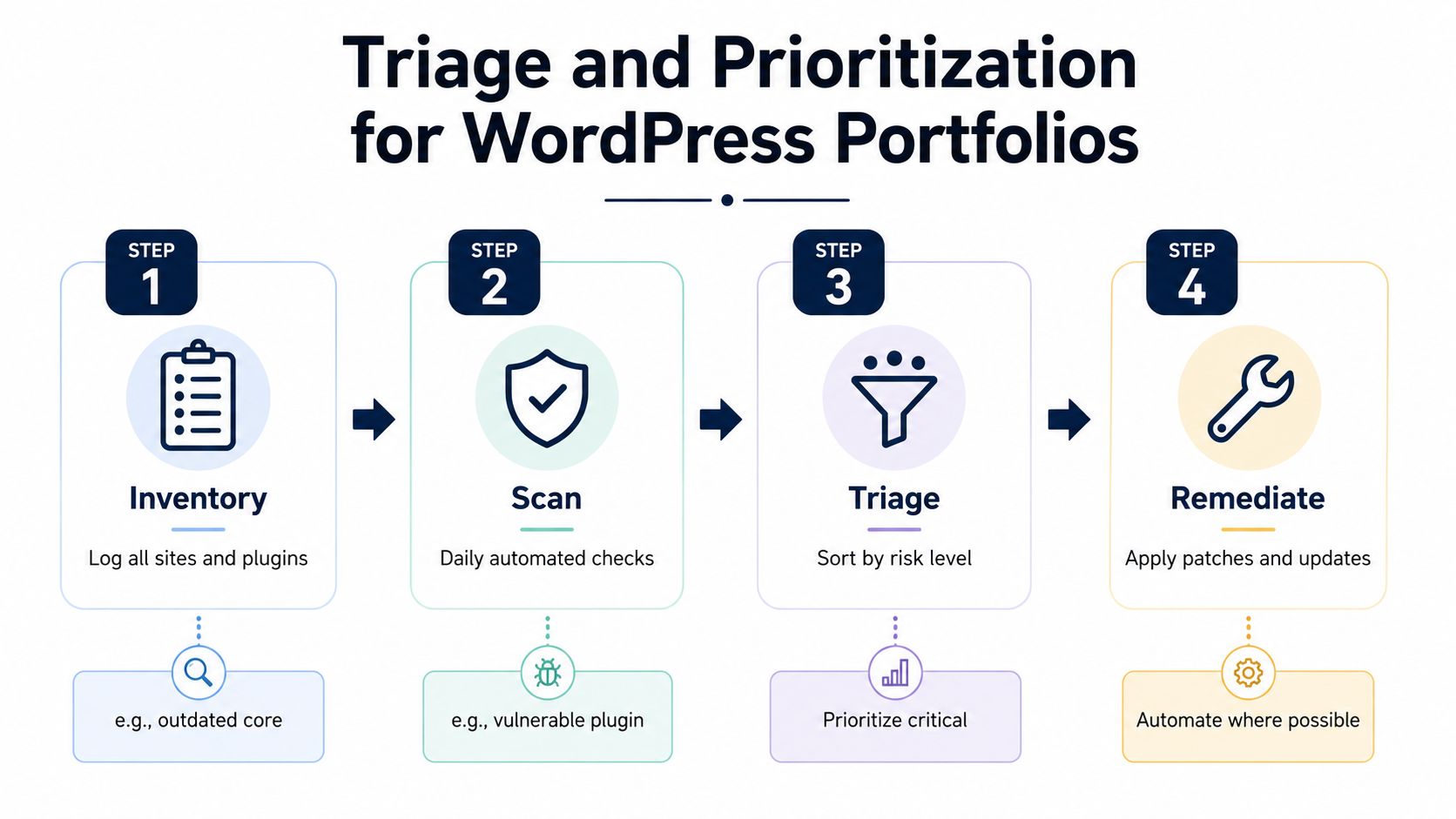
Managing one WordPress site manually is possible. A portfolio needs a different operating model because a plugin update, exposed endpoint, or compromised administrator account can affect many installations at once. Without context, a long update queue becomes noise rather than a basis for action.
Start with a daily technical snapshot for every site. Record WordPress core, plugin, theme, and PHP versions, then compare installed components with a maintained vulnerability source. CISA's exploited-vulnerability catalog adds exploitability context, while WordPress-specific vulnerability data can identify affected extensions. The snapshot should support a decision, not become another dashboard that nobody uses.
A workable portfolio sequence
Inventory the estate. List every domain, environment, owner, business function, and installed component. Mark revenue-critical stores and sites holding personal or membership data.
Scan for change. Compare the latest snapshot with the previous one. A newly installed plugin, unexpected administrator, version downgrade, or sudden configuration change requires a different response from routine maintenance.
Triage by exposure and impact. Rank known exploitation, vulnerability severity, software age, public reachability, required privilege, and the business function behind the affected site. Give extra weight to routes and integrations that can change accounts, orders, payments, or customer data.
Remediate in order. Patch or remove the highest-consequence exposure first. Test where checkout or other customer workflows could break, document exceptions, and verify that the affected version or behavior changed.
A practical scoring model can place each site's condition on a 0–100 risk scale, with broad bands such as Safe, At Risk, and Critical. The score supports consistent comparison, but it does not replace judgment. A low-scoring site with an actively exploited component may deserve attention before a higher-scoring site with weaker business impact.
Keep the fix list short
A portfolio dashboard should show the strongest signals and a ranked sequence. For each site, identify the top three issues, affected component, known exploitation status, and next action. Operators should not have to interpret every warning from scratch.
That structure limits alert fatigue. Notifications can focus on critical vulnerabilities and sudden score changes, while routine maintenance moves into a weekly summary. Urgent events should reach the person responsible for the site, not disappear into a shared queue.
Speed and certainty often conflict. Waiting for a perfect assessment leaves an exposed component available while attackers probe it. Acting without testing can break checkout, subscriptions, or customer workflows. A ranked workflow makes the trade-off explicit, allowing an operator to choose a temporary control, maintenance window, rollback, or replacement instead of silently postponing the fix.
Checklist Security Versus Decision-Driven Security
A checklist is useful until a WooCommerce checkout is failing and three other sites show urgent plugin alerts. It can confirm that administrator accounts, authentication, backups, software updates, and logs received attention. It cannot decide which exposure deserves the next hour, whether a vulnerable component is reachable, or how much operational risk a rushed update creates.
Decision-driven security keeps those baseline controls, then ranks the work. The ranking should consider exploitability, known vulnerabilities, software age, severity, public exposure, customer workflows, and business importance. The result is a sequence that an operator can validate, assign, and execute with existing tools rather than another unprioritized report.
A 2025 report found that 33% of critical and high vulnerabilities remained unpatched for more than 180 days. It also reported that web applications took 74.3 days to fix, compared with 54.8 days for network issues, as summarized by EdgeScan's 2025 Verizon DBIR analysis. The same source reported that 56% of organizations experienced a breach or compromise in the previous 12 months, while only 5% were fully satisfied with their current web application security tools. The operational gap is clear: finding issues does not make them disappear.
The operating models compared
| Dimension | Checklist-Driven Security | Triage-Driven Security |
|---|---|---|
| Primary question | Have we completed the standard controls? | What should we fix next, and why? |
| Portfolio view | Separate site reports and alert queues | Comparable risk bands and ranked site priorities |
| Alert handling | Treats many findings similarly | Filters for exploitability, impact, and change |
| Staffing trade-off | Easy to document, difficult to sustain at scale | Requires scoring rules and validation, but focuses scarce time |
| Remediation | Update in a broad or scheduled batch | Sequence patches, isolation, testing, and replacement |
| Best use | Establishing minimum standards | Managing competing risks across active sites |
A checklist may identify an outdated plugin. It will not usually tell you whether that update comes before disabling an abandoned extension on a revenue-generating store. Nor will it resolve the trade-off if the update breaks payment processing, subscriptions, or a theme integration. Those decisions require exposure and business context.
A checklist defines the floor. Triage determines where the next hour goes.
A WordPress security checklist remains useful for organizing recurring controls. Treat it as input to the decision process, not the decision itself.
Scoring also has limits. A model can miss a custom integration, misunderstand a business dependency, or understate an active compromise. Operators still need to validate findings, preserve recovery options, and escalate when evidence points beyond routine maintenance. The value is a shared reason for putting one issue first while another waits, not automation for its own sake.
Building a Repeatable Web Security Workflow
A reliable workflow should feel calm even when the underlying threat environment isn't. Begin with a current inventory of WordPress core, plugins, themes, PHP versions, administrator accounts, and important integrations. Take daily snapshots so you can distinguish a known baseline from an unexpected change.
Next, match installed components against known vulnerabilities and exploit information. Score every site consistently on a 0–100 scale, place it into a risk band, and generate a ranked list of the top three issues. The list should state the affected site, the reason for its priority, and the action that will reduce exposure.
Use targeted notifications for critical vulnerabilities, suspicious changes, and significant score drops. Put routine movements into a concise weekly summary. This approach keeps the team informed without turning every update notice into an emergency.
For a deeper review of an individual installation, use a structured website security audit that covers both technical inventory and practical exposure. Then assign an owner, maintenance window, validation step, and rollback plan for each material fix.
WP Triage applies this model to WordPress portfolios by monitoring core, plugins, themes, and PHP, matching known vulnerabilities, and producing a risk score with a ranked fix sequence. It is designed for prioritization, not as a replacement for a firewall, malware scanner, backup system, or deployment tool.
If you manage multiple WordPress or WooCommerce sites, WP Triage can give your team a portfolio view, daily technical snapshots, targeted security alerts, and a clear top-three fix order for each installation. Connect your sites, review the risk bands, and use the ranked findings to decide what to patch, investigate, or isolate first.