You've just added a redirect, saved the file, and refreshed the site. Instead of the homepage, Apache returns a 500 Internal Server Error. The WordPress dashboard is unreachable, the client is asking what happened, and the only recent change is a small edit to a hidden file named .htaccess.
That scenario is common because .htaccess sits at the boundary between Apache and WordPress. It can route requests, apply access rules, and influence redirects before WordPress processes a request. For agencies, the risk multiplies across every client installation, especially when undocumented snippets accumulate and nobody knows which rule is safe to remove.
Table of Contents
- Why a Tiny File Can Break Your Entire WordPress Site
- How htaccess in WordPress Actually Works
- Safe Editing Practices That Prevent Disasters
- Essential Directives and Real-World Examples
- Security Rules and What They Actually Protect
- Performance Myths and Measurable Impact
- Building a Repeatable htaccess Workflow for Your Portfolio
Why a Tiny File Can Break Your Entire WordPress Site
A production incident often starts innocently. Someone needs to redirect an old landing page, pastes a rule below the WordPress block, and tests one URL. The page loads, so the change appears successful. Later, a malformed directive, an unsupported Apache option, or an unintended rewrite condition affects every request and takes the site offline.
I've seen operators lose valuable recovery time because they treated .htaccess like an ordinary text file. It isn't. Apache reads its directives as server instructions, and a syntax error can prevent Apache from serving the site correctly. The file may be small, but its position in the request path gives it disproportionate influence.

The agency risk is larger than one broken site
A freelancer can often recover a single installation quickly. An agency managing multiple domains has a different problem: the same undocumented practice can create repeated risk across a portfolio. A copied security block might work on one Apache host and fail on another because the host permits different directives. A redirect added for one site can also create loops if the domain sits behind a proxy or CDN with different HTTPS handling.
The file also carries operational history. It may contain WordPress-generated rewrite rules, old migrations, temporary access restrictions, caching directives, and rules added by plugins. Without comments and a changelog, the next operator has to infer intent from regular expressions under pressure.
Production rule: Treat every
.htaccessedit as a deployment change, not as a quick tweak.
.htaccess is useful, but it shouldn't become your only reliability or security control. WordPress updates, plugin maintenance, server configuration, backups, vulnerability monitoring, and rollback access all matter. The safest operators use .htaccess for narrow, well-understood controls and keep a recovery path available before making changes.
How htaccess in WordPress Actually Works
Apache describes .htaccess as a distributed configuration file. WordPress uses that per-directory model to support URL rewriting, while Apache processes the applicable file for the directory handling a request. WordPress's Apache web server documentation explains that the standard root file commonly contains rewrite directives that route requests through index.php when no matching file or directory exists.
Think of the server as a building. A request enters through the lobby, then passes access panels on the floors it crosses. A root .htaccess file can affect the installation beneath that directory, while a file in a deeper directory can add rules for that location and its descendants. This is why a file in the WordPress root can influence permalinks across the installation without being a global Apache configuration file.
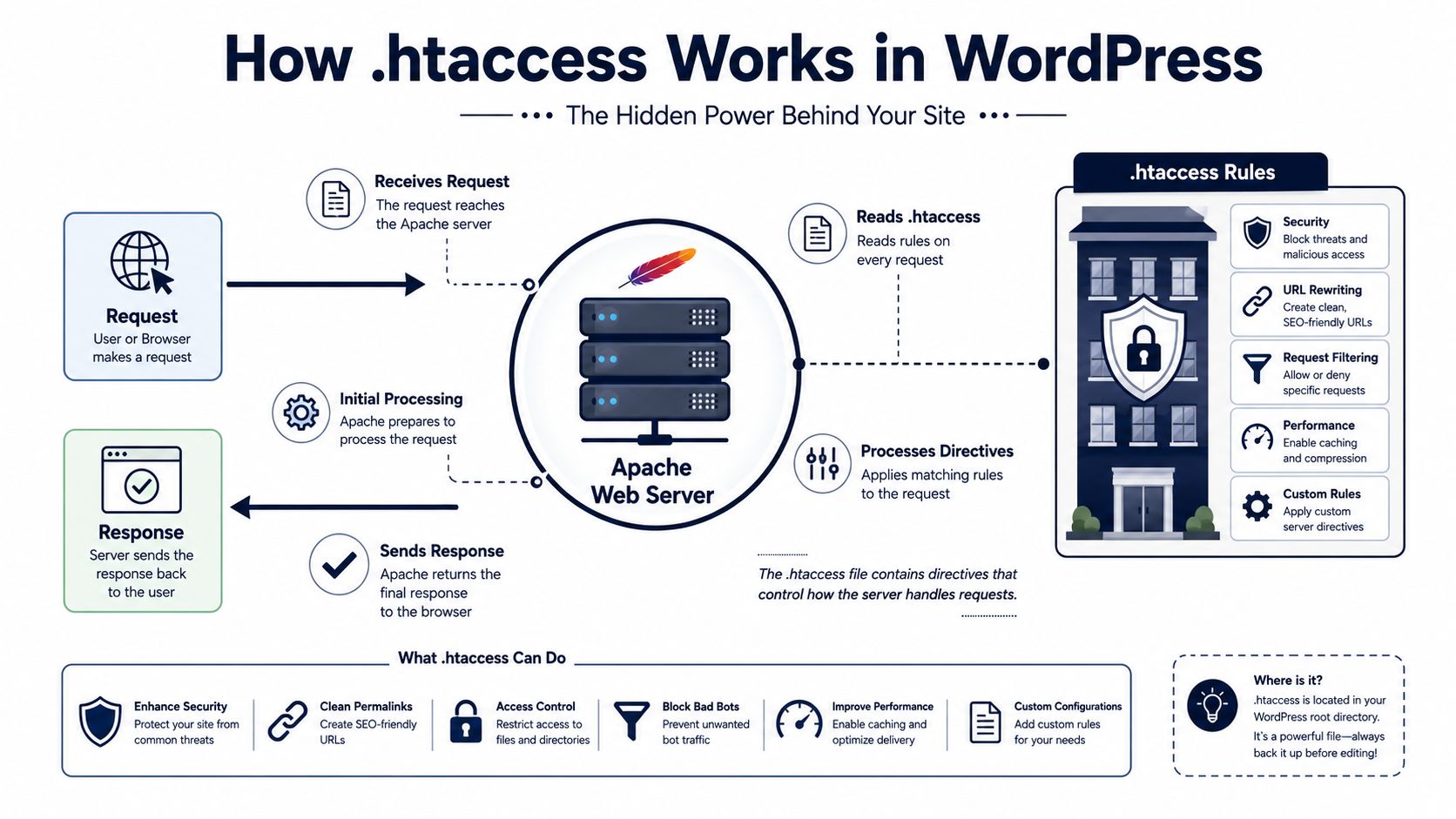
The WordPress rewrite flow
A typical WordPress rewrite block does several important things:
- It enables Apache's rewrite engine.
- It allows a direct request for
index.phpto pass through. - It checks whether the requested path already maps to a real file.
- It checks whether the requested path maps to a real directory.
- If neither exists, it sends the request to
/index.php.
That final step lets WordPress resolve a human-readable permalink inside the application. Without the rewrite behavior, a site's homepage might still respond while internal post and page URLs return errors or fail to reach WordPress.
The root location matters. A standard single-site installation commonly places .htaccess beside index.php, although a subdirectory installation can use the directory containing that WordPress site. Apache's per-directory processing explains why multiple .htaccess files can coexist in different parts of a server.
Distributed rules versus server configuration
A VirtualHost or main Apache configuration file is controlled at the server level. .htaccess is delegated to a directory, which makes it practical on shared hosting where customers can't edit the main configuration. That convenience comes with trade-offs, including provider restrictions, recursive processing, and less centralized visibility.
If you need to inspect the server safely before editing files, a practical server remote access guide can help you choose an appropriate access method. Use the least privileged access that still gives you a reliable way to download, replace, and restore the file.
WordPress has relied on this mechanism for advanced routing for a long time. WordPress support documentation identifies WordPress 3.4 as a historical milestone because older multisite installations required specific .htaccess rules, as described in the WordPress support documentation for .htaccess.
Safe Editing Practices That Prevent Disasters
The safest .htaccess workflow is deliberately boring. Before touching production, download the current file, record why you're changing it, and decide how you'll restore the previous version if Apache rejects the edit.
Start by locating the file through SFTP, FTP, or the hosting file manager. Make hidden files visible if necessary, then download the original rather than relying on a copy displayed in a browser-based editor. Give the backup a meaningful name that identifies the site and change, and store it where another operator can find it.
A controlled change sequence
Use this sequence for routine work:
- Back up the current file. Preserve the exact live version, including comments and line endings.
- Use staging where possible. Test redirects and access rules against a staging copy before production.
- Make one logical change. Don't combine HTTPS enforcement, security restrictions, caching, and redirects in one unreviewed edit.
- Save the original separately. Keep the previous file available for immediate replacement.
- Test immediately. Check the homepage, a representative post, an admin login, media URLs, and the specific route you changed.
- Record the result. Note the rule, reason, date, operator, test URLs, and rollback outcome.
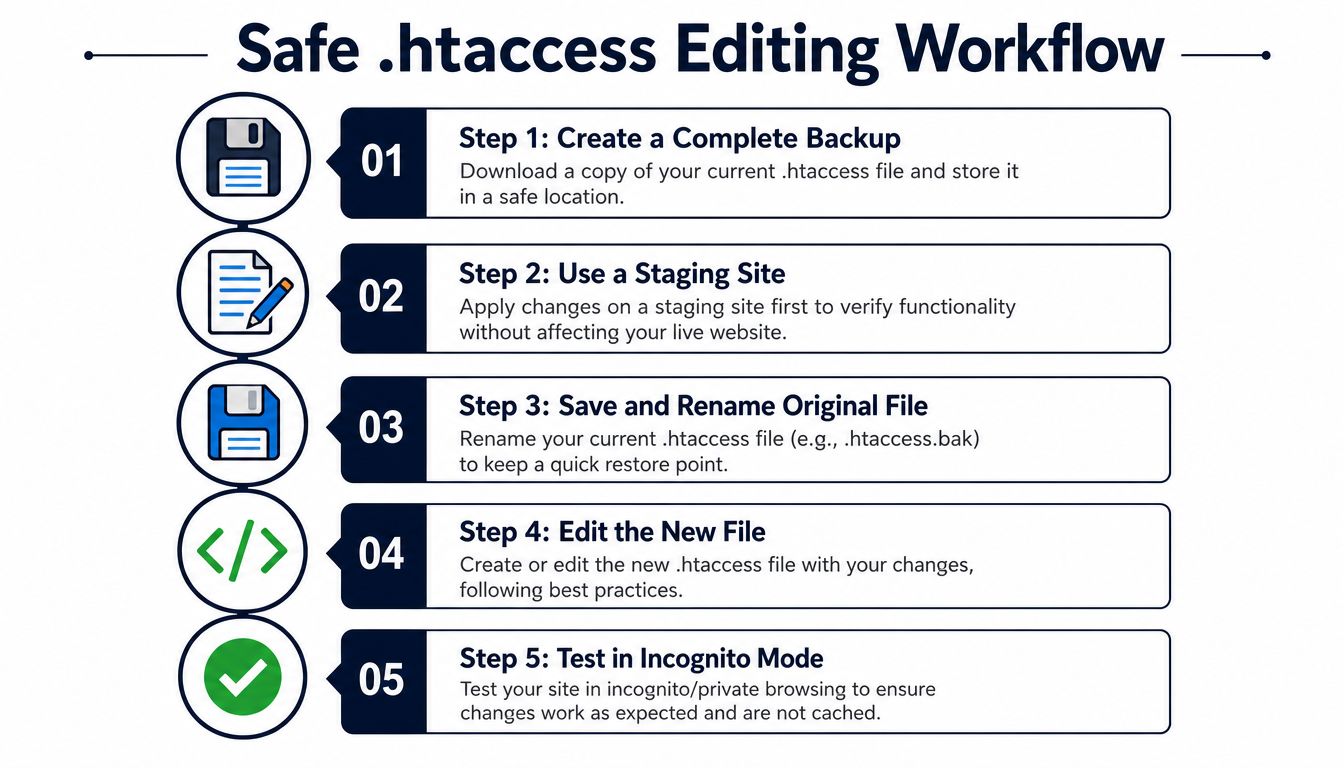
A change log matters more when several people maintain the same portfolio. A short entry such as “redirected legacy campaign path to current service page, tested anonymous and logged-in requests” is more useful than “updated htaccess.” Teams that already use formal approvals can adapt a change control procedures guide to include .htaccess edits.
Rollback rule: If the site fails immediately after a file change, restore the known-good file first. Investigate the failed rule after service returns.
Keep the video below as a practical visual reference, but don't treat any copied snippet as universally safe. Apache modules, hosting permissions, proxy behavior, and WordPress installation paths differ.
For a 500 error, rename the active file through SFTP or the file manager, restore the backup, and inspect the Apache error log if you have access. Don't keep adding rules to a broken file while guessing. The fastest recovery is usually a clean rollback followed by one controlled reintroduction at a time.
Essential Directives and Real-World Examples
The most useful .htaccess patterns solve narrow problems. Keep custom rules outside the # BEGIN WordPress and # END WordPress markers because WordPress may regenerate that managed block when permalink settings are saved. Always adapt paths and conditions to the installation rather than pasting a complete hardened file without review.
Preserve the WordPress routing block
A conventional root block looks like this:
<IfModule mod_rewrite.c>
    RewriteEngine On
    RewriteBase /
    RewriteRule ^index\.php$ - [L]
    RewriteCond %{REQUEST_FILENAME} !-f
    RewriteCond %{REQUEST_FILENAME} !-d
    RewriteRule . /index.php [L]
</IfModule>
The !-f and !-d conditions keep real files and directories from being routed through WordPress. The final rule handles virtual URLs, which is the foundation of ordinary WordPress permalinks.
Redirect a moved URL
For a direct permanent redirect, a simple Redirect directive is often easier to audit:
Redirect 301 /old-page/
Use it when one known path has moved permanently. For a large migration, application-level redirect management or a CDN can provide better visibility, especially when editors need to review and update redirects without server access. If a site is generating unexpected redirect chains, inspect RewriteRule, Redirect 301, and RedirectMatch entries using this WordPress redirect troubleshooting guide.
Enforce HTTPS carefully
A basic Apache rewrite can send HTTP requests to HTTPS:
<IfModule mod_rewrite.c>
    RewriteEngine On
    RewriteCond %{HTTPS} off
    RewriteRule ^ https://%{HTTP_HOST}%{REQUEST_URI} [R=301,L]
</IfModule>
This can misbehave behind a reverse proxy if Apache doesn't receive the expected HTTPS state. Confirm how the host identifies secure requests before activating it, and test both the homepage and deep links. If the CDN already performs canonical HTTPS redirects, duplicating the behavior at several layers can create loops.
Prevent media hotlinking
A referrer-based rule can deny external embedding of selected assets:
<IfModule mod_rewrite.c>
    RewriteEngine On
    RewriteCond %{HTTP_REFERER} !^$
    RewriteCond %{HTTP_REFERER} !^https?://(www\.)?example\.com/ [NC]
    RewriteRule \.(jpg|jpeg|png|gif|webp)$ - [F,L]
</IfModule>
This is a blunt control. Referrer headers can be absent or altered, and legitimate partners may need access. A CDN policy can be a better fit when bandwidth control and asset delivery are already managed there.
Provide a custom error page
Apache can serve a branded response for missing pages:
ErrorDocument 404 /404/
Keep the target path valid and avoid redirecting every missing request to the homepage. A proper 404 response helps visitors understand what happened and prevents broken URLs from appearing successful.
| Directive | Purpose | When to Use |
|---|---|---|
RewriteRule |
Rewrites, blocks, or redirects matching requests | Targeted routing and request conditions |
Redirect |
Sends a known path to another URL | Simple permanent URL moves |
ErrorDocument |
Selects a custom error response | Branded 404 and server error handling |
Options -Indexes |
Disables directory listings | Apache environments where browsing isn't needed |
<FilesMatch> |
Applies access rules to named files | Protecting sensitive configuration files |
Each directive has a narrower job than many copy-paste guides suggest. The right choice depends on whether the rule belongs in Apache, WordPress, a redirect plugin, or the CDN.
Security Rules and What They Actually Protect
.htaccess can block some requests before they reach WordPress, but it isn't a complete security boundary. The practical question is not whether a rule looks hardened. It's whether the rule blocks a specific exposure without breaking a legitimate workflow.
Protect files that should never be public
A file match can deny direct access to sensitive files:
<FilesMatch "^(wp-config\.php|\.env|\.htaccess)$">
    Require all denied
</FilesMatch>
The purpose is clear: prevent accidental download or display if the server mishandles a sensitive file. It doesn't protect the server from compromised administrator credentials, malicious plugins, vulnerable themes, or an attacker who already has filesystem access.
Directory browsing is another limited exposure:
Options -Indexes
This stops Apache from presenting a directory listing when no index file is available. It doesn't hide filenames from someone who already knows a direct URL.
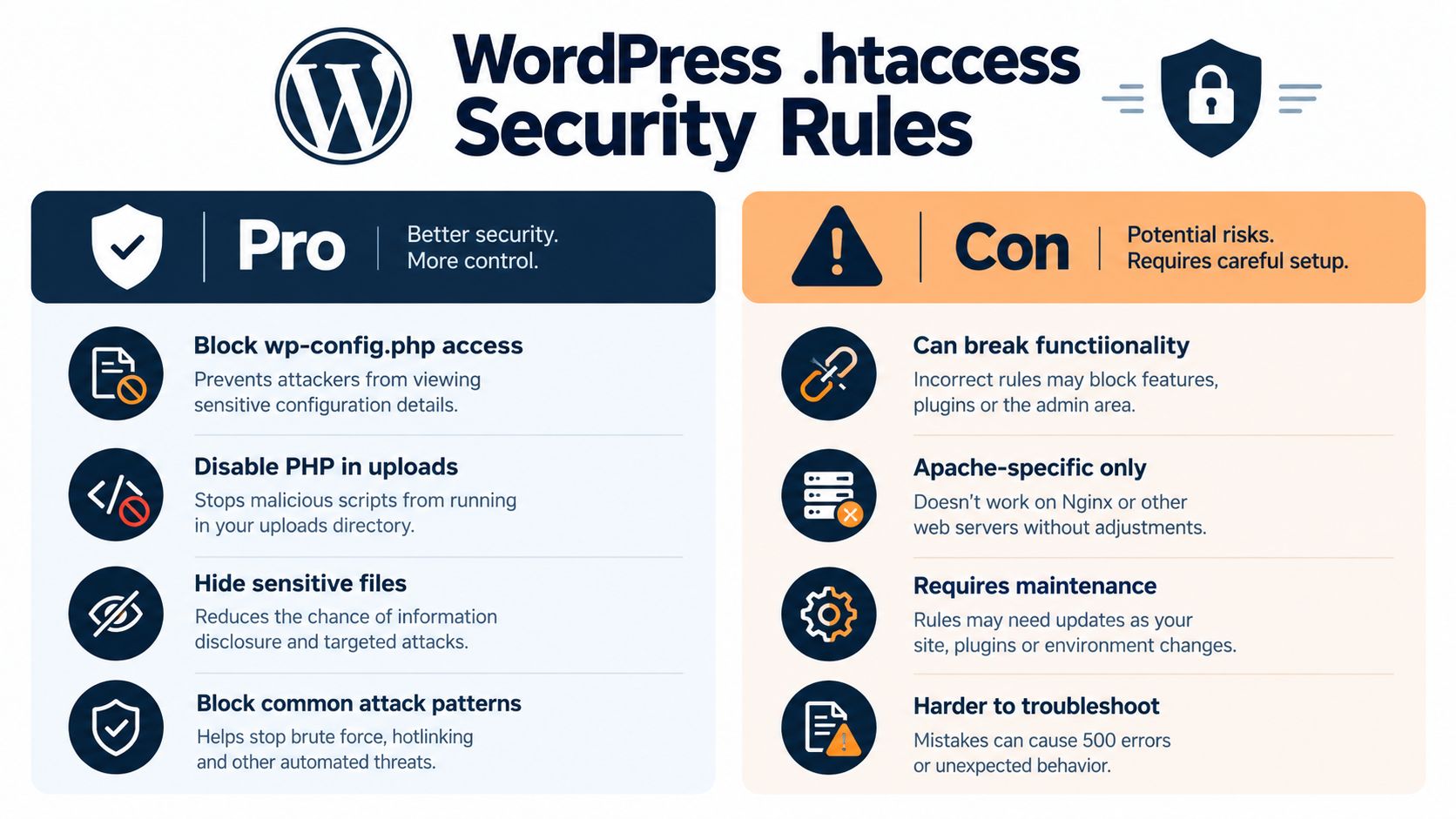
Reduce executable-file risk in uploads
User-uploaded media should generally be served as media, not executed as server-side code. A directory-level rule can disable PHP handling in the uploads directory, but the exact directive depends on the Apache version and hosting configuration. Test it against image delivery, media management, and any legitimate upload workflow before deploying.
Restricting xmlrpc.php can reduce an unwanted request path, but it can also break integrations that depend on XML-RPC. Blocking it is not automatically correct for every site. Confirm whether Jetpack, mobile workflows, publishing tools, or other integrations use it before applying a denial rule.
The WordPress admin password protection guide is useful context for separating login protection from file-level restrictions. A .htaccess rule can reduce exposure to a particular endpoint, while strong credentials, multifactor authentication, patching, rate limiting, and monitoring address different parts of the risk.
Security boundary:
.htaccessis a compensating control for Apache environments, not a standalone firewall or malware defense.
Use it alongside server controls, WordPress security configuration, backups, vulnerability monitoring, and an incident response process. The current WordPress .htaccess security guidance emphasizes protections such as blocking wp-config.php, disabling PHP execution in uploads, and restricting xmlrpc.php, while also stressing incremental changes, backups, and rollback testing.
Be especially cautious with broad user-agent blocks, IP allowlists, and method restrictions. Legitimate monitoring, APIs, proxies, and administrators can resemble the traffic those rules target. A rule that blocks an attack path but locks out the store owner is still an operational failure.
Performance Myths and Measurable Impact
The existence of .htaccess doesn't automatically make a WordPress site slow. The more accurate concern is per-directory rewrite processing, where Apache evaluates applicable rules as it handles a request. The cost depends on the number and complexity of directives, the directories involved, and the surrounding server configuration.
Small redirect sets usually add negligible latency. Large rule collections become less efficient because Apache tests rules sequentially, and complicated conditions increase the work required to determine a match. That makes a short, documented file easier to operate and generally easier to reason about than a growing archive of abandoned redirects.
Decide where rules belong
Use .htaccess when you lack server-level access or need a narrowly scoped directory rule. Move stable, high-volume rewrites into VirtualHost or main server configuration when you control Apache. Setting AllowOverride None prevents per-request .htaccess parsing overhead, which is the preferred pattern for high-traffic WordPress sites with suitable server access, according to the Apache rewrite performance discussion.
That recommendation isn't a reason to rewrite every shared-hosting file. Server-level configuration introduces its own deployment and access requirements. The practical decision is based on infrastructure, request volume, rule complexity, and who can validate changes.
Track outcomes rather than relying on folklore. Compare response behavior before and after a change, inspect redirect chains, review Apache logs, and watch error rates. A Fivenines server monitoring platform can provide useful visibility into Apache health when your team needs monitoring beyond occasional browser checks.
A clean rule set is easier to optimize because operators can identify which directive is responsible for a request.
Caching plugins and CDNs can also overlap with Apache behavior. If several layers set redirects, compression, or cache headers, document the ownership of each function. Performance work fails when operators optimize one layer while another layer applies conflicting behavior.
Building a Repeatable htaccess Workflow for Your Portfolio
A multi-site team should maintain a site-specific .htaccess record, not one universal file. Store the current version, the purpose of each custom rule, the host environment, test URLs, and the person who approved the change. Keep a separate library of reviewed snippets, but never deploy that library unchanged across every client site.
Use a maintenance checklist that asks:
- Routing: Do representative pages, media files, and the admin area respond correctly?
- Security: Does each rule address a known exposure without blocking a required integration?
- Recovery: Can an operator restore the previous file without dashboard access?
- Complexity: Are obsolete redirects or duplicate conditions creating technical debt?
- Portfolio risk: Does this site also have outdated plugins, themes, core files, or PHP?
.htaccess history can reveal broader maintenance problems. A file filled with emergency rules often belongs to a site that also lacks documented ownership, clean deployment practices, or consistent patching. For selective network restrictions, teams can review a guide to blocking an IP address in WordPress, then decide whether the rule belongs in Apache, a CDN, or another control layer.
WordPress support documentation's reference to WordPress 3.4 and older multisite .htaccess requirements shows how long this file has been part of advanced routing. Its age is a reason to understand it, not a reason to treat it as a complete modern defense.
WP Triage helps WordPress operators compare risk across multiple sites by tracking core, plugin, theme, and PHP versions, matching known vulnerabilities, and ranking the next fixes through site-level risk scores. Visit WP Triage to bring .htaccess work into a broader, prioritized maintenance process instead of managing isolated server changes by memory.